
Vehicle maintenance tracker for every car you own: service history, fuel and running costs in one offline file.
A vehicle maintenance tracker that keeps the whole record in one private file: what was done, what is due next and what each car really costs.
Set your own maintenance schedule by date or mileage, log every service, oil change and fill-up, and see what is overdue the moment you open it.
Key benefits
One-time payment
No monthly fee and no yearly renewal. The price you see is the whole price.
Maintenance by date or mileage
Your own schedule for each vehicle, tracked by date, by mileage or whichever comes first.
Real fuel economy
MPG, km/L or L/100 km worked out from your own fill-ups, with EV charging logged too.
Your records stay yours
No account and nothing uploaded. Your VIN, plate and receipts never leave your computer.
What this vehicle maintenance tracking software does
Everything a vehicle needs on file, in one place.
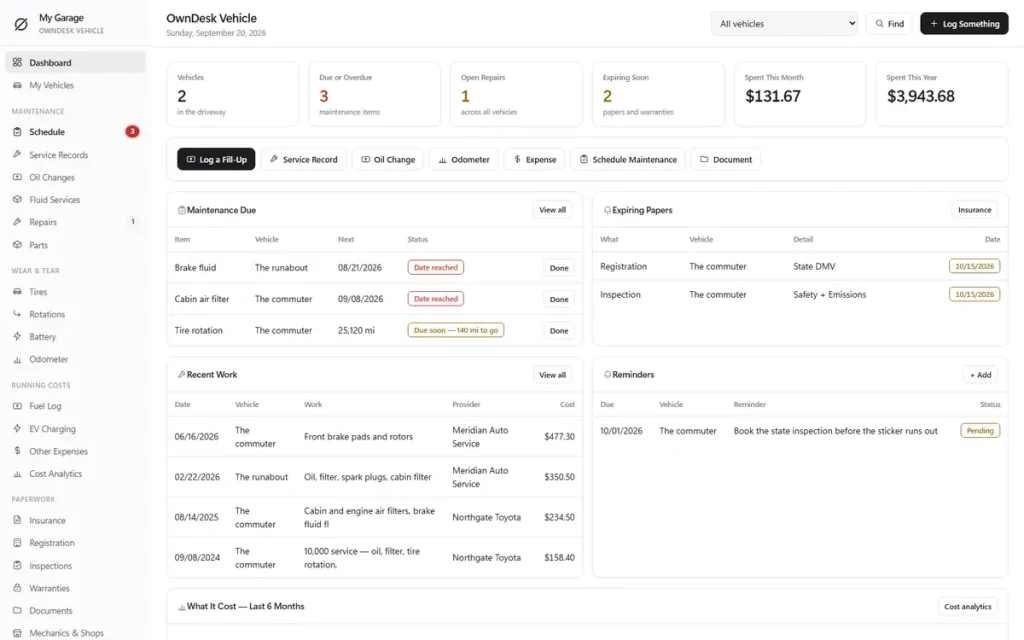
You get a dashboard, unlimited vehicle profiles, a maintenance schedule, service records and oil changes, and repairs, parts and fluids.
It also tracks tires, rotations and battery, odometer history, a fuel log with EV charging, and cost analytics.
Insurance, registration and warranties, documents and receipts, and a calendar with reminders are covered too. You can print the history, export to CSV or JSON backup, and pick from eight colour themes.
A maintenance schedule that reminds you
Build your own schedule per vehicle: oil, filters, brakes, tires, fluids, battery, belts, or anything you add yourself. Each item is tracked by date, by mileage, or by whichever comes first, and shows a plain status: due soon, date reached, mileage reached.
Overdue items show on the dashboard and beside the menu. Finished work moves into history instead of vanishing.
Service records and oil changes
Every service with the date, odometer, shop, description, labor, parts, tax, total, invoice number and warranty. Every oil change with the brand, type, viscosity, quantity, filter, cost and the next one you planned.
When you sell the car, a documented service history is worth real money to the next buyer.
Fuel log and real fuel economy
Log every fill-up with the odometer, quantity, price and station. Once there is enough data, the tracker calculates your real MPG, km/L or L/100 km charts fuel cost over time.
Electric and plug-in hybrid charging sessions get their own log with kWh, cost and charge percentage.
What each car really costs
Fuel, charging, maintenance, repairs, tires, insurance, registration, parking, tolls, car wash or your own categories. See spend by month, by year or a custom range, average monthly cost, cost by category, cost by vehicle, and cost per mile or kilometer.
Tires, battery and parts
Tire sets with brand, model, size, type, install date and mileage, tread depth and warranty. Rotations by wheel position with pressure and cost. Battery records, and every part fitted with the part number, who installed it and when the warranty ends.
The paperwork that expires
Insurance policies, registration, inspections and warranties, with start and renewal dates, policy numbers and mileage limits. Receipts and photographs attach to a document. The dashboard shows what is coming due before it lapses, not after.
How to track vehicle maintenance
How to track maintenance on your vehicles, in four steps.
Vehicle maintenance tracking only works if it is quick enough to do at the counter of the shop, so each step here is one screen.
Add the vehicle
Year, make, model, VIN, plate, purchase details and the current odometer. Add every car you own and switch between them from one selector.
Set the maintenance schedule
Type in the intervals from your owner’s manual: oil every 5,000 miles or 9 months, whichever comes first, and so on. This is the part that tells you what is due.
Log the work as it happens
A service, an oil change, a fill-up or a repair takes a few fields. Mark a schedule item done and it moves into the history for good.
Open the dashboard
What is due or overdue, what papers are expiring, what you spent this month and this year, and your last service, all on one screen.
Why people switch
You are not really choosing between two vehicle maintenance trackers.
Most car maintenance apps rent you your own service history: stop paying and the records stop being yours. A spreadsheet is free but never reminds you of anything. This vehicle maintenance tracking software is a file you own, with the reminders built in.
| OwnDesk Vehicle | Subscription car apps | A spreadsheet | |
|---|---|---|---|
| Price | $ 29.00 once | $2–$5+/month | Free, but you build it |
| Due and overdue reminders | Built in | Built in | Only if you write the formulas |
| Real fuel economy from your fill-ups | Built in | Usually | Only if you write the formulas |
| Works offline | Yes | Often needs an account and a connection | Yes |
| Your records if you stop paying | Still yours | Access ends | Still yours |
| Sync between devices | Not included — one computer at a time | Usually included | Only through a cloud drive |
Subscription pricing is a general market range for consumer car-maintenance apps, checked 4 September 2026, not a quote from any single company — check current pricing on each site.
OwnDesk Vehicle is single-computer software: it does not sync between devices and it does not read your car, connect to OBD or supply the manufacturer’s schedule.
Who it is for
One car, the whole driveway, or a few work vehicles.
One car or a family driveway
The everyday case: a commuter, a second car, a truck in the yard. Each vehicle has its own schedule, costs and history, and the All Vehicles view shows what is due across the household in one look.
A handful of work vehicles
A tradesperson with two vans or a small business with a few trucks can use it for fleet vehicle maintenance tracking on a small scale: a schedule, a service history and running costs per vehicle.
It is not a fleet management system. There is no dispatch, no telematics, no driver logins and no multi-user access, and it measures mileage, not engine hours.
From payment to your first entry
Three steps, about two minutes.
Pay with card
Checkout runs on Stripe. Your card details never touch this site.
Download and open
The link appears the moment payment clears. Double-click the file — it opens in your browser, no install, no internet needed after that.
Look around, then clear the samples
It opens with two sample vehicles and two years of history loaded. Erase them from Settings, set your units and currency, and add your own car.
If OwnDesk Vehicle isn't right for how you keep track of your cars, email me and you get a refund — no questions. If something's confusing, you're writing to the person who built it, not a queue. English and Spanish, both spoken here.
Questions
Before you buy.
What is a vehicle maintenance tracker?
How do I track maintenance on my vehicles with it?
Is this vehicle maintenance tracking software or a vehicle maintenance tracker app?
Is there a phone app?
How many vehicles can I track?
Does it do fleet vehicle maintenance tracking?
Does it tell me what maintenance my car needs?
Can it track fuel economy and what my car costs to run?
Where are my records stored, and can I back them up?
Is there a subscription?
See your own car in it before you decide.
The live demo has real screens and two sample vehicles loaded — no sign-up, no credit card. If it fits, buying takes about a minute.
14-day money-back guarantee · instant download · one-time payment