
Handyman business software for solo operators and small crews.
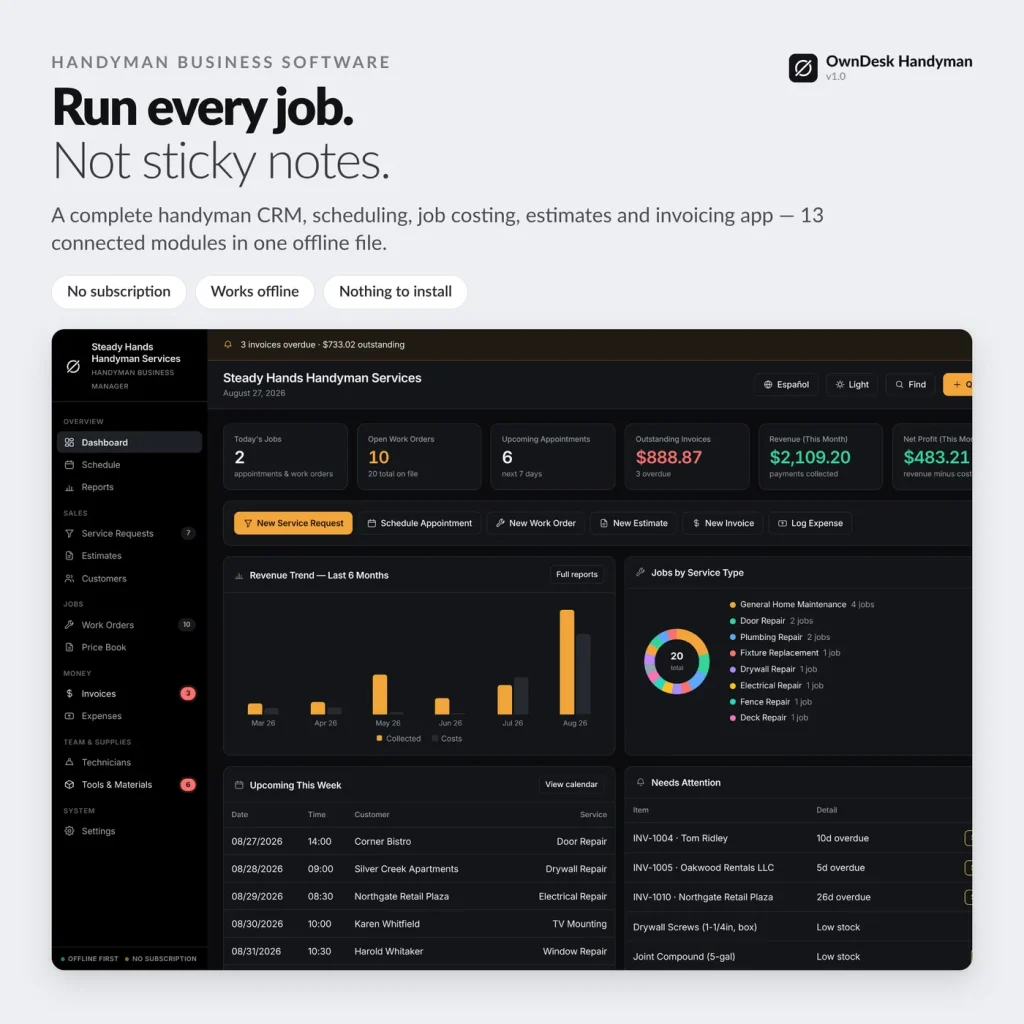
Handyman business management software with a real price book, scheduling, job costing, estimates and invoicing in one offline app — the call comes in, and it's connected all the way to the paid invoice. No subscription, no login, no internet required to run it.
Sound familiar?
Every one-truck handyman business hits the same wall.
Not enough jobs to justify a $50–$100/mo subscription — more than enough calls, quotes and invoices to need something better than sticky notes and a group text.
Paying every month, forever
Handyman business software runs $30–$100+/mo once you're past the free tier — hundreds a year for a scheduler and an invoice book you never own.
Quoting from memory, every time
No price book means every estimate is retyped by hand — and it's easy to quote two customers two different prices for the exact same job.
You don't know which jobs actually paid
Materials and drive time add up fast. Without job costing, "was that job profitable?" is a guess until long after the truck is gone.
Service requests fall through the cracks
A call, a text, a voicemail — each one living in a different place until somebody remembers to follow up, or doesn't.
One-time payment
Never another monthly bill. The price you see is the whole price, for as long as you use it.
Works offline
A basement, an attic, a job site with no signal — no internet required to open it or run it.
Your data stays on your PC
No cloud, no server, nothing to leak. Customer and job records live on your own disk, not someone else's.
Double-click and go
No install, no account. Unzip it and it opens in the browser you already have.
What it does
Handyman service business software built for how a one-truck crew actually works.
Price book • service requests • scheduling • work orders & job costing • estimates & invoicing • tools & materials • reports.
A price book most handyman software skips entirely
Fixed prices for the jobs you quote every week — "TV Mounting, $150", "General Handyman, $65/hr" — dropped straight into an estimate, work order or invoice with one click instead of typed out by hand, differently, every time.
Job cost that builds itself
Materials used plus labor hours times technician rate equals the real cost of the job — calculated automatically as you log them, not a number somebody has to remember to update.
The call to the paid invoice, connected
Converting a service request creates the customer and a work order in one click. An accepted estimate becomes a work order with the material lines carried across. "Invoice This Job" builds the invoice from the work order automatically — you review, you send.
Tools and materials, by truck or shop
Track what's in each truck and what's on the shop shelf, with a low-stock warning highlighted in red before you show up to a job without the part.
- Dashboard — today's jobs, open work orders, upcoming appointments, revenue, net profit
- Service Requests — every inbound call or message, priority and status, to scheduled job
- Schedule — one month, every appointment, work order date and invoice due date
- Work Orders — the job: customer, service, technician, priority, materials, labor hours
- Price Book — fixed-price services and hourly rates by category
- Estimates — line items from the price book or typed by hand, prints on your letterhead
- Customers — every customer, their jobs, billed and paid over time
- Invoices — line items, tax, and a running list of payments — balance calculates itself
- Expenses — materials, fuel, tools, insurance, optionally tagged to a work order
- Technicians — employees and subcontractors, trade, hourly rate and status
- Tools & Materials — status and stock level, with a low-stock warning
- Reports — revenue, costs, net profit, work order profitability, technician hours
- Settings — business profile, currency and tax, numbering, backup, demo data
Why small handyman businesses switch
You're not really choosing between two handyman apps.
You're choosing between paying once and paying every month, forever, for a platform priced for a company with an office and a dispatcher.
| OwnDesk Handyman | Cloud handyman apps | |
|---|---|---|
| Price | $ 49.00 once | roughly $30–$300/mo depending on plan and crew size |
| Works offline | Yes | No |
| Your data stays on your PC | Yes | No — lives on their servers |
| Seats / technicians | No seats to count | Often priced per user |
| Setup | Unzip, double-click | Onboarding call, account setup |
Competitor pricing varies by plan and provider, is publicly listed and may change — check their sites for today's figure. OwnDesk Handyman is a single-operator tool: no live multi-technician sync, client portal or in-app payments; if your crew needs those, a cloud platform is the right tool and this isn't.
Reviews
Real reviews, not written by me.
Left on Etsy, where they're moderated by someone who isn't me, across the OwnDesk product line. Names, dates and wording exactly as written.
★★★★★
“I’ve tried several similar programs, but this one is by far the most complete. It’s intuitive, user-friendly and works perfectly. Thank you so much.”
Aday · 7 August 2026 · OwnDesk customer
★★★★★
“Exactly what i was looking for. Was just one area i wanted to edit and Adrian messaged me back fast and upgraded it. Very Happy.”
Troy · 2 August 2026 · OwnDesk customer
★★★★★
“Great customer service from Adrian, I just downloaded and the first impression was very good. Looking forward to use it for the business real soon”
Francisco · 7 August 2026 · OwnDesk customer
★★★★★
“Really easy to use and makes managing employees much simpler”
Nicolas · 11 August 2026 · OwnDesk customer
From payment to working
Four steps, about two minutes.
Pay with card
Checkout runs on Stripe. Your card details never touch this site.
Download straight away
The link appears the moment payment clears, and arrives by email too.
Run the one-minute setup
Your business, your price book, your first customer — that's it.
Start working
Sample data is already loaded so you see how it connects. One click clears it for your own jobs.
If OwnDesk Handyman isn't right for your business, email me and you get a refund — no questions. If something's confusing, you're writing to the person who built it, not a queue. English and Spanish, both spoken here — and so is the app.
Questions
Before you buy.
What is the best handyman business software for a solo operator or small crew?
Is there handyman business management software with a real price book?
What is the best software for a handyman service business, from the first call to getting paid?
Is there a good, free handyman business software?
Does it work as handyman business invoicing software on its own?
Is there a handyman business booking software module for scheduling jobs?
What's the best accounting software for a handyman business, or do I still need one?
Do I need the internet or a monthly subscription to run it?
Where is my data stored, and is it safe?
Can two technicians use it at the same time?
Is it available in Spanish for a bilingual crew?
See your own price book and job costing in it before you decide.
The live demo has real screens and sample data loaded — no sign-up, no credit card. If it fits, buying takes about a minute.
14-day money-back guarantee · instant download · one-time payment