
Moving company software for movers and small moving companies.
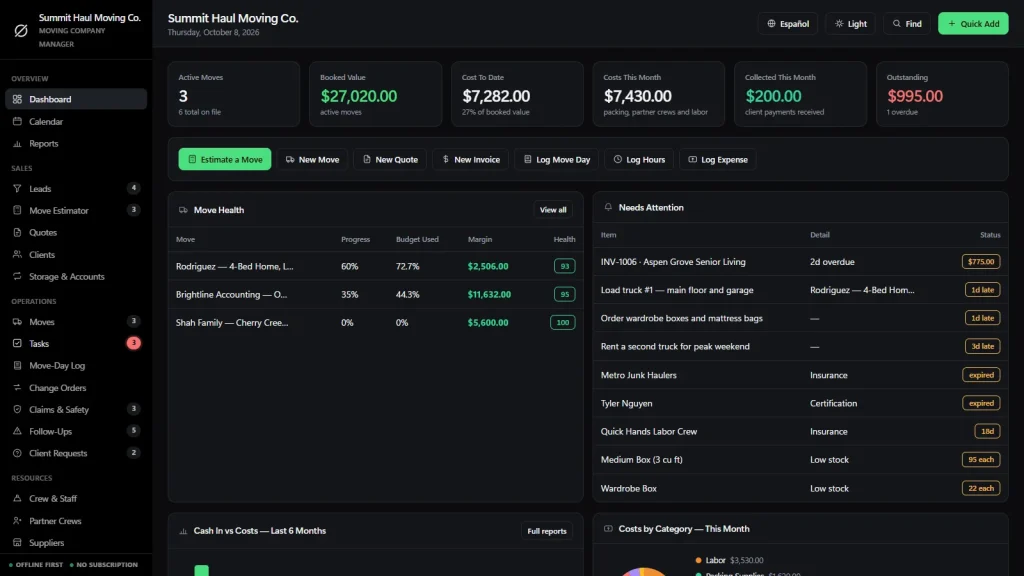
Software for a moving company that runs the whole move in one offline file: a move estimator that prices by room, quotes, a move-day log, damage claims, crew and trucks, real margin on every move and invoices that track themselves. Software for moving companies that you buy once, with no monthly fee.
Key benefits
One-time payment
No monthly fee, no per-user charge and no yearly renewal. The price you see is the whole price.
A move estimator by room
Items and cubic feet in, volume, truck, crew, hours and a price range out.
Estimate to quote to move
One click turns an estimate into a quote, and one more turns the accepted quote into a booked move.
Real margin per move
Move price minus expenses and crew hours, from the records you already entered.
What this moving company software does
Everything a small moving company runs on, in one place.
You get a dashboard, a calendar, reports, leads, a move estimator, quotes, clients, storage and corporate accounts, moves, tasks, a move-day log, change orders and claims and safety.
It also tracks follow-ups, client requests, crew and staff, partner crews, suppliers, trucks and equipment and packing supplies, with invoices, purchase orders, expenses and timesheets alongside.
That is 24 modules in one file. You can export every list to CSV or a JSON backup, and the app runs in English and Spanish.
Moving company estimate software
Build the inventory room by room from common items or your own lines with a cubic-foot size. The estimate adds the volume, picks a 16, 20 or 26 ft truck, recommends a crew, estimates the hours and prices it from your own rates.
Stairs, a long carry, driving miles and packing service change the time and the price. It prints the items by room with a non-binding note and a signature line.
Quotes that fill themselves in
Click the quote icon on an estimate and a draft appears with labor, truck, mileage and packing lines you can edit. Quotes carry kind, quantity, unit cost and markup, and print on your own letterhead.
When the customer accepts, one more click turns the quote into a move with its price and cost budget.
A light moving company CRM
Leads run from first call to won or lost, and one button turns a lead into a client. Each client shows their moves, their invoices and what they have paid you over the years.
It records the relationship; it does not send emails or texts for you.
Moves run like small projects
Each move has progress, price against cost, margin, a crew lead, pickup and delivery addresses and dates, a task board and a cost sheet. A health score from 0 to 100 flags a move that is spending faster than it is being completed.
Move-day log, claims and follow-ups
Record the crew, hours, what was done, supplies delivered and delays for each day, and print a daily move report. Log damage claims, near misses, truck inspections and safety briefings, and track post-move fixes with a sign-off sheet.
Crew, trucks, packing supplies and invoicing
Hourly rates with license and medical card expiry, partner crews with insurance expiry, which truck is on which move and when it is next due for service, and boxes, paper and wrap against a minimum level. Deposit, final and additional-charge invoices show Paid, Partial and Overdue on their own.
Moving and storage company software, honestly
The renewal nobody called about is lost revenue.
Many movers earn between moves: monthly storage, corporate relocation accounts and apartment partner programs. The software you choose should show which of them is about to lapse. It should also say where its limits are.
Agreements with renewal dates
Storage & Accounts lists each storage agreement, corporate account and partner program with the next service, the renewal date, the annual price and a one-click renew. The ones renewing soon show in the alerts.
Works with no signal
The file runs offline in your browser, on a laptop or tablet, at the warehouse or on the curb. Nothing needs a connection once it is open.
Who is covered, who is not
Crew licenses and medical cards, and partner crew insurance, show an alert before they expire, so a crew member or a partner is not on a move with a lapsed document.
What it does not do
No warehouse, vault or lot tracking, no automatic storage billing, no GPS, no customer portal, no texts or emails sent from the app and no two people editing at once. It records the numbers and prints the paperwork.
How a move runs
From estimate to paid in four steps.
Estimate it
Add the lead, then list the inventory by room in the Move Estimator. It returns the volume, the truck, the crew, the hours and a price range, and you can print it for the customer.
Quote and book it
Turn the estimate into a quote in one click, edit the lines, and when the customer accepts, turn it into a move with its price, cost budget, crew lead and dates.
Move it and cost it
Fill in the move-day log, log hours and expenses against the move and record any change orders, such as extra items found on the day. Margin and the health score update themselves.
Invoice and close it out
Raise the deposit or final invoice, record the payment and see what is still owed. Log any damage claim and track the follow-up until the customer signs off.
Why movers switch
You are not really choosing between two moving software packages.
Most moving software is rented by the month, and the records live on somebody else’s server. Spreadsheets are free but cannot price a move from an inventory or show the margin on every job.
This software for moving companies is a file you own, with the moving-specific parts built in.
| OwnDesk Moving | Subscription moving software | Paper & spreadsheets | |
|---|---|---|---|
| Price | Original price was: £149.00.£49.00Current price is: £49.00. once | Monthly fee, for as long as you use it | Free, but it costs your evenings |
| Estimate from an inventory by room | Built in (from numbers you enter) | Usually | By hand, every quote |
| Estimate, quote and move without retyping | One click each step | Varies | Copy and paste |
| Margin on every move | Included | Varies | Your own formulas |
| Works offline | Yes | Often needs a connection | Yes |
| Your records if you stop paying | Still yours | Access ends | Still yours |
| GPS, customer portal, automatic texts | Not included | Often included | No |
| Several people at once | Not included — one computer at a time | Usually included | Only through a cloud drive |
The subscription column is a general description of moving software sold by the month, not a claim about any single company — features and pricing differ, so check each site.
OwnDesk Moving is single-computer software: it does not sync between devices, track trucks by GPS, send messages or process card payments.
From payment to your first estimate
Three steps, about two minutes.
Pay with card
Checkout runs on Stripe. Your card details never touch this site.
Download and open
The link appears the moment payment clears. Double-click the file — it opens in your browser, no install, no internet needed after that.
Look around, then start fresh
It opens with a sample moving company already loaded. Remove the sample data from Settings and add your own rates, clients and moves.
If OwnDesk Moving isn't right for how you run your moving company, email me and you get a refund — no questions. If something's confusing, you're writing to the person who built it, not a queue. English and Spanish, both spoken here.
Custom build
Need it to work exactly the way your moving company does?
I can adapt OwnDesk Moving to the way your moving company works: your own fields, your quotes, your reports, or two OwnDesk products combined into one. It’s still a one-time payment, it still runs offline, and it’s yours. I built the software, and I build your version myself.
- A bill of lading printed in the layout you already use
- Storage billing, with monthly rent per vault and who owes what
- Long-distance pricing by weight or by cubic foot
Custom builds start at £490, paid in two halves: 50% to start, 50% after you’ve tested it.
Tell me about your businessQuestions
Before you buy.
What is moving company software?
What is the best moving company software?
What is the best software for moving companies with a small crew?
How does the moving company estimate software work?
Can I set my own rates?
Is it moving company CRM software?
Is it project management software for a moving company?
Is it moving and storage company software?
Can it track damage claims and safety?
What are moving company software programs, and do I need to install one?
Does it do job costing and invoicing?
How much does moving company software cost?
Can it take card payments, track trucks by GPS or run payroll?
Can several people use it at the same time?
Where are my records stored, and is there a subscription?
Can you customize it for my moving business?
Estimate a move in it before you decide.
The live demo has real screens and a sample moving company loaded — no sign-up beyond your name and email, no credit card. If it fits, buying takes about a minute.
14-day money-back guarantee · instant download · one-time payment