
Pool service software for pool service companies and independent pool pros.
Pool service management software that runs the route in one offline file: customers with pool volume and sanitizer, a day schedule per technician, service plans that book their own next visit, a water test at every stop with a dose helper, chemical stock that counts itself down and pool service invoice software built in, so you can create, print and track invoices. Pool service business software you buy once, with no monthly fee.
Key benefits
One-time payment
No monthly fee, no per-technician charge and no yearly renewal. The price you see is the whole price.
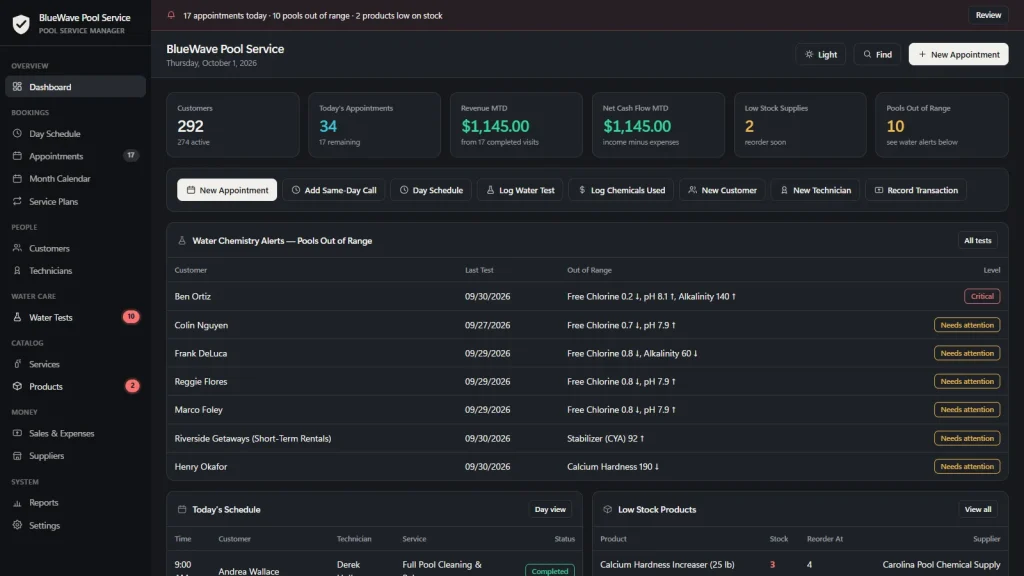
Water tests that raise alerts
Every reading checked against target ranges, with the pools that are out of range listed on the dashboard.
Plans that book themselves
One click books the next visit of a weekly, monthly or seasonal plan and moves the due date forward.
Pool service invoice software
Yes, you can make invoices: bill a visit or a month of service, record payments and see unpaid and overdue invoices on the dashboard.
What this pool service software does
Everything a small pool company runs on, in one place.
You get a dashboard, a day schedule per technician, appointments, a month calendar, service plans, customers, technicians, water tests and invoices.
It also keeps a service price list, chemical and supply stock, suppliers, invoices, sales and expenses, and reports by category, technician and day of the week.
Everything prints on your own letterhead, exports to CSV or a JSON backup, and runs offline in your browser.
A water test at every stop
Type free chlorine, pH, alkalinity, stabilizer, calcium hardness and, for salt pools, salt. Each reading turns green, amber or red and the test is marked Balanced, Needs attention or Critical.
The history stays on the customer, so you can show a homeowner that the stabilizer has been creeping up for a month, or that you fixed the green pool in two visits.
A dose helper scaled to the pool
While you type, the form suggests a fix for every reading that is off, scaled to the volume on the customer record, such as how much liquid chlorine raises free chlorine to about 2 ppm.
They are starting estimates: follow the product label, add in portions and retest. It does not connect to test strips, photometers or pool controllers; you type the readings in.
Pool service scheduling by technician
One day at a time with a column per technician. Click an empty slot to book it, click a visit to open it. Open times are worked out for you and a double booking is flagged.
Add a same-day call in two clicks, and print the day as a route sheet. There is a month calendar for the long view.
Service plans for the weekly route
Weekly, bi-weekly, monthly, quarterly or annual plans per customer with a next due date and a status of Active, Lapsed or Cancelled. “Generate Next Appointment” books the visit and moves the plan forward.
Customers, pools and technicians
Each pool carries its address, gate code, type, volume in gallons, surface, sanitizer system, equipment notes and special instructions. Technicians have a role, truck or route, commission and a performance view with revenue and visits.
Pool service invoice software: make invoices and track payments
Yes, you can create invoices in it. Create an invoice from an appointment or a customer, with line items picked from your services and products, a tax rate and a due date. Record payments, partial or in full, and the status follows: Sent, Partial, Paid, or Overdue past the due date.
Print it on your own letterhead or save it as a PDF. It does not email invoices, bill on a schedule or take card payments.
Chemical stock, check-out and reports
Log chemicals used and the stock counts down, the charge is recorded and low stock raises an alert. Check out a visit to record the sale once. Reports show income, expenses, invoiced and unpaid amounts over any date range, by category, by technician and by day of the week.
Pool service invoice software
Yes, you can create pool service invoices.
Most pool companies bill a visit or a month of service and then wait to be paid. This pool service invoice software lets you create the invoice, print it or save it as a PDF, and keep track of who has paid.
Create the invoice
Start from a visit on the schedule or from a customer. Pick lines from your services and products or type your own, set the tax and the due date.
Print it or save it as a PDF
It prints on your own letterhead with the customer and pool details, the total and the balance due. Send the PDF yourself; the app does not email it.
Record payments
Enter a payment, partial or in full, and the invoice moves from Sent to Partial to Paid. The money is added to your sales.
See who still owes you
Unpaid invoices are listed on the dashboard, and anything past its due date is flagged Overdue in the menu and the top bar.
Swimming pool service software, honestly
A pool visit is a test, a correction and a record.
Most business tools treat a pool like any other job. The pool service company software you choose should know the difference, and should also say where its limits are.
Pools out of range, at a glance
The dashboard lists every pool whose latest test is out of range, the exact readings that are off and the level. The Water column on Customers shows the same status for each pool, and a red badge sits on the Water Tests menu.
A report for the homeowner or the HOA
The printer icon on a test prints a Water Test Report on your letterhead: readings, targets, chemicals added, recommended next steps and your notes. Save it as a PDF and email it.
Works with no signal
The file runs offline in your browser, on a laptop or tablet, in the truck or at the pool. Nothing needs a connection once it is downloaded.
What it does not do
No recurring billing or autopay, no emailing of invoices, no card processing, no customer portal, no texts or reminders, no GPS or route optimization and no cloud sync. It is one person at a time, and it is not a substitute for your health department rules.
How a pool route runs
From plan to paid in four steps.
Set up the customer
Add the pool with its address, gate code, volume and sanitizer, and a service plan with its frequency and price.
Book the route
Generate the next appointment from each plan, then see the day on the schedule with a column per technician. Print it as the route sheet.
Test and treat
Log the water test, follow the dose helper, then log the chemicals used so stock and the chemical charge stay right.
Invoice or check out
Create an invoice with the pool service invoice software, or check out the visit to record the sale. Raise an invoice for a visit or a month and record the payment when it arrives. Commission is figured on the service price, not on chemical charges.
Why pool pros switch
You are not really choosing between two pool software packages.
Most pool service software is rented by the month, and the records live on somebody else’s server. Spreadsheets are free but cannot book the next visit from a plan, flag a pool out of range or count chemical stock down.
This software for a pool service company is a file you own, with the pool-specific parts built in.
| OwnDesk Pool | Subscription pool software | Paper & spreadsheets | |
|---|---|---|---|
| Price | $ 49.00 once | Monthly fee, for as long as you use it | Free, but it costs your evenings |
| Water tests with target ranges and a dose helper | Built in | Varies | A separate sheet |
| Service plans that book the next visit | One click | Usually | By hand |
| Day schedule per technician | Included | Usually, often live | Your own grid |
| Works offline | Yes | Often needs a connection | Yes |
| Your records if you stop paying | Still yours | Access ends | Still yours |
| Pool service invoices you can print or save as PDF | Included | Usually | Retyped each time |
| Recurring billing, autopay, customer texts, route optimization | Not included | Often included | No |
| Several technicians at once | Not included — one computer at a time | Usually included | Only through a cloud drive |
The subscription column is a general description of pool service software sold by the month, not a claim about any single company — features and pricing differ, so check each site.
OwnDesk Pool is single-computer software: it does not sync between devices, bill on a schedule, email invoices, send messages or process card payments.
From payment to your first route
Three steps, about two minutes.
Pay with card
Checkout runs on Stripe. Your card details never touch this site.
Download and open
The link appears the moment payment clears. Double-click the file — it opens in your browser, no install, no internet needed after that.
Look around, then start fresh
It opens with a sample pool company already loaded. Remove the sample data from Settings and add your own customers, plans and prices.
If OwnDesk Pool isn't right for how you run your pool service business, email me and you get a refund — no questions. If something's confusing, you're writing to the person who built it, not a queue. English and Spanish, both spoken here.
Questions
Before you buy.
What is pool service software?
Is this pool service management software for a small company?
Is it good pool service scheduling software?
Is it pool service dispatch software?
Is this pool service invoice software? Can I make invoices with it?
Is it pool service billing software, and does it do recurring billing?
How does the water test and dose helper work?
Is it pool and spa service software?
Is it swimming pool service software for a company with commercial pools?
What is the best software for a pool service company?
Does it track chemical stock?
How much does pool service software cost?
Can several technicians use it at the same time?
Where are my records stored, and is there a subscription?
Log a water test and make an invoice in it before you decide.
The live demo has real screens and a sample pool company loaded — no sign-up beyond your name and email, no credit card. If it fits, buying takes about a minute.
14-day money-back guarantee · instant download · one-time payment