
Classroom management software for teachers who want their whole class in one file.
Classroom management software for teachers: a gradebook, one-click attendance, seating charts, a lesson planner, parent contacts, behavior notes and report cards that draft their own comments. Software for classroom management that opens with a double-click and runs offline, on your own computer.
Most teacher software is rented by the month or the school year, and your student records sit on someone else’s server. This one you buy once.
Key benefits
One-time payment
No monthly fee, no per-student charge and no yearly renewal. The price you see is the whole price.
A gradebook that saves as you type
Type a score and it is saved. Letter grades and averages update by themselves.
Alerts that say what needs you
At-risk students, ungraded work, missed attendance and parent follow-ups, each one click away.
Records stay on your computer
No account, no upload and no internet needed. The file makes no network requests at all.
Classroom management software: read this first
This is the teacher’s kind, not the kind that watches screens.
The same words describe two products. If you are comparing K-12 classroom management and student safety software for a school or district, this is not it. If you want your own class records in order, keep reading.
What this is
A teacher’s private workspace: classes, students, grades, attendance, seating, lessons, parent contacts, behavior, goals and report cards. One teacher, one file, one computer.
What it does not do
No viewing of student screens, no website blocking or filtering, no control of student devices, no safety alerts, no student logins and no district console.
Who it suits
A K-12 teacher who wants records of their own beside the school systems, plus tutors and homeschooling parents who have no school system at all.
Who should look elsewhere
School IT teams, and anyone who needs one shared system across several teachers or a whole district.
What this classroom management software does
Everything that used to be four spreadsheets and a pile of sticky notes.
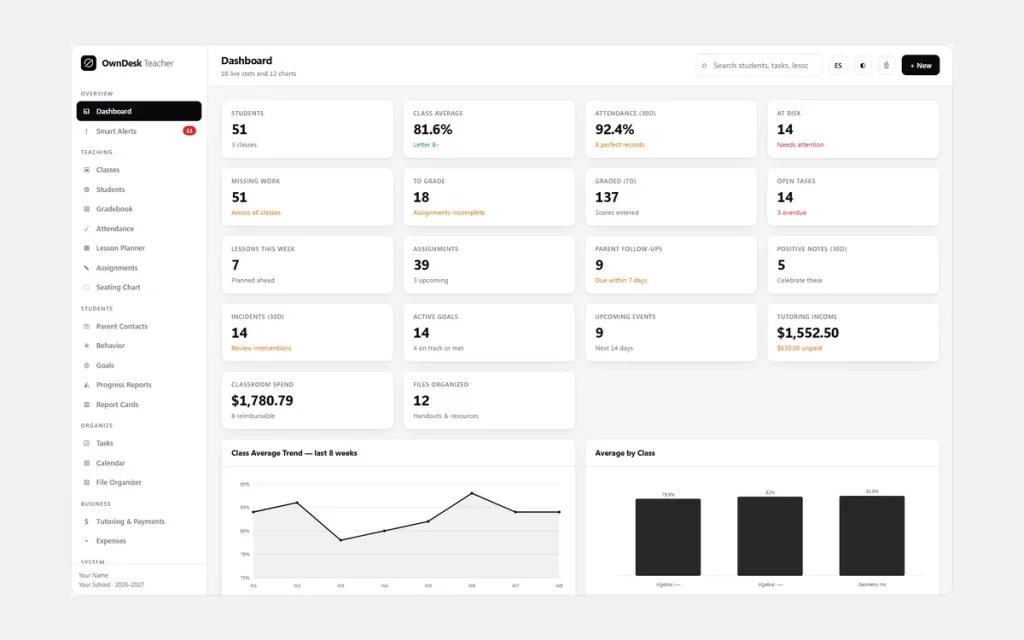
You get a dashboard with 18 live stats and 12 charts, Smart Alerts, classes, students, a gradebook, attendance, a lesson planner, assignments and a seating chart.
Parent contacts, behavior, goals, progress reports, report cards, tasks, a calendar, a file index, tutoring, expenses and 28 ready-made reports are included too.
Every report exports to CSV, Excel or PDF, with your logo on every printed page. The app runs in English or Spanish.
Attendance in one click
Mark all present, then change the few who are not. Below the register you get a 20-day trend line and a chronic-absence watchlist of anyone under 92%.
Seating charts that print for a substitute
Set your rows and columns, then auto-arrange A–Z, shuffle, or place students by hand. Drag one desk onto another to swap them, and print a clean room layout.
Student profiles with the full picture
Two guardians, medical notes and IEP, 504 and ELL accommodations, with averages, attendance, a trend chart, the behavior log, contact history and goals on one printable page.
Behavior, goals and parent contacts
Log incidents and positives with severity and action taken. Track goals from baseline to target. Keep every parent conversation with a follow-up date, so it is there at conference time.
Report cards that draft the comment
Each card shows average, letter, GPA, attendance and missing work, with a comment written from that student’s real grades and trend. Edit it, then print the whole class at once.
Lesson planner and calendar
Date, class, unit, objective, materials, homework and a reflection for each lesson, plus a month view with events, lessons, due dates and task deadlines.
Tutoring and classroom expenses
Log tutoring sessions with hours and rate, print a branded invoice, and track what you spend on your classroom and what can be reimbursed.
Smart Alerts each morning
One screen scans everything: overdue tasks, due follow-ups, at-risk students, ungraded assignments, classes with no attendance today and unresolved incidents.
Gradebook software for teachers
Type a score. It is saved.
Good gradebook software should feel like the paper grid, with the math done for you. This teacher gradebook software is that grid, and it feeds your report cards and alerts by itself.
The classic grid
Students down the side, assignments across the top. Tab moves across and Enter moves down. Scores below your passing mark turn red, and the footer shows the average for each assignment.
Bulk entry and import
Open one assignment as a clean list with a fill-all box for the days everyone gets full marks, or import scores by CSV for one assignment or many.
Your grade scale
Add, rename or remove letter bands and set the minimum percent for each. Set your passing mark and drop the lowest N scores from every average.
What it does not do
No weighted categories, no standards-based or competency grading, no transcripts, no student or parent logins and no online access. It is student gradebook software for the teacher’s desk.
Why teachers switch
You are not really choosing between two classroom apps.
Most software for classroom management is rented, and the records live on somebody else’s server. A spreadsheet and a paper grade book are cheap but warn you about nothing.
This is a file you own, with the gradebook, the attendance and the report cards already connected.
| OwnDesk Teacher | Subscription classroom software | Paper & spreadsheets | |
|---|---|---|---|
| Price | Original price was: $99.00.$49.00Current price is: $49.00. once | A monthly fee or a school contract, or a free plan with limits | Free, but it costs your evenings |
| Gradebook, attendance and report cards connected | Included | Usually | Copied by hand |
| Drafted report card comments | Included, from real grades | Varies | Written one by one |
| Works offline | Yes | Often needs a connection | Yes |
| Your records if you stop paying | Still yours | Access ends | Still yours |
| Student and parent logins, weighted grading | Not included | Often included | No |
| Screen monitoring and website blocking | Not included | Only in device-monitoring products | No |
| A shared system across a school | Not included — one teacher, one copy | Usually included | Only through a cloud drive |
The subscription column is a general description of software sold that way, not a claim about any single company — features and pricing differ, so check each site.
OwnDesk Teacher is single-computer software: it does not sync between devices, monitor students or send messages.
From payment to your first class
Three steps, about two minutes.
Pay with card
Checkout runs on Stripe. Your card details never touch this site.
Download and open
The link appears the moment payment clears. Double-click the file — it opens in your browser, no install, no internet needed after that.
Look around, then start fresh
Load a demo classroom with three classes and 51 students, then clear it in one click. Paste your roster in by CSV and you are ready.
If OwnDesk Teacher isn't right for how you run your classroom, email me and you get a refund — no questions. If something's confusing, you're writing to the person who built it, not a queue.
Custom build
Need it to work exactly the way your classroom does?
I can adapt OwnDesk Teacher to the way your classroom works: your own fields, your report cards, your reports, or two OwnDesk products combined into one. It’s still a one-time payment, it still runs offline, and it’s yours. I built the software, and I build your version myself.
- A report card that matches your school template and grading scale
- Extra student fields for accommodations, reading levels or lunch groups
- A tutoring center version, with session packs and invoices for parents
Custom builds start at $490, paid in two halves: 50% to start, 50% after you’ve tested it.
Tell me about your businessQuestions
Before you buy.
What is classroom management software?
Is this classroom management software for teachers or for school IT?
Is it one of the top K-12 classroom management and student safety software tools?
What is the best classroom management software?
What is the most used classroom management software in K-12?
Can a school or district pilot this classroom management software?
Does it work on Chromebooks, iPads and Windows?
Is there a free version? Is this free classroom management software?
Is it gradebook software?
Is it student gradebook software? Can students or parents log in?
Is it online gradebook software?
Does the gradebook do weighted categories or competency-based grading?
Does it work as a homeschool gradebook?
How do report cards and progress reports work?
Does it connect to Google Classroom or our student information system?
Does it email or text parents?
Is student data private, and is it allowed at my school?
Can I use it on two computers or share it with my department? Is it in Spanish?
Where are my records stored, and is there a subscription?
Can you customize it for my school?
Enter a grade in it before you decide.
The live demo has real screens and a sample classroom loaded — no sign-up beyond your name and email, no credit card. If it fits, buying takes about a minute.
14-day money-back guarantee · instant download · one-time payment