
Landscaping business software for lawn care and landscaping companies who would rather own it than rent it.
This is landscape business management software in one file. Quote a job from line items, turn it into a job with one click, cost it as materials and hours come in, and send invoices that track themselves.
It also tracks the recurring mowing and seasonal contracts that pay the bills between big jobs. No monthly fee, no login, and it works with the Wi-Fi off.
Key benefits
One-time payment
No monthly fee and no yearly renewal. The price you see is the whole price.
Quotes that become jobs
One click turns an accepted quote into a job, price and budget already filled in.
Maintenance contracts
Mowing, cleanup, fertilization and irrigation programs, with their own renewal date.
Real margin per job
Job price minus materials, subs and crew hours, from records you already entered.
Landscape business management software for a small company
Everything a small landscaping business runs on, in one place.
You get a dashboard, a calendar, reports, leads, quotes and estimates, clients, maintenance contracts, jobs and tasks.
It also tracks the site visit log, change orders, safety, follow-ups, client requests, employees, subcontractors, suppliers, equipment, inventory, invoices, purchase orders, expenses and timesheets. English and Spanish are both in the same file.
Landscape business software that uses your numbers
Build a quote from line items — materials, labor, subcontractor, equipment — with quantity, unit cost and markup, tax on top.
Accept it and one click creates the job with the contract amount and cost budget already filled in. No retyping the same numbers twice.
The quote prints on your letterhead with a signature line. Its status runs from draft to sent, accepted, rejected or expired.
Maintenance contracts for the work that repeats
Weekly and bi-weekly mowing programs, seasonal cleanup packages, fertilization and weed control, irrigation maintenance, snow removal.
Each contract carries its own annual price, visits per year, next visit and renewal date, with a one-click renewal so nothing lapses by accident.
Scheduling software for a landscaping business, kept simple
A Jobs board, a month Calendar and a Site Visit Log that captures weather, crew on site, hours worked and what got done, per stop.
You create and move the jobs yourself. As landscaping business scheduling software it is a board you fill in, not a route optimizer.
Invoicing, including deposits and progress billing
Deposit, progress claim, final invoice, variation and credit note, with Paid, Partial and Overdue worked out for you.
Job price plus approved change orders, minus materials, subs and crew hours, gives the margin. A 0 to 100 health score flags the jobs going wrong.
Follow-ups and client requests, tracked apart from the job
A dead shrub, a misaligned sprinkler head, a paver that settled — Follow-Ups keeps a punch list with a location, a trade and an assignee.
Client Requests tracks questions and change requests through to an answer, separate from the job's own change orders.
Inventory and equipment, not just a job list
Mulch, soil, sod, plants, fertilizer, irrigation parts and pavers, tracked against a minimum stock level, with low-stock alerts.
Mowers, trucks and trailers — owned or hired — with a next service date, alongside your suppliers and subcontractors.
From quote to paid in four steps
Quote it. Build it. Get paid.
Good landscape business software has to keep four things in the same place: what you quoted, who is doing it, what it cost and what you are owed.
Quote it
Add the client, then build the quote from line items — materials, labor, subs, equipment — with markup and tax.
Accept it
The quote becomes a job with its contract amount and cost budget already filled in. Set the crew lead and the schedule.
Do it and cost it
Log the site visit, hours and expenses against the job and record change orders. Margin and health score update themselves.
Invoice and follow up
Raise the deposit, progress or final invoice, record the payment and see what is still owed. Contract renewals and follow-ups show up before they are forgotten.
Recurring work is managed separately, as a Maintenance Contract with its own visits and renewal date, so a mowing route does not get mixed in with one-off install jobs.
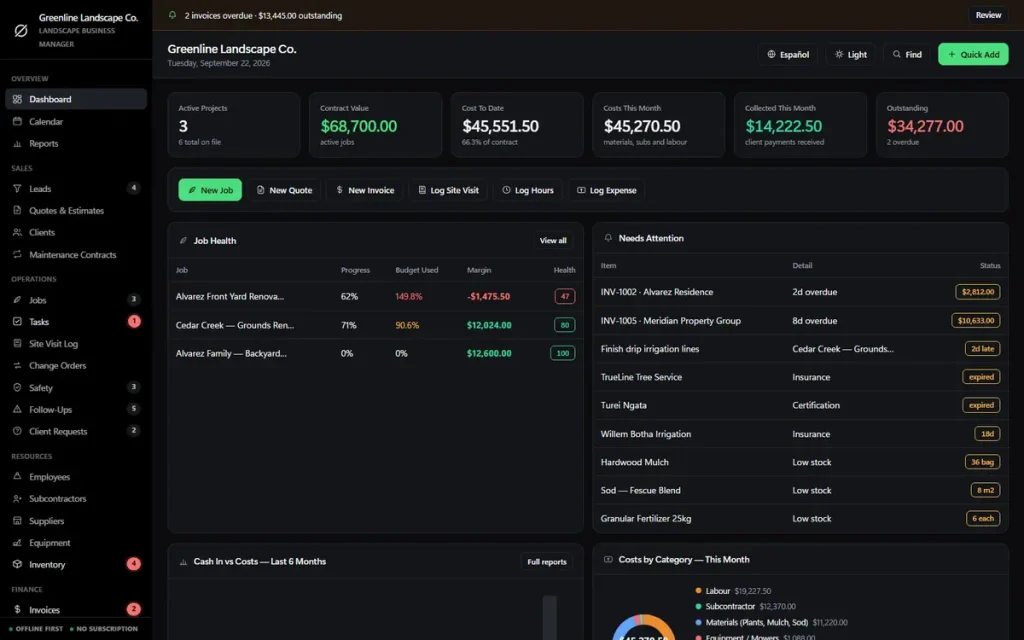
The numbers, on the first screen
Six figures a landscaping business owner actually steers by.
Active jobs, contract value, cost to date, costs this month, collected this month and outstanding invoices — plus a job health table and a needs-attention list.
Job health, live
Progress, budget used and margin, per job, updating as costs and hours come in. A job spending faster than it is being built is visible before it is a problem.
Needs attention
Overdue invoices, late tasks, expiring documents and low stock, all in one list, so nothing gets chased by memory.
Maintenance contract renewals
Contracts coming up for renewal are flagged before the renewal date passes, so recurring revenue does not lapse by accident.
Cash in vs. costs
Six months at a glance, plus costs by category for the month, so a slow month shows up before it surprises you.
Accounting, irrigation and the field, honestly
The business side of a landscaping company, without the monthly fee.
A landscaping company lives out of trucks, yards and phone calls. Landscape business software should keep the jobs, the money and the paperwork straight. It should also tell you where its limits are.
Is it accounting software for a landscaping business?
It covers the job side: quotes, invoices, payments, expenses, timesheets, job costing and margin, with every list exportable to CSV for your accountant.
It is not a general ledger. There is no payroll, no bank feed and no tax filing, so keep your bookkeeping program for those.
Does it design irrigation systems?
No. It does not design irrigation layouts, calculate square footage from a drawing or check code compliance. Keep the tool you already use for that.
What it does is everything around the job: the quote, the schedule, the invoice and the follow-up.
Site visit reports that print
Weather, crew on site, hours worked, work completed and deliveries received on one page, printable as a daily report and linked to the job for costing.
Works with no signal
The file runs offline in your browser, on a laptop or tablet, in a truck cab or on a job site. Nothing needs a connection once it is downloaded.
What it does not do
No GPS or route tracking, no crew mobile app, no customer self-booking, no automatic texts or emails, no card processing, no irrigation design, and no two people editing at once.
It is the office record of the operation, not a live field service platform.
Safety records
Safety keeps toolbox talks, site inspections, near misses, inductions and corrective actions — mower and trimmer safety, chemical storage, PPE checks. It is a place to write things down, not a compliance log, so keep the official records your applicator license requires.
Choosing landscape business management software
You are not really choosing between two software packages.
Most landscape business software is rented by the month — commonly $49 to $697, depending on the plan and how many users you need — and the records live on somebody else’s server. Spreadsheets are free but cannot turn a quote into a job or track a mowing contract's renewal date.
This is landscape business software you own, with the recurring-work parts built in.
| OwnDesk Landscape | Subscription landscape software | Paper & spreadsheets | |
|---|---|---|---|
| Price | $ 49.00 once | Monthly fee, for as long as you use it | Free, but it costs your evenings |
| Quotes that become jobs in one click | Built in | Usually | By hand, every quote |
| Maintenance contracts with renewal tracking | Included | Varies | A list you keep up |
| Site visit log per crew stop | Included | Varies | No |
| Job costing with a live margin | Included | Varies | Your own formulas |
| Works offline | Yes | Often needs a connection | Yes |
| Your records if you stop paying | Still yours | Access ends | Still yours |
| GPS tracking, route planning, crew mobile app | Not included | Often included | No |
| Several people at once | Not included — one computer at a time | Usually included | Only through a cloud drive |
The subscription column is a general description of landscape business software sold by the month, checked 22 September 2026 against published pricing (examples: Jobber Core about $49/month for one user, LMN Advanced about $697/month with unlimited users) — not a claim about any single company; features and pricing differ, so check each site. Some platforms, like Yardbook, offer a limited free tier for solo operators under $50K in annual revenue. OwnDesk Landscape is single-computer software: it does not sync between devices, track crews by GPS, send messages, design irrigation systems or process card payments.
From payment to your first quote
Three steps, about two minutes.
Pay with card
Checkout runs on Stripe. Your card details never touch this site.
Download and open
The link appears the moment payment clears. Double-click the file — it opens in your browser, no install, no internet needed after that.
Look around, then start fresh
It opens with a sample landscaping company already loaded. Clear it from Settings, which keeps your company name, logo and tax rate, then add your own clients, jobs and maintenance contracts.
If OwnDesk Landscape isn't right for how you run your landscaping business, email me and you get a refund — no questions. If something's confusing, you're writing to the person who built it, not a queue. English and Spanish, both spoken here.
Questions
Before you buy.
What is landscape business management software?
What is the best landscaping business software for a small company?
Does it handle recurring mowing contracts, not just one-off jobs?
Is this landscape estimating or job costing software?
Is it scheduling software for a landscaping business?
Does it design irrigation systems or calculate material takeoffs from a plan?
Can it work as a simple landscape CRM?
Is it accounting software for a landscaping business?
What happens to a follow-up or a client request after the job is done?
Can several people use it at the same time?
Where are my records stored, and is there a subscription?
Build a quote in it before you decide.
The live demo of this landscaping business software has real screens and a sample landscaping company loaded — no sign-up, no credit card. If it fits, buying takes about a minute.
14-day money-back guarantee · instant download · one-time payment