
Caregiver scheduling software for home care agencies.
Caregiver management software that keeps a small agency in one offline file: a weekly schedule with open shifts, attendance, hours and overtime, invoices built from completed shifts, and the credentials that keep each caregiver cleared to work. Caregiver software you buy once, with no monthly fee per caregiver.
Key benefits
One-time payment
No monthly fee, no per-caregiver and no per-client charge. The price you see is the whole price.
Gaps you can see
Open shifts show dashed on the schedule and are counted on the dashboard until someone is assigned.
Hours ready for payroll
Hours and weekly overtime per caregiver, with a CSV for your payroll provider.
Invoices from shifts
Completed shifts priced at each client’s bill rate, with Overdue worked out by itself.
What this caregiver management software does
Everything a small agency runs on, in one place.
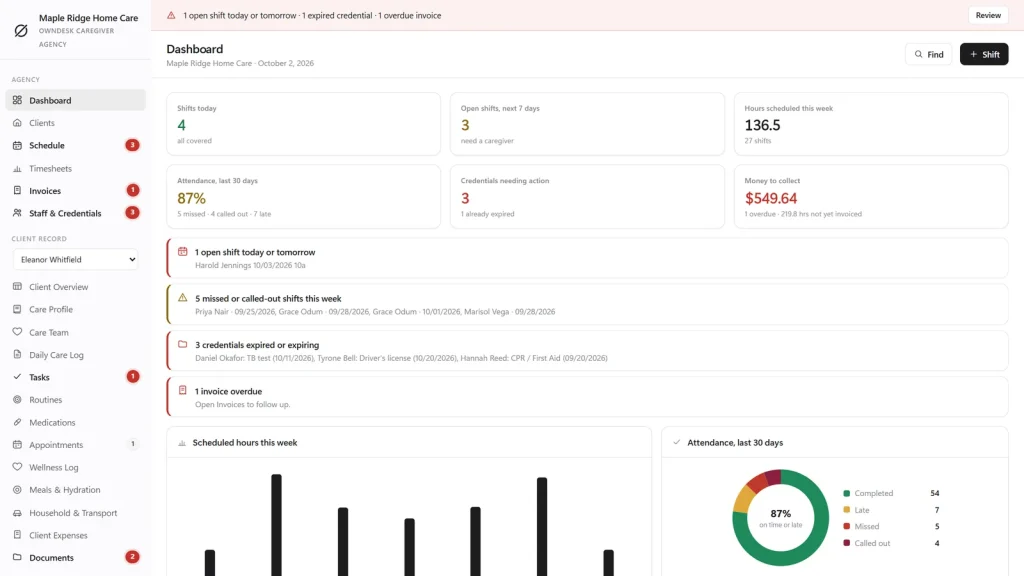
You get a dashboard, clients, a weekly schedule, timesheets, invoices and staff with their credentials for the whole agency, and for each client a full care record: profile, care team, daily care log, tasks, routines, medications, appointments, wellness, meals, household and transport, expenses, documents, an emergency sheet and a calendar.
It prints eight agency reports and eighteen client reports, and runs in eight themes with your agency name on every printout.
A weekly schedule built for staff scheduling
Caregivers down the side, days across, an Open shifts row for work nobody has covered. Click the + in a cell to add a shift, repeat it for the following weeks, or copy the whole week forward. Filter by client, and print the week.
When you save a shift the app warns you if the caregiver is already booked at that time, has an expired credential, is inactive, or the client is marked Discharged.
Attendance, recorded
Click a shift to clock a caregiver in or out, or to mark it Completed, Late, Missed (no-show), Called out or Cancelled. The dashboard shows attendance over the last 30 days, and the Attendance & No-shows report breaks it down per caregiver.
Timesheets and overtime
Pick any period and see regular hours, overtime hours and total hours per caregiver, plus hours and billable hours per client. Overtime is worked out per Monday to Sunday week for Employees paid hourly, from the threshold and multiplier you set.
The pay figure is an estimate, before taxes, and exports to CSV. It is not payroll.
Invoices from completed shifts
Choose a client and a period. The app takes every completed, billable shift not yet invoiced and prices the hours at the client’s bill rate. Draft, Sent and Paid, with Overdue worked out by itself, and an Invoices Outstanding report with ageing.
Credentials that cannot lapse unnoticed
Record CPR, TB tests, background checks, certificates, driver’s licenses and insurance with an expiry date. The dashboard and the sidebar flag what is expired or about to be, saving a shift warns you if the caregiver has an expired credential, and a Credential Expiry report prints the lot.
A care record for every client
Switch client in the sidebar and every care screen shows that person: medications with refill alerts, appointments, the daily care log with a handoff that writes itself for the next caregiver, tasks, documents with expiry dates and a printable emergency sheet.
Where an agency loses money, honestly
The cost is in what nobody noticed in time.
Caregiver scheduling software cannot promise you a saving, and this page will not invent one. What it can do is keep the numbers that money depends on in one place, so that a gap, an overtime week or an uninvoiced shift shows up while it can still be fixed.
Shifts nobody covered
Open shifts are counted on the sidebar and on the dashboard, and flagged in the alert bar when one falls today or tomorrow. The Open Shifts report prints what is still uncovered.
Overtime before payroll
The schedule marks a caregiver who is over the overtime threshold for the week while you can still move a shift, not after the hours have been worked.
Hours that never got invoiced
The Invoices page shows how many completed hours are not on an invoice yet and roughly what they are worth, and overdue invoices are counted in the sidebar.
What it does not do
No payroll, no Medicaid or insurance billing or EVV, no reminders or texts sent to caregivers, no caregiver log-in and no two people editing at once. It records and prints; it is not medical, legal or payroll advice.
How an agency week runs
From the schedule to the invoice, in four steps.
Plan the week
Add shifts for each client, repeat them weekly, and leave a shift open until you find someone. Fix any double-booking or credential warning before you save.
Record what happened
Clock caregivers in and out, or mark a shift late, missed or called out. The client’s daily care log and handoff carry the care detail.
Close the period
Open Timesheets, check hours and overtime, and export the CSV for your payroll provider.
Invoice and collect
Create the invoice from the completed shifts, send it, and mark it paid. Anything late is flagged on the dashboard.
Why small agencies switch
You are not really choosing between two caregiver software packages.
Most caregiver and home care software is rented per caregiver or per client by the month, and the records live on somebody else’s server. A spreadsheet is free, but it cannot warn you about a double-booking or turn completed shifts into an invoice.
This caregiver software is a file you own, with the agency parts built in.
| OwnDesk Caregiver Agency | Subscription caregiver software | Spreadsheets & paper | |
|---|---|---|---|
| Price | $ 79.00 once | Monthly fee, for as long as you use it | Free, but it costs your evenings |
| Weekly schedule with open shifts | Built in | Usually | Drawn by hand every week |
| Double-booking and expired-credential warning | Included | Varies | You remember |
| Hours, overtime and invoices from shifts | Included (estimate, not payroll) | Varies | Re-typed every period |
| Works offline | Yes | Often needs a connection | Yes |
| Your records if you stop paying | Still yours | Access ends | Still yours |
| Caregiver app, reminder texts, payroll, Medicaid billing and EVV | Not included | Often included | No |
| Several people at once | Not included — one computer at a time | Usually included | Only through a cloud drive |
The subscription column is a general description of caregiver software sold by the month, not a claim about any single company — features and pricing differ, so check each site.
OwnDesk Caregiver Agency is single-computer software: it does not sync between devices, send messages, run payroll, bill Medicaid or insurers, or give caregivers a log-in. It is a record-keeping tool, not a medical device and not medical advice.
From payment to your first schedule
Three steps, about two minutes.
Pay with card
Checkout runs on Stripe. Your card details never touch this site.
Download and open
The link appears the moment payment clears. Double-click the file — it opens in your browser, no install, no internet needed after that.
Look around, then start fresh
It opens empty. Settings has a button that fills every screen with a sample agency, and another that removes it. Then add your clients, caregivers and first week of shifts.
If OwnDesk Caregiver Agency isn't right for how you run your agency, email me and you get a refund — no questions. If something's confusing, you're writing to the person who built it, not a queue. English and Spanish, both spoken here.
Questions
Before you buy.
What is caregiver software?
What is caregiver management software, and what should it include?
What is caregiver scheduling software, and is it the same as home care scheduling software?
Is this caregiver agency software?
How does caregiver scheduling software reduce costs?
How does home care scheduling software reduce caregiver no-shows?
How do I use caregiver scheduling software for staff scheduling?
What does caregiver software for staff scheduling need to do, and what does this one not do?
Is it Medicaid billing software for caregivers in Connecticut?
Is it caregiver payroll software?
How do timesheets and overtime work?
How do invoices work?
Does it keep client care records?
Is it HIPAA compliant?
How much does caregiver scheduling software cost?
Can several people use it at the same time?
Is there a version for looking after one family member?
Build a week of shifts in it before you decide.
The live demo has real screens and a sample agency loaded — no sign-up beyond your name and email, no credit card. If it fits, buying takes about a minute.
14-day money-back guarantee · instant download · one-time payment