
Painting business software for painting contractors and small painting companies.
Painting business management software that runs the whole job in one offline file: a room-by-room Paint Estimator that works out gallons, crew hours and price, a color schedule the client signs, real margin on every job and invoices that track themselves. Software for a painting business that you buy once, with no monthly fee.
Key benefits
One-time payment
No monthly fee, no per-user charge and no yearly renewal. The price you see is the whole price.
A color schedule the client signs
Color, code, brand, sheen and gallons, approved and ordered before the crew arrives.
Room-by-room estimating
Sizes, doors, windows, coats and prep in; gallons, crew hours and price out, then one click to a quote.
Real margin per job
Job price minus paint, expenses and painter hours, from the records you already entered.
What this painting business software does
Everything a small painting company runs on, in one place.
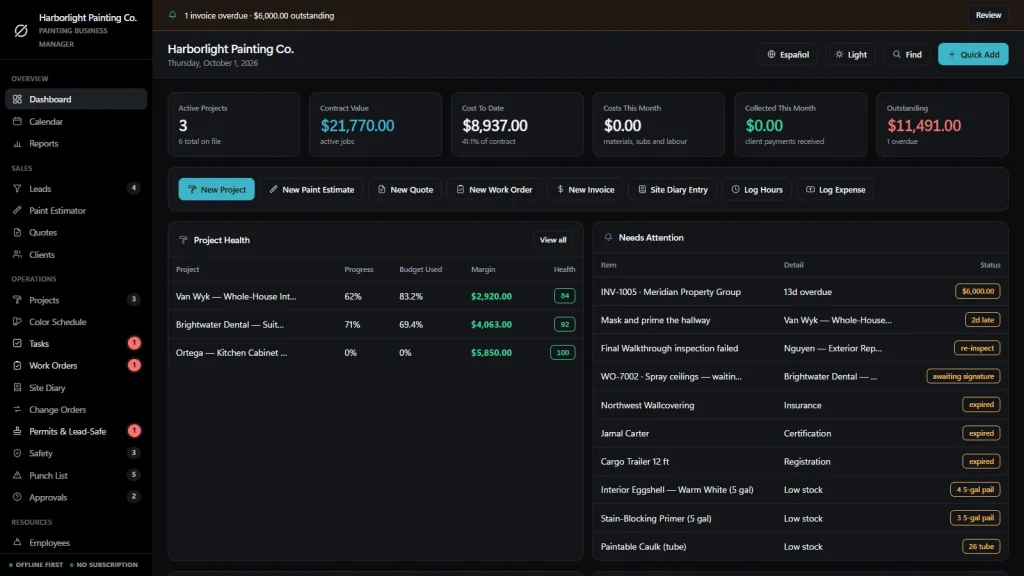
You get a dashboard, a calendar, reports, leads, a Paint Estimator, quotes, clients, projects, a color schedule and tasks on a board.
It also tracks work orders, a site diary, change orders, permits and lead-safe records, safety, punch lists, client approvals, employees, subcontractors, suppliers, equipment and vehicles, and paint stock.
Invoices, purchase orders, expenses and timesheets are included. You can export to CSV or JSON backup, and the app runs in English and Spanish.
A Paint Estimator, room by room
Add one row per room and type the length, width and height, then the doors and windows. Tick ceiling and trim, set the coats and pick a prep level of light, standard or heavy.
It subtracts the openings, measures the trim and shows wall, ceiling and trim paint separately: the gallons you need, the whole gallons to buy, crew hours, your cost, your markup and the price, with the price per square foot. It works from the sizes you type; it does not measure from photos or plans.
Quotes that write themselves
“Create Quote” turns an estimate into a quote with the paint, sundries and labor lines filled in. Tax and markup update as you build, and the quote prints on your letterhead with a signature line.
An accepted quote becomes a project in one click, and the price and the cost budget carry across.
A color schedule for every job
Room, surface, color name and code, brand and product, sheen and gallons, with a color chip if you add a hex code. Move each line from Proposed to Approved to Ordered to Applied.
The dashboard lists the approved colors that are ready to order, and the printed schedule has a client approval line. You type the colors yourself; there is no paint-brand database.
Work orders, site diary and punch lists
The crew’s job sheet with scope, crew size, materials and date, signed by the client on screen when the job is done. A daily site diary records weather, crew, hours, deliveries and delays such as drying time or a client decision.
Touch-ups go on a punch list with who fixes them and by when, and print as a sign-off sheet.
Job costing and invoicing
Job price plus approved change orders, minus expenses and painter hours at their rate. Deposit, progress, final, variation and credit-note invoices, with Paid, Partial and Overdue worked out for you.
Permits, safety, stock and equipment
Lead-safe (RRP) paperwork, HOA approvals and final walkthroughs with an alert on a failed one, toolbox talks and ladder and fume checks, and paint and sundries against a minimum level with low-stock alerts. Sprayers, ladders, scaffold and vans carry their next service date.
Painting business software, honestly
The expensive mistake is the wrong color on the wall.
A painting company loses money on repaints, a sheen change nobody wrote down and a color question that was answered on the phone. The painting contractor business software you choose should keep all three on paper. It should also say where its limits are.
Approvals that do not get lost
A color question for the client, a sheen switch or a change of scope goes under Approvals with a reply-by date and any cost impact. Open ones show on the calendar and on the sidebar badge until they are closed.
Change orders that reach the price
An approved change order is added to the price of its job, and the job cost sheet shows original, changes and revised, so extra work gets paid for.
Works with no signal
The file runs offline in your browser, on a laptop or tablet, in the van or on site. Nothing needs a connection once it is downloaded.
What it does not do
No cloud sync, no customer portal, no texts or emails sent from the app, no online payments, no GPS tracking, no photo library and no two people editing at once. It records the numbers and prints the paperwork; it is not legal or regulatory advice.
How a painting job runs
From first call to paid in four steps.
Estimate it
Log the lead, measure each room in the Paint Estimator and turn it into a quote with one click. Print it for the client to sign.
Plan the colors
Accept the quote and it becomes a project with its price and cost budget. Build the color schedule, get it approved and order the paint before the crew arrives.
Do it and cost it
Issue the work order, keep the site diary, log hours and expenses against the job and record any change orders. Margin updates itself.
Invoice and close out
Walk the job with a punch list, get the final sign-off, raise the invoice and see what is still owed. Overdue ones are flagged on the dashboard.
Why painters switch
You are not really choosing between two painting software packages.
Most software for a painting business is rented by the month, and the records live on somebody else’s server. Spreadsheets are free but cannot work out gallons from room sizes, keep a color schedule or tie a job to its real margin.
This painter business software is a file you own, with the painting-specific parts built in.
| OwnDesk Paint | Subscription painting software | Paper & spreadsheets | |
|---|---|---|---|
| Price | $ 49.00 once | Monthly fee, for as long as you use it | Free, but it costs your evenings |
| Room-by-room estimate with gallons and hours | Built in (from sizes you enter) | Varies | Your own formulas |
| Color schedule with client approval | Included | Varies | A separate sheet |
| Quote to project to invoice | One click each step | Usually | Retyped each time |
| Works offline | Yes | Often needs a connection | Yes |
| Your records if you stop paying | Still yours | Access ends | Still yours |
| Customer portal, automatic texts, online payments | Not included | Often included | No |
| Several people at once | Not included — one computer at a time | Usually included | Only through a cloud drive |
The subscription column is a general description of painting software sold by the month, not a claim about any single company — features and pricing differ, so check each site.
OwnDesk Paint is single-computer software: it does not sync between devices, send messages, process card payments or replace your accounting package.
From payment to your first estimate
Three steps, about two minutes.
Pay with card
Checkout runs on Stripe. Your card details never touch this site.
Download and open
The link appears the moment payment clears. Double-click the file — it opens in your browser, no install, no internet needed after that.
Look around, then start fresh
It opens with a sample painting company already loaded. Remove the sample data from Settings and add your own clients, rates and jobs.
If OwnDesk Paint isn't right for how you run your painting business, email me and you get a refund — no questions. If something's confusing, you're writing to the person who built it, not a queue. English and Spanish, both spoken here.
Questions
Before you buy.
What is painting business software?
Is this painting business management software for a small company?
What is the best software for a small painting business?
Is it painting contractor business software, or only for house painters?
Is it good estimating software for a painting business?
What does the color schedule do?
Does it work as accounting software for a painting business?
Does it handle reviews and testimonials?
Can it track lead-safe (RRP) paperwork and permits?
Does it do job costing and invoicing?
How much does painting business software cost?
Can it take card payments, sync with accounting software or run payroll?
Can several people use it at the same time?
Where are my records stored, and is there a subscription?
Build a paint estimate in it before you decide.
The live demo has real screens and a sample painting company loaded — no sign-up beyond your name and email, no credit card. If it fits, buying takes about a minute.
14-day money-back guarantee · instant download · one-time payment