
Roofing business software for roofing contractors and small roofing companies.
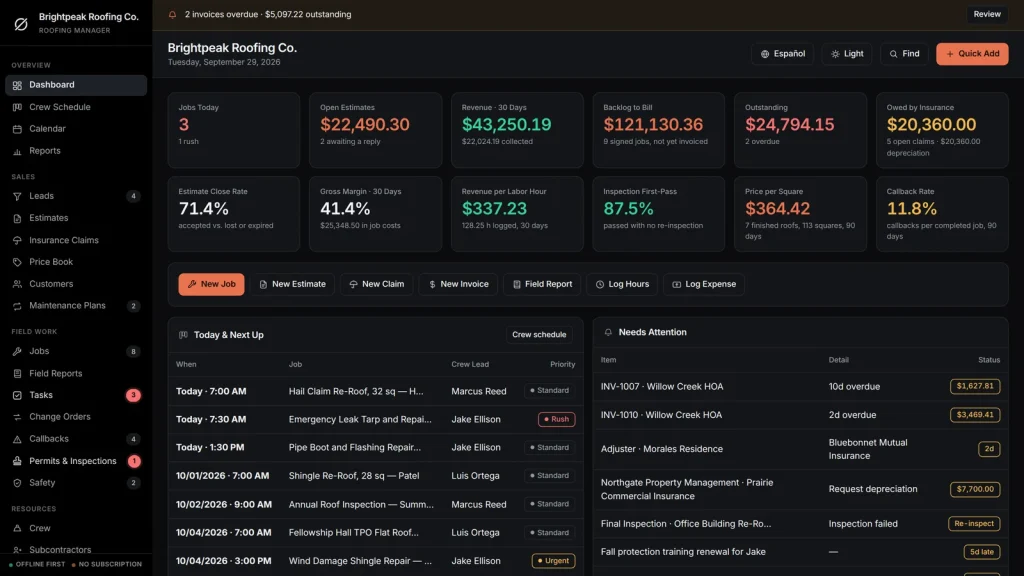
Roofing business management software that runs the whole job in one offline file: estimates with a roof takeoff, an insurance claim tracker for storm work, a crew schedule, real margin on every roof and invoices that track themselves. Business software for roofing contractors that you buy once, with no monthly fee.
Key benefits
One-time payment
No monthly fee, no per-user charge and no yearly renewal. The price you see is the whole price.
Insurance claims, tracked
RCV, ACV, deductible, supplements and the depreciation each carrier still owes you.
A roof takeoff with pitch
Plan area, pitch and waste in, true squares and whole bundles out, added to the estimate.
Real margin per roof
Job price minus materials, expenses and crew hours, from the records you already entered.
What this roofing business software does
Everything a small roofing company runs on, in one place.
You get a dashboard, a crew schedule, a calendar, reports, leads, estimates, insurance claims, a price book, customers, maintenance plans, jobs and field reports.
It also tracks tasks, change orders, callbacks, permits and inspections, safety, crew, subcontractors, suppliers, tools and vehicles, and materials and stock.
Invoices, purchase orders, expenses and timesheets are included. You can export to CSV or JSON backup, and the app runs in English and Spanish.
Roofing estimates from a price book
Set your shingles, metal, TPO, underlayment, ice and water shield, flashing, vents, decking, tear-off and dumpsters once, each with a cost, a sell price and crew hours. Add them to a roofing estimate in one pick.
Tax, cost and gross margin update as you build. The estimate prints on your letterhead with a signature line, and an accepted one becomes a job in one click.
A roof takeoff with pitch and waste
Enter the plan area of each roof section, pick the pitch from flat to 12/12 and add a waste percentage. The takeoff shows true roof squares and rounds up to whole bundles, rolls and pieces.
It then adds the lines to the estimate, with crew hours as a labor line. It works from the numbers you enter; it does not measure a roof from satellite images.
An insurance claim tracker for storm work
Carrier, claim and policy number, cause and date of loss, adjuster and visit date, RCV, ACV, deductible and supplement requested and approved, with a tick for each check as it arrives.
It works out the first check, the depreciation held back and what the carrier still owes you, and prints a claim worksheet.
A crew schedule
One row per crew lead and one column per day. Every job is a card; click the + in an empty cell to book a roof into that slot. The calendar adds adjuster visits, inspections and invoice due dates. You enter and move the jobs yourself.
Job costing and invoicing
Job price plus approved change orders, minus expenses and crew hours at their rate. Service, deposit, progress, final, change-order and credit-memo invoices, with Paid, Partial and Overdue worked out for you.
Permits, callbacks, safety and stock
Building permits, mid-roof and final inspections and HOA approvals with an alert on a failed inspection, leak callbacks and warranty work, fall protection and ladder checks, and bundles, rolls and drip edge against a minimum level with low-stock alerts.
Roofing business software for storm work, honestly
The last check is the one that gets forgotten.
After a hail storm, a roofing company is paid in pieces: a first check, a supplement and the depreciation held back. The roofing business management software you choose should show which of them has arrived. It should also say where its limits are.
What each carrier still owes
Tick “First (ACV) check received”, “Supplement check received” and “Depreciation check received” as the money comes in. The dashboard totals what every carrier still owes you.
Depreciation ready to request
A finished roof whose depreciation has not been requested is flagged on the dashboard, next to the adjuster visits coming up, so the money does not sit with the carrier.
Works with no signal
The file runs offline in your browser, on a laptop or tablet, in the truck or on the roof. Nothing needs a connection once it is downloaded.
What it does not do
No satellite measurement, no customer portal, no texts or emails sent from the app, no card processing and no two people editing at once. It records the numbers and prints the worksheet; it is not legal or insurance advice.
How a roofing job runs
From estimate to paid in four steps.
Estimate it
Add the customer, then build the estimate from your price book. Use the roof takeoff for squares and bundles, and print it for the customer to sign.
Schedule it
Accept the estimate and it becomes a job with its price, cost budget and roof size. Put it on the crew schedule with a crew lead and a day.
Do it and cost it
File the field report, log hours and expenses against the job, and record any change orders, such as rotten decking. Margin and price per square update themselves.
Invoice and collect
Raise the invoice, record the payment and see what is still owed, by the customer and by the carrier. Callbacks and maintenance renewals show up before they are forgotten.
Why roofers switch
You are not really choosing between two roofing software packages.
Most roofing software is rented by the month, and the records live on somebody else’s server. Spreadsheets are free but cannot build an estimate from a price book or track a claim to the last check.
This business software for roofing contractors is a file you own, with the roofing-specific parts built in.
| OwnDesk Roofing | Subscription roofing software | Paper & spreadsheets | |
|---|---|---|---|
| Price | $ 49.00 once | Monthly fee, for as long as you use it | Free, but it costs your evenings |
| Estimates from a price book | Built in | Usually | By hand, every quote |
| Roof takeoff with pitch and waste | Included (from numbers you enter) | Varies, often from aerial imagery | Your own formulas |
| Insurance claim tracking (RCV, ACV, depreciation) | Included | Varies | A separate sheet |
| Works offline | Yes | Often needs a connection | Yes |
| Your records if you stop paying | Still yours | Access ends | Still yours |
| Aerial measurement, customer portal, automatic texts | Not included | Often included | No |
| Several people at once | Not included — one computer at a time | Usually included | Only through a cloud drive |
The subscription column is a general description of roofing software sold by the month, not a claim about any single company — features and pricing differ, so check each site.
OwnDesk Roofing is single-computer software: it does not sync between devices, measure roofs from images, send messages or process card payments.
From payment to your first estimate
Three steps, about two minutes.
Pay with card
Checkout runs on Stripe. Your card details never touch this site.
Download and open
The link appears the moment payment clears. Double-click the file — it opens in your browser, no install, no internet needed after that.
Look around, then start fresh
It opens with a sample roofing company already loaded. Remove the sample data from Settings and add your own price book, customers and jobs.
If OwnDesk Roofing isn't right for how you run your roofing business, email me and you get a refund — no questions. If something's confusing, you're writing to the person who built it, not a queue. English and Spanish, both spoken here.
Questions
Before you buy.
What is roofing business software?
Is this roofing business management software for a small company?
What is the best all-in-one software for running a roofing business in 2026?
Is it complete business software for roofing contractors?
How does the roof takeoff work?
Can it track insurance claims and depreciation for storm work?
Is it roof coating business software, or can I use it for repairs and commercial roofs?
Does it do job costing and invoicing?
How much does roofing business management software cost?
Can it take card payments, sync with accounting software or run payroll?
Can several people use it at the same time?
Where are my records stored, and is there a subscription?
Build a roofing estimate in it before you decide.
The live demo has real screens and a sample roofing company loaded — no sign-up beyond your name and email, no credit card. If it fits, buying takes about a minute.
14-day money-back guarantee · instant download · one-time payment