
Work order software for independent auto shops.
OwnDesk Auto PRO: repair orders, estimates, digital vehicle inspections, service reminders, customer e‑signature and invoices — in one file that opens with a double-click. Buy once. Runs offline. Your data never leaves your computer.
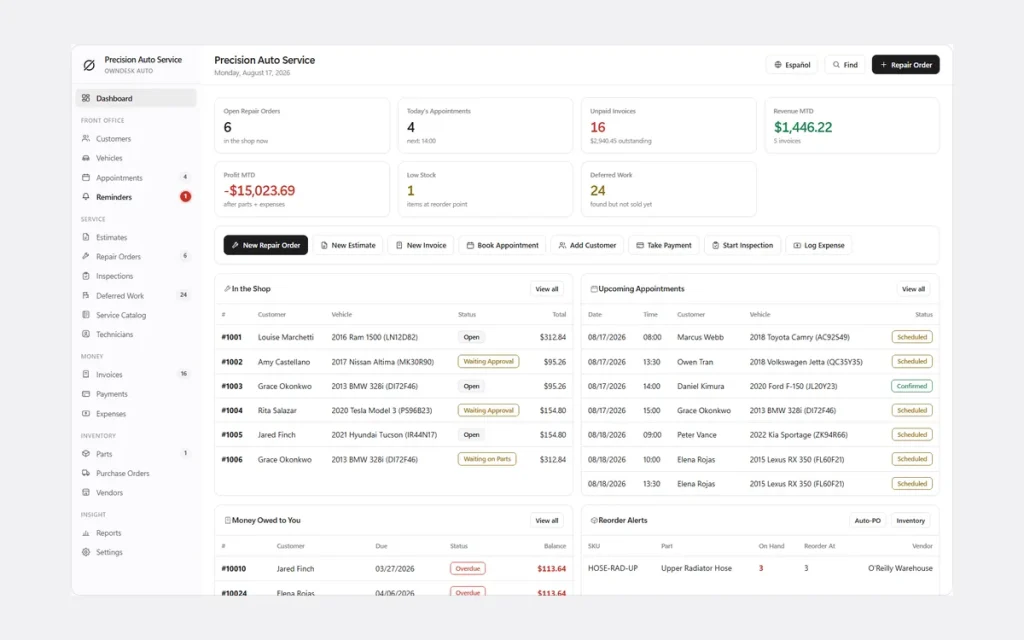
See it running
5-minute walkthrough of OwnDesk Auto PRO.
Repair orders, digital vehicle inspections, service reminders and the customer signature step, recorded start to finish — no script, no cuts.
One-time payment
Never another monthly bill. The price you see is the whole price.
Works offline
No internet required to open it, run it or print from it.
Your data stays on your PC
No cloud, no server, nothing to leak. Records live on your own disk.
Double-click and go
No install, no account. Unzip it and it opens in the browser you already have.
What it does
Everything a repair order touches, on one screen.
Repair orders • estimates • digital vehicle inspections with photos • service reminders • customer e‑signature • invoices • parts inventory • appointments & schedule • customer & vehicle history • technicians.
The whole shop, one screen
Customers, vehicles, work orders, estimates, invoices, parts, technicians and the day-by-day schedule. Nothing lives in a second spreadsheet.
Digital vehicle inspections with photos
Run a full inspection with photos, mark deferred work, and turn what the customer declined today into the estimate you send next month.
Service reminders, PRO
Every vehicle keeps its own next-service date and mileage. When it's due, it surfaces on the dashboard — no separate spreadsheet of who's overdue for an oil change.
Customer e-signature, PRO
The customer signs the estimate or the finished work order on the screen in front of them — approval and sign-off on the same document, no printer involved.
Pricing that holds up
Several labour rates, a parts price matrix that fills in blanks without ever overwriting a figure you typed by hand, and per-vehicle history.
Reports a manager reads
Shop KPIs, revenue by service, technician output and outstanding work — printable, and exportable to CSV.
Why shops switch
You're not really choosing between two work order apps.
You're choosing between paying once and paying every month, forever, for a chain-shop tool sized for a business you don't run.
| OwnDesk Auto PRO | Tekmetric / Shopmonkey / AutoLeap | |
|---|---|---|
| Price | Original price was: $ 79.00.$ 69.00Current price is: $ 69.00. once | $200–$400/mo ($2,400–$4,800/yr) |
| Service reminders | Yes | Yes |
| Customer e-signature on work orders | Yes | Yes |
| Works offline | Yes | No |
| Your data stays on your PC | Yes | No — lives on their servers |
| Seats / users | No seats to count | Priced per user |
| Setup | Unzip, double-click | Onboarding call, account setup |
Competitor pricing is publicly listed and current as of this page's last update — check their sites for today's figure. OwnDesk Auto PRO does not do multi-location sync, live multi-user editing, SMS or in-app card payments; if your shop needs those, one of the products above is the right tool and this isn't.
Reviews
Real reviews, not written by me.
Left on Etsy, where they're moderated by someone who isn't me. Names, dates and wording exactly as written.
★★★★★
“I’ve tried several similar programs, but this one is by far the most complete. It’s intuitive, user-friendly and works perfectly. Thank you so much.”
Aday · 7 August 2026 · Auto repair app
★★★★★
“Exactly what i was looking for. Was just one area i wanted to edit and Adrian messaged me back fast and upgraded it. Very Happy.”
Troy · 2 August 2026 · Auto repair app
★★★★★
“Great customer service from Adrian, I just downloaded and the first impression was very good. Looking forward to use it for the business real soon”
Francisco · 7 August 2026 · Auto repair app
★★★★★
“Really easy to use and makes managing employees much simpler”
Nicolas · 11 August 2026 · OwnDesk customer
From payment to working
Three steps, about two minutes.
Pay with card
Checkout runs on Stripe. Your card details never touch this site.
Download straight away
The link appears the moment payment clears, and arrives by email too.
Unzip and double-click
It opens with demo data loaded. Clear it in one click and start on your own repair orders.
If OwnDesk Auto PRO isn't right for your shop, email me and you get a refund — no questions. If something's confusing, you're writing to the person who built it, not a queue. English and Spanish, both spoken here.
Questions
Before you buy.
What is the best auto repair software for a small independent shop?
Does it send service reminders?
Can the customer sign the work order or estimate?
Is there free work order software for an auto repair shop?
Can this replace the spreadsheet I run my shop on?
Does it do digital vehicle inspections with photos?
Do I need an internet connection or a subscription?
Is there a multi-user / multi-technician version?
Does it work on Mac?
How do I back up my data?
See your own repair orders in it before you decide.
The live demo has real screens and demo data loaded — no sign-up, no credit card. If it fits, buying takes about a minute.
14-day money-back guarantee · instant download · one-time payment