
Tire shop software that runs on your own computer.
Tread depth by wheel, DOT codes, seasonal storage, work orders, inventory and invoices — without another monthly subscription. Buy once. Runs offline. Your data stays local.
One-time payment
Never another monthly bill. The price you see is the whole price.
Works offline
No internet required to open it, run it or print from it.
Your data stays on your PC
No cloud, no server, nothing to leak. Records live on your own disk.
Double-click and go
No install, no account. Unzip it and it opens in the browser you already have.
What it does
Built for a shop that sells tires, not a generic garage tool.
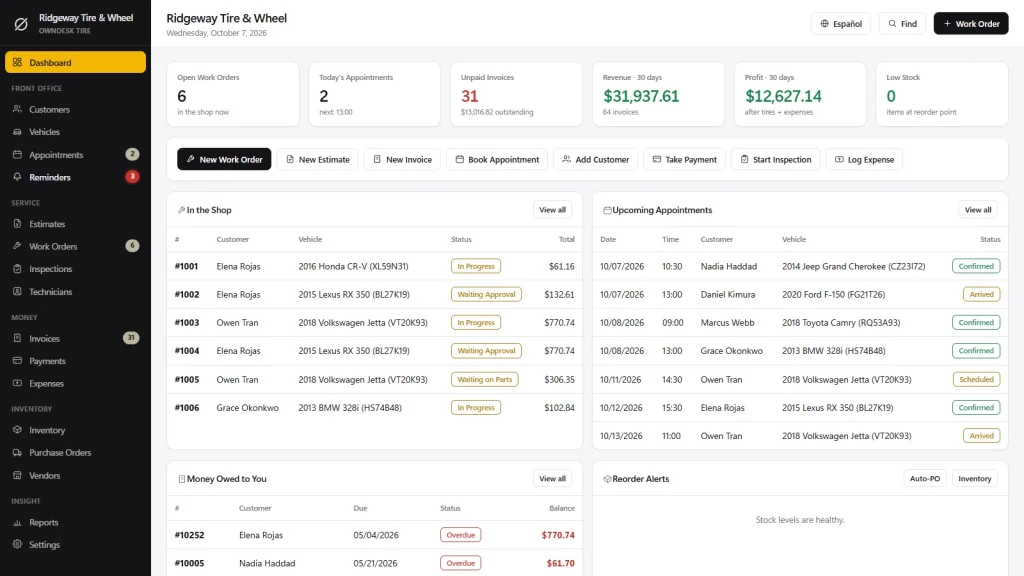
Inventory by size & brand • mount & balance work orders • tread depth & DOT tracking • seasonal storage • invoices • appointments & customer history.
Tread depth, wheel by wheel
Record 32nds per wheel with history, so the customer sees wear over time instead of taking your word for it. Customer asking how old their tires are? Read the DOT code with our free tire date code checker.
Seasonal storage that stays straight
Who left what, on which rack, and when it comes back. No more sticky notes on the rim.
Inventory and appointments
Stock by size and brand, low-stock warnings, and a booking screen that shows the day at a glance.
Branded invoices
Your logo on every estimate, invoice and inspection report, printed or saved as PDF.
Why shops switch
You're not really choosing between two tire-shop apps.
You're choosing between paying once and paying every month, forever, for a cloud platform sized for a chain you don't run.
| OwnDesk Tire | Cloud tire shop platforms | |
|---|---|---|
| Price | Original price was: 149,00€.49,00€Current price is: 49,00€. once | roughly $150–$300/mo (e.g. Tekmetric's Tire Suite runs about $238/mo) |
| Works offline | Yes | No |
| Your data stays on your PC | Yes | No — lives on their servers |
| Seats / users | No seats to count | Priced per user |
| Setup | Unzip, double-click | Onboarding call, account setup |
Competitor pricing is publicly listed and may change — check their sites for today's figure. OwnDesk Tire doesn't do live multi-user sync across computers, SMS reminders or in-app card payments; if your shop needs those, a cloud platform is the right tool and this isn't.
Reviews
Real reviews, not written by me.
From verified buyers, moderated by someone who isn’t me. Dates and wording exactly as written.
★★★★★
“Very satisfied with customer service, i had a issue with the software i contacted him and the other day he fixed the issue for me. Highly recommend this..”
keyan · 30 September 2026
★★★★★
“Excellent software and truly outstanding customer support. After testing the program, I had a few specific needs based on how I actually use it in my business. Adrian listened carefully to my feedback, understood what I was trying to achieve, and was willing to make adjustments to better fit my workflow. I never felt like I was left on my own — the support was responsive, patient, and genuinely helpful. This kind of service makes a huge difference. The software is absolutely worth it, and I highly recommend it.”
Oksana · 29 August 2026
From payment to working
Three steps, about two minutes.
Pay with card
Checkout runs on Stripe. Your card details never touch this site.
Download straight away
The link appears the moment payment clears, and arrives by email too.
Unzip and double-click
It opens with demo data loaded. Clear it in one click and start on your own inventory.
If OwnDesk Tire isn't right for your shop, email me and you get a refund — no questions. If something's confusing, you're writing to the person who built it, not a queue. English and Spanish, both spoken here.
Custom build
Need it to work exactly the way your shop does?
I can adapt OwnDesk Tire to the way your shop works: your own fields, your work orders, your reports, or two OwnDesk products combined into one. It’s still a one-time payment, it still runs offline, and it’s yours. I built the software, and I build your version myself.
- Fleet accounts, with tread readings for each truck
- Storage tags for seasonal sets that print with the rack location
- OwnDesk Tire and OwnDesk Auto PRO combined, if you also do repairs
Custom builds start at 490€, paid in two halves: 50% to start, 50% after you’ve tested it.
Tell me about your businessQuestions
Before you buy.
What is the best tire shop software for a small independent shop?
Does it track tread depth and DOT codes?
How does seasonal tire storage work?
Can I track stock by size and brand without a spreadsheet?
Do I need an internet connection or a subscription?
Is there a multi-user version, and does it work on Mac?
How do I back up my data?
Can you customize it for my tire business?
See your own inventory and work orders in it before you decide.
The live demo has real screens and demo data loaded — no sign-up, no credit card. If it fits, buying takes about a minute.
14-day money-back guarantee · instant download · one-time payment