
Window cleaning software for window cleaners, storefront crews and small route businesses.
Window cleaning business software that prices every job by the pane and tells you your dollars per hour before you send the quote. Window cleaning scheduling software that puts the day’s stops in driving order with an arrival time at each one, plus recurring plans, quotes and invoices, all in one offline file.
Most window cleaning management software is rented by the month, built for every trade, with a hundred buttons you never touch, and you keep paying it for as long as you keep working. This one you buy once.
Key benefits
One-time payment
No monthly fee, no per-user charge and no yearly renewal. The price you see is the whole price.
Priced by the pane
Your own rate card for every type of glass, with height, sides and condition built into the price.
A route with arrival times
Stops in driving order, an ETA at each one and revenue per route hour, printed for the crew.
Recurring plans that roll forward
Mark a stop done and the quarterly or monthly plan moves to its next visit by itself.
What this window cleaning software does
Everything a small window cleaning company runs on, in one place.
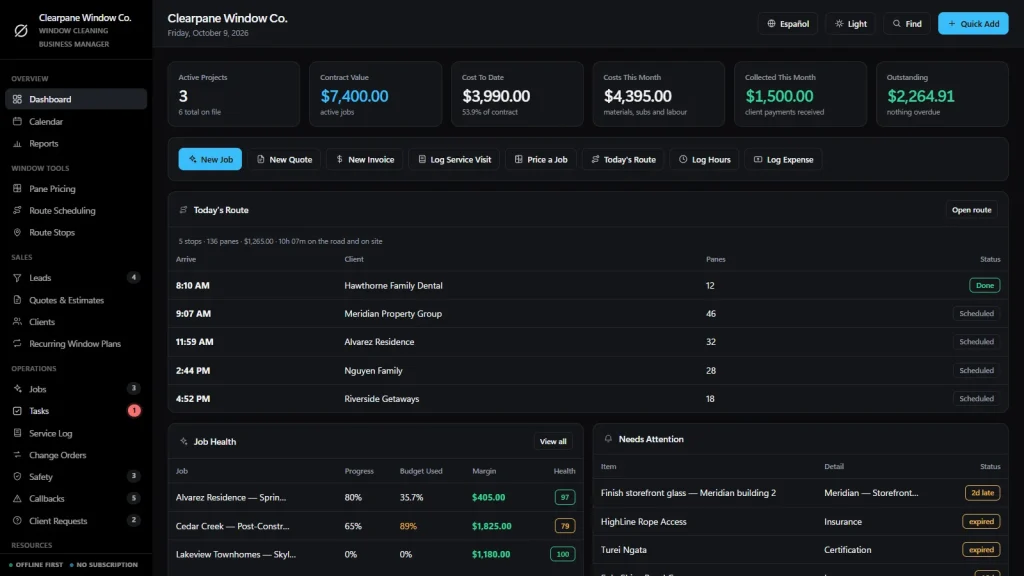
You get a dashboard, a calendar, reports, leads, pane pricing, route scheduling, quotes, clients, recurring window plans, jobs and a service log.
It also tracks tasks, add-on orders, ladder and safety records, callbacks for streaks and missed spots, client requests, employees, subcontractors, suppliers, equipment and stock.
Invoices, purchase orders, expenses and timesheets are included. You can export to CSV or JSON backup, and the app runs in English and Spanish.
Pane pricing: price, time and dollars per hour
Type how many standard panes, picture windows, sliding doors, skylights, screens and tracks the job has. Choose interior and exterior or one side, ground floor or two or three storeys, and routine, first clean or post-construction. Tick hard-water treatment if the glass needs it.
The price, the estimated time and your dollars per labor hour update as you type. These window cleaning pricing tools work from the counts you type.
A warning before you send a bad price
Set your minimum service charge and your target dollars per hour once in the Rate Card. If the job falls below the target, the screen says so while you can still change the price.
A rate card that is yours
One line per type of glass with your price and your minutes. Set it once, tune it as you learn how long each job really takes. The sample rates are only examples.
Quotes that become jobs
“Create Quote” turns the pane count into a draft with one line per type of glass, tax added. It prints on your letterhead, and an accepted quote becomes a job with its price, crew and dates.
Job costing and invoicing
Job price plus approved add-ons, minus expenses and crew hours at their rate. Deposit, progress, final, add-on and credit-note invoices, with Paid, Partial and Overdue worked out for you.
Service log, ladders and stock
What was cleaned, the weather, the crew and delays like wind and rain. Ladder inspections, fall protection checks and near misses, and squeegee rubber, solution, blades and towels against a minimum level with low-stock alerts.
Window cleaning scheduling software for the day’s route
A route in your head is one missed call from a lost client.
The Tuesday storefront run, the quarterly homes, the HOA that wants its clubhouse done “sometime this month”. Window cleaning scheduling software should put them in order, show when you arrive and say where its limits are.
Stops with arrival times
Pick a date, add stops and set the start time of the first one. The app works out the arrival time at every stop from the drive minutes and on-site minutes you enter, and the up and down arrows reorder the route.
Revenue per route hour
The top of the page shows stops, panes, work time, drive time, route revenue and revenue per route hour, so you can see whether a route is worth its hours.
A route sheet for the crew
“Print Route Sheet” gives the crew a one-page list with a box to tick off each stop.
What it does not do
No dispatch board, no GPS tracking, no automatic driving directions (drive minutes are the numbers you enter), no technician app, no texts or emails to customers and no two people editing at once.
Window cleaning management software for repeat work
The client who should have been cleaned in March is still waiting in June.
Monthly storefronts and quarterly homes are the steadiest money in the trade, but only if somebody remembers the next visit. Window cleaning management software should show it, not leave it to a text thread.
Recurring plans with panes and minutes
Monthly, quarterly and twice-a-year plans, each with the panes, minutes and price per visit, the next visit and the renewal date. One click renews a plan.
Due visits appear on the route
When a visit comes due it shows under “Recurring Visits Due” on Route Scheduling. One click adds it to the day with the right price.
Done means rolled forward
Mark the stop done and the plan sets its last visit and calculates the next one from the number of visits per year. Plans renewing in the next 30 days are listed.
Streaks and re-cleans
Missed spots and callbacks: what went wrong, who is fixing it and by when. Clients are homeowners, storefronts, property managers and HOAs, each with their jobs and what they have paid you.
How a window cleaning job runs
From first call to paid in four steps.
Price it
Log the lead, count the glass in Pane Pricing and read the price, the time and your dollars per hour. Turn it into a quote.
Book it
Accept the quote and it becomes a job. Add the stop to the day’s route, or put the client on a recurring plan.
Clean it and cost it
Mark the stop done, fill in the service log, add hours and expenses to the job and record any add-on orders. Margin updates itself.
Invoice and renew
Raise the invoice, record the payment and see what is still owed. The recurring plan has already moved to its next visit.
Why window cleaners switch
You are not really choosing between two window cleaning software packages.
Most window cleaning service software is rented by the month, and the records live on somebody else’s server. A spreadsheet price list is cheap but has no route, clients, invoices or recurring plans behind it.
This window cleaning business software is a file you own, with the pane pricing and the route built in.
| OwnDesk Window | Subscription window cleaning software | Paper & spreadsheets | |
|---|---|---|---|
| Price | Original price was: $149.00.$49.00Current price is: $49.00. once | Monthly fee, for as long as you use it | Free, but it costs your evenings |
| Pricing by the pane with a $/hour check | Built in, from your rate card | Varies | Your own formulas |
| Route with arrival times | Included, from the minutes you enter | Usually | A list in a notes app |
| Recurring plans that roll forward | Included, with renewal dates | Usually | A reminder in your head |
| Works offline | Yes | Often needs a connection | Yes |
| Your records if you stop paying | Still yours | Access ends | Still yours |
| Card payments, GPS, automatic texts | Not included | Often included | No |
| Several people at once | Not included — one computer at a time | Usually included | Only through a cloud drive |
The subscription column is a general description of software sold by the month, not a claim about any single company — features and pricing differ, so check each site.
OwnDesk Window is single-computer software: it does not sync between devices, track GPS, send messages or process card payments.
From payment to your first quote
Three steps, about two minutes.
Pay with card
Checkout runs on Stripe. Your card details never touch this site.
Download and open
The link appears the moment payment clears. Double-click the file — it opens in your browser, no install, no internet needed after that.
Look around, then start fresh
It opens with a sample window cleaning company already loaded. Remove the sample data from Settings and add your own rate card, clients and routes.
If OwnDesk Window isn't right for how you run your window cleaning business, email me and you get a refund — no questions. If something's confusing, you're writing to the person who built it, not a queue. English and Spanish, both spoken here.
Custom build
Need it to work exactly the way your window cleaning business does?
I can adapt OwnDesk Window to the way your window cleaning business works: your own fields, your route sheets, your reports, or two OwnDesk products combined into one. It’s still a one-time payment, it still runs offline, and it’s yours. I built the software, and I build your version myself.
- A monthly statement per plaza or property manager for storefront routes
- Your own add-ons for screens, tracks, hard water and French panes
- OwnDesk Window and OwnDesk Gutter combined, for crews that work both on one route
Custom builds start at $490, paid in two halves: 50% to start, 50% after you’ve tested it.
Tell me about your businessQuestions
Before you buy.
What is window cleaning software?
Is this window cleaning business software for a one-person route?
How does the pane pricing work?
Will it tell me if a job pays too little?
Is it window cleaning scheduling software?
Is it window cleaning management software for recurring clients?
Is it window cleaning service software with a service log?
Does it show what each job really made?
Does it take card payments, send invoices by email or text customers?
Can several people use it at the same time?
Where are my records stored, and is there a subscription?
Can you customize it for my window cleaning business?
Price a window cleaning job in it before you decide.
The live demo has real screens and a sample window cleaning company loaded — no sign-up beyond your name and email, no credit card. If it fits, buying takes about a minute.
14-day money-back guarantee · instant download · one-time payment