
Snow removal business software with storm dispatch, seasonal contracts and a liability log.
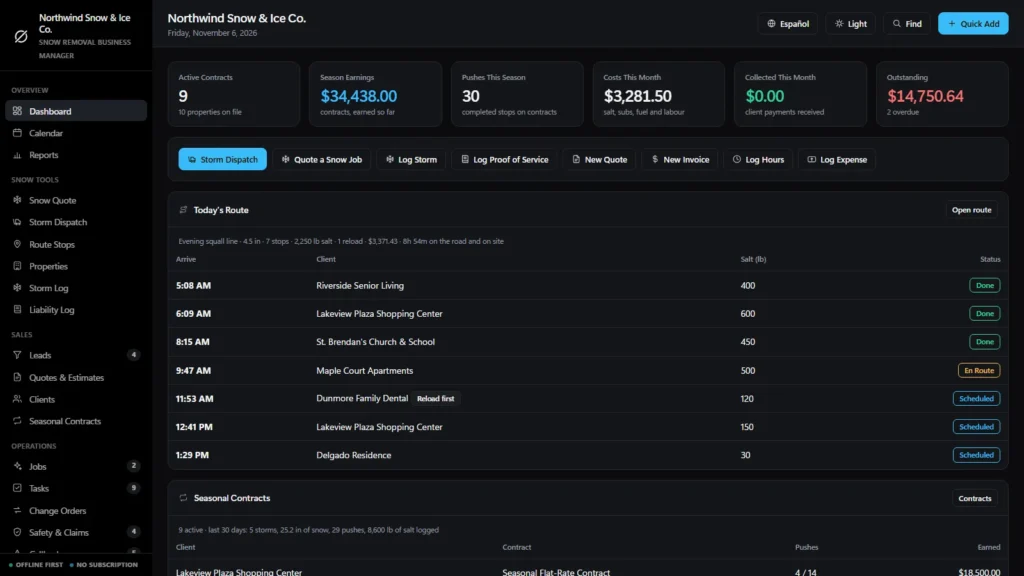
Snow removal software for a small business, in one offline file: a quote calculator that shows the per-push price, the seasonal price and your net dollars per hour as you type, storm dispatch that sends every contract property a storm triggers and tracks the salt in the spreader, seasonal contracts that count the pushes and bill themselves, and a time-stamped log of every visit. Software for a snow removal business that plows, shovels and salts, bought once, with no monthly fee.
Most software for a snow removal business is rented by the month, and the records live on somebody else’s server. This one is a file you own, with the winter-specific parts built in.
Key benefits
One-time payment
No monthly fee, no per-user charge and no yearly renewal. The price you see is the whole price.
Priced per push or per season
Property, storm size and access in; per-push price, seasonal price and net dollars per hour out.
Storms that build the route
Log the snowfall and every contract property it triggers goes on the day, with salt and reloads worked out.
A record of every visit
Times, snow depth, salt applied and hazards noted, and a proof-of-service report you can print per property.
What this snow removal business software does
Everything a small plowing and salting company runs on, in one place.
You get a dashboard, a calendar, reports, a snow quote calculator, storm dispatch, a list of every route stop, properties, a storm log and a liability log. Leads, quotes, clients, seasonal contracts and jobs sit alongside tasks, change orders, safety and claims, callbacks and client requests.
Employees, subcontractors, suppliers, plow trucks and equipment and salt inventory are tracked, and invoices, purchase orders, expenses and timesheets are included. You can export to CSV or JSON backup, and the app runs in English and Spanish.
Snow quotes per push and per season
Choose the property size and how many properties, the typical storm size (2-4, 4-8, 8-12, 12-18 inches and up), the access and whether you salt. Add sidewalks, stacking, haul-away, roof snow or ice dams.
The per-push price, the seasonal flat-rate price, the monthly payment, crew time, salt per visit and net dollars per hour update as you type, and the screen warns you when a quote falls below your target. The rate card, minimum charge and salt price are yours to edit.
Storm dispatch, salt and reloads
Log the storm, press dispatch, and every active contract whose trigger depth is at or below the snowfall goes onto the route in priority order. Salt-only contracts also trigger on ice.
Set the start time and how many pounds your spreader holds. The app works out the arrival time at every stop, tracks the salt left in the hopper and adds a reload before any stop that needs more. Print a one-page route sheet for the crew.
Seasonal contracts that bill themselves
Per-push, seasonal flat-rate, per-inch tiered, monthly, hourly and salt-only contracts. Pushes are counted from the route, so you see pushes done against pushes included and what you have earned so far. Invoice the completed pushes, the season or a monthly installment, then renew for next season.
Properties that remember the hazards
Each property has its trigger depth, priority, plowed area, sidewalks, salt per application, must-be-clear-by time, hazards and obstacles, snow storage location and gate code, and goes onto a route with one click.
Storm log
Every storm with its snowfall, ice level, overnight low, start and end, and crews out. The list shows the stops done, the salt used and the revenue for each storm day, and the dashboard totals the last 30 days.
Real margin on every job
For hauling, roof snow, ice dams and call-outs, job price is the quote plus approved change orders. Cost is the expenses booked to the job plus crew hours times their rate, so a job spending faster than it is being finished is visible before it is a problem.
Liability tracking, honestly
A slip-and-fall claim comes down to what you can show.
When a claim lands, the question is what was done, when, and in what conditions. The software you choose should help you keep that record and should say where its limits are.
The Liability Log
Completing a stop opens a short form: time arrived, time left, snow depth, conditions, salt applied, whether before-and-after photos were taken and the hazards you saw. Saving it marks the stop done and writes a dated entry you can print, one visit or a full proof-of-service report for a property.
Claims, callbacks and safety
Slip-and-fall and property-damage claims, vehicle incidents, missed-service complaints, pre-storm truck inspections, spreader checks and cold-weather briefings each have a record with a responsible person, an action and a due date. Callbacks track a missed spot until it is fixed.
Works with no signal
The file runs offline in your browser, on a laptop or tablet, in the office or the truck. Nothing needs a connection once it is downloaded.
What it does not do
No photo storage, no automatic GPS or phone time-stamps (the times are the ones you confirm), no legal advice and no promise about how a claim is decided. Also no weather feed or storm alerts, no map or driving directions, no texts or emails sent from the app, no client portal, no card processing and no two people editing at once.
How a storm runs
From the forecast to paid in four steps.
Log the storm and dispatch
Enter the snowfall and ice level. Every contract property it triggers goes on the route, critical sites first.
Run the route
Arrival times, the salt left in the spreader and reloads are worked out. Print the route sheet for the crew.
Complete each stop
Confirm the times, snow depth, salt and hazards. The stop is done, the push counts toward the contract and a proof-of-service entry is saved.
Invoice and collect
Invoice the completed pushes or the installment, record the payment and see what is still owed.
Why snow companies switch
You are not really choosing between two kinds of software for a snow removal business.
Most snow removal software is rented by the month, and the records live on somebody else’s server. Spreadsheets are free but cannot price a push with the salt, count the pushes on a contract or save a record of the visit when the stop is done.
This snow removal business software is a file you own, with the winter-specific parts built in.
| OwnDesk Snow | Subscription snow software | Paper & spreadsheets | |
|---|---|---|---|
| Price | Original price was: $149.00.$79.00Current price is: $79.00. once | Monthly fee, for as long as you use it | Free, but it costs your evenings |
| Per-push and seasonal price with a dollars-per-hour check | Built in | Varies | Your own formulas |
| Storm route with arrival times, salt in the spreader and a printable sheet | Included | Usually | Retyped, every storm |
| Contracts that count pushes and invoice them | Included | Varies | A separate sheet |
| Time-stamped record of each visit and a printable report per property | Included | Varies | Paper logs |
| Works offline | Yes | Often needs a connection | Yes |
| Your records if you stop paying | Still yours | Access ends | Still yours |
| GPS tracking, weather alerts, photo capture, customer texts, client portal | Not included | Often included | No |
| Several people at once | Not included — one computer at a time | Usually included | Only through a cloud drive |
The subscription column is a general description of snow software sold by the month, not a claim about any single company — features and pricing differ, so check each site.
OwnDesk Snow is single-computer software: it does not sync between devices, show a map, track trucks by GPS, pull in weather, send messages, keep photos, process card payments or give legal advice.
From payment to your first quote
Three steps, about two minutes.
Pay with card
Checkout runs on Stripe. Your card details never touch this site.
Download and open
The link appears the moment payment clears. Double-click the file — it opens in your browser, no install, no internet needed after that.
Look around, then start fresh
It opens with a sample snow removal company already loaded. Remove the sample data from Settings, enter your own rate card and add your clients, properties and contracts.
If OwnDesk Snow isn't right for how you run your snow removal business, email me and you get a refund — no questions. If something's confusing, you're writing to the person who built it, not a queue. English and Spanish, both spoken here.
Custom build
Need it to work exactly the way your snow business does?
I can adapt OwnDesk Snow to the way your snow business works: your own fields, your quotes, your reports, or two OwnDesk products combined into one. It’s still a one-time payment, it still runs offline, and it’s yours. I built the software, and I build your version myself.
- A proof-of-service report in the layout your insurer or property manager asks for
- Per-inch and per-event rate tables that match your contracts
- Your landscaping or lawn care work in the same file as your winter work
Custom builds start at $490, paid in two halves: 50% to start, 50% after you’ve tested it.
Tell me about your businessQuestions
Before you buy.
What is snow removal business software?
Is this snow removal software for a small business?
Is it software for a snow removal business that does contracts?
What is the best software for growing a snow and ice removal business?
Does it have liability tracking for snow removal?
What is the best liability tracking software for snow removal businesses?
Does it send the crews out when a storm hits?
Is it snow removal route software? Does it track salt?
Does it price per push and per season?
What is the best software for a snow removal business?
Which snow removal software is best in 2025 or 2026?
Does it handle properties, trigger depths and hazards?
Does it do quotes, job costing and invoicing?
Can it take card payments, send texts or run payroll?
Can several people use it at the same time?
Does it store photos of the work?
Where are my records stored, and is there a subscription?
Can you customize it for my snow removal business?
Price a push in it before you decide.
The live demo has real screens and a sample snow removal company loaded — no sign-up beyond your name and email, no credit card. If it fits, buying takes about a minute.
14-day money-back guarantee · instant download · one-time payment