
Pet grooming business software with appointment booking, scheduling and size-based pricing built in.
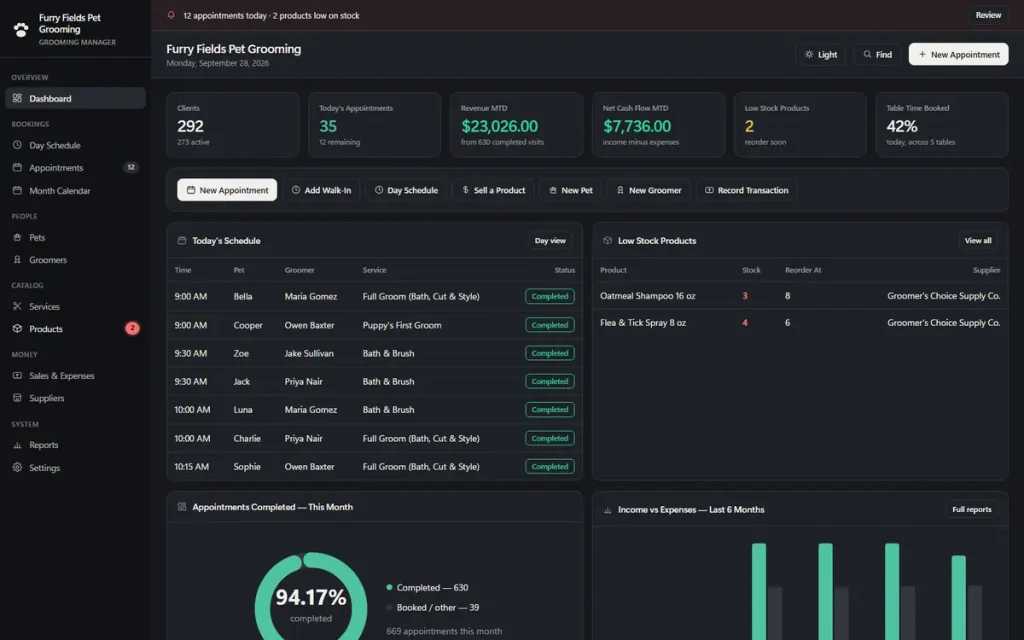
Pet grooming software for salons and mobile groomers that run on appointments: a day schedule for every groomer, open times, walk-ins, check-out with tips, price and length that adjust automatically for the pet's size, pet profiles and groomer commission — one offline pet grooming appointment software, one screen at a time. No subscription, no cloud account.
One-time payment
Never another monthly bill per groomer or per van. The price you see is the whole price.
Booking and scheduling that shows every groomer
A day view with a column per groomer, open times as you book, and a warning before a double-booking.
Price and length by pet size
Pick a pet and a service and the price and the length adjust automatically — no manual math for a Small vs. an X-Large dog.
No cloud account
Records stay on your own computer — nothing to sign up for, nowhere for a breach to happen.
What it does
Everything a grooming salon touches, in one pet grooming business software.
Dashboard with live salon KPIs • day schedule per groomer • appointments & month calendar • pets with breed, size and groom notes • groomers with commission • services & pricing • retail products with reorder alerts • sales, tips & expenses • suppliers • reports with no-show rate and busiest days.
A day schedule with a column for every groomer
Pet grooming scheduling software should show the whole salon at a glance. The Day Schedule lays the day out by the hour, one column per groomer, each appointment a block colored by status. Click an empty slot to book it, click a block to open it, and print the day sheet for the front desk.
Price and length that adjust for the pet's size
Pick a pet and a service and the price and the length are worked out automatically from that pet's saved size — a Small dog and an X-Large dog are not billed or scheduled the same for a Full Groom. Edit either by hand any time; it never overwrites a number you typed yourself.
Walk-ins, rebooks, check-out and tips
Add Walk-In opens the form at the next slot. Rebook books the same pet, groomer, service and time again in 1 to 6 weeks and checks the calendar first. Check Out records the service price, the tip and how the owner paid; Sell a Product records a retail sale and takes it off your stock.
Pet profiles and groomer commission
Every pet carries its breed, size, coat type, temperament and groom notes, plus the owner's contact details, preferred groomer, visits and last visit. Set a commission percentage per groomer once, then click a groomer for this month's appointments, revenue and commission owed, tips excluded.
Pet grooming appointment software
Pet grooming scheduling software you use fifty times a day.
Pet grooming appointment software, pet grooming booking software and pet grooming scheduling software are the same job at the front desk: get the pet onto the right groomer's table at the right time, priced correctly for its size, without a double-booking. Here is how it does that.
Pick the pet, groomer and service
The price and the length come from the service and the pet's saved size. Change either for a longer visit.
Click an open time
The form lists the start times that groomer is free, from your business hours and their other bookings.
Rebook before they leave the table
One click books them again in 1, 2, 3, 4 or 6 weeks, checking the calendar first.
It does not take bookings from your clients by itself: there is no public booking page and no booking widget for your website. You or your front desk enter the appointment; the app makes it fast and keeps the groomers from being double-booked.
Pet grooming POS software
A simple pet grooming POS for the sales record.
Record what was charged and how it was paid, not the card swipe itself.
Check out with the tip
Service price, tip and payment method (cash, card, gift card and more) in one step. The visit is marked Completed and the sale recorded.
Sell the shampoo
A retail sale takes the quantity off your stock count and flags the product on the dashboard at its reorder level.
Reports that add it up
Income, expenses, net, no-show rate, walk-in share, average ticket, performance per groomer and busiest days.
It does not process cards, connect to a card reader or print receipts. If your card terminal is separate, this is the record-keeping side of a pet grooming POS.
One app, salon or van
Built for every kind of pet grooming business.
A "service" is whatever you sell by the appointment — the same screens run a one-groomer salon, a full crew or a mobile van.
Independent salons
An owner-groomer with a few tables, and a phone that never stops.
Multi-groomer crews
Groomers on commission, a master groomer, an apprentice, one column each.
Mobile groomers
The same file, opened from a laptop each morning in the van — no location lock, no per-van fee.
Walk-in salons
Add Walk-In at the next slot, and see walk-in share in your reports.
Why groomers switch
You're not really choosing between two pet grooming apps.
You're choosing between paying once and paying per groomer or per van, every month, for online booking and payment features a salon that takes its bookings by phone may never open.
| OwnDesk Pet Grooming | A subscription grooming platform | |
|---|---|---|
| Price | $ 49.00 once | About $29–$150/mo, by plan, van or groomer |
| Day schedule, open times, double-booking warnings | Included | Included |
| Price & length by pet size | Included, automatically | Rarely built in |
| Check-out with tips, retail sales, commission | Included, as a record | Included, often with card processing |
| Your data | Stays on your own computer | Lives in their cloud |
| Online client booking, text reminders, card processing | Not included — pair it with your own tools | Often included, at a price |
| Setup | Unzip, open, go | Account sign-up, onboarding |
Competitor pricing is a general market range for pet grooming booking software as of September 2026, not a quote from any single company — check current pricing on each site. OwnDesk Pet Grooming does not take online bookings, send reminders or process card payments itself, and does not sync live between two computers; it is single-computer by design, with a backup file to move between devices.
From payment to your first appointment
Three steps, about two minutes.
Pay with card
Checkout runs on Stripe. Your card details never touch this site.
Download and open
The link appears the moment payment clears. Double-click the file — it opens in your browser, no install, no internet needed after that.
Clear the sample salon, add your own
It opens with five sample groomers, nearly three hundred pets and a month of appointments already loaded so you can see how it works. Remove the sample in one click from Settings, set your business hours and book your first pet.
If OwnDesk Pet Grooming isn't right for your salon, email me and you get a refund — no questions. If something's confusing, you're writing to the person who built it, not a queue. English and Spanish, both spoken here.
Questions
Before you buy.
What is the best pet grooming software for a small salon that does not want a subscription?
Is this pet grooming scheduling software? Can it handle booking and appointments?
Does the price change based on the pet’s size?
Is this pet grooming salon software, or built for mobile groomers too?
What is the best pet grooming management software in 2026?
Is it pet grooming POS software? Does it take payments?
Does it work out groomer commission?
Can more than one person use it at the same time?
What do you get, and what do you need to run it?
See your own grooming salon in it before you decide.
The live demo has real screens and a sample grooming salon loaded — no sign-up, no credit card. If it fits, buying takes about a minute.
14-day money-back guarantee · instant download · one-time payment