
Construction management software for small business contractors.
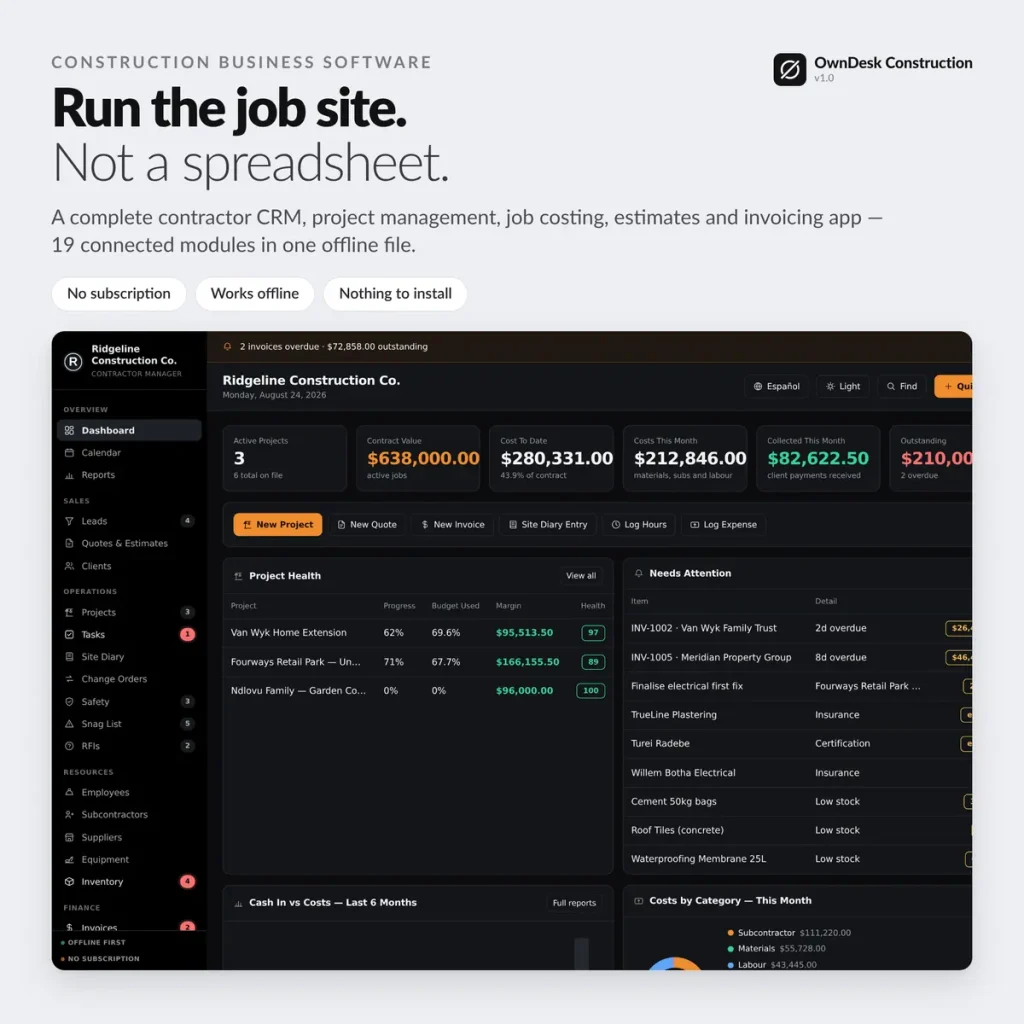
Contractor CRM, project management, job costing, estimates and invoicing in one offline app — leads to change orders to the final invoice, all connected. No subscription, no login, no internet required to run it.
Sound familiar?
Every small construction business hits the same wall.
Not enough jobs to justify a $300/month platform — more than enough chaos to need something better than a spreadsheet.
Paying every month, forever
Construction management software runs $50–$400/mo once you're past the free tier — $600–$4,800 a year for software you never own.
Your real margin is a guess
A job costing spreadsheet only knows what you remember to type in. Half the time nobody knows if a job is profitable until it's finished.
Change orders that don't change anything
The client signs a change order, but the contract value and the margin in your head never actually update to match.
No warning until the final account
By the time you notice a job is going bad, the crew, the material and the hours are already spent.
One-time payment
Never another monthly bill. The price you see is the whole price, for as long as you use it.
Works offline
Site office, basement, a truck cab with no signal — no internet required to open it or run it.
Your data stays on your PC
No cloud, no server, nothing to leak. Job records live on your own disk, not someone else's.
Double-click and go
No install, no account. Unzip it and it opens in the browser you already have.
What it does
Construction project management software built for how a small crew actually runs a job.
Contractor CRM • job costing • estimates & invoicing • change orders • site diary • safety & RFIs • crew & subcontractors • inventory • reports.
Job costing that builds itself
Contract + approved change orders − (expenses + timesheet hours × rate) = margin, live, per job. You log expenses and hours as they happen — the number can't go stale because nobody has to remember to update it.
Change orders that change the contract
Approve a change order and the contract value, the margin and the printed job cost sheet all move with it. Original contract → changes → revised contract, on one page a client can sign.
A health score on every project
0–100, folding together spend-versus-progress, overdue tasks, open snags and the completion date — so you see which job is going wrong while you can still fix it.
A site diary that prints as a daily report
Weather, crew count, hours, work done, deliveries, delay cause and hours lost — the document that wins a delay claim, not a spreadsheet bundle.
- Dashboard — active jobs, contract value, costs, collected, outstanding
- Leads — first call to Won or Lost, source, follow-up date
- Quotes & estimates — materials, labour, equipment, subs, permits, markup
- Clients — jobs, invoices, paid and owed, in one place
- Projects — progress, budget vs. spent, margin, days left
- Tasks — Kanban or list, by project, priority and due date
- Site diary — the daily record, printable
- Change orders — amount, extra days, approval, printable
- Safety · Snag list · RFIs — the compliance trio, each printable
- Crew & subcontractors — rates, trades, insurance expiry alerts
- Suppliers · Equipment · Inventory — accounts, service reminders, low-stock alerts
- Invoices — deposits, progress claims, final accounts, credit notes
- Purchase orders · Expenses · Timesheets — order, receive, cost, billable
- Calendar — every deadline the app knows about, one month view
- Reports — revenue, costs, budget vs. actual, labour, safety — export to CSV
Why small contractors switch
You're not really choosing between two construction apps.
You're choosing between paying once and paying every month, forever, for a platform sized for a company with a back office.
| OwnDesk Construction | Cloud construction platforms | |
|---|---|---|
| Price | $ 49.00 once | roughly $50–$400/mo (e.g. Buildertrend's Essential plan runs about $399/mo) |
| Works offline | Yes | No |
| Your data stays on your PC | Yes | No — lives on their servers |
| Seats / users | No seats to count | Priced per user |
| Setup | Unzip, double-click | Onboarding call, account setup |
Competitor pricing is publicly listed and may change — check their sites for today's figure. OwnDesk Construction is a single-operator tool: no live multi-user sync, client portal or in-app payments; if your company needs those, a cloud platform is the right tool and this isn't.
Reviews
Real reviews, not written by me.
Left on Etsy, where they're moderated by someone who isn't me, across the OwnDesk product line. Names, dates and wording exactly as written.
★★★★★
“I’ve tried several similar programs, but this one is by far the most complete. It’s intuitive, user-friendly and works perfectly. Thank you so much.”
Aday · 7 August 2026 · OwnDesk customer
★★★★★
“Exactly what i was looking for. Was just one area i wanted to edit and Adrian messaged me back fast and upgraded it. Very Happy.”
Troy · 2 August 2026 · OwnDesk customer
★★★★★
“Great customer service from Adrian, I just downloaded and the first impression was very good. Looking forward to use it for the business real soon”
Francisco · 7 August 2026 · OwnDesk customer
★★★★★
“Really easy to use and makes managing employees much simpler”
Nicolas · 11 August 2026 · OwnDesk customer
From payment to working
Four steps, about two minutes.
Pay with card
Checkout runs on Stripe. Your card details never touch this site.
Download straight away
The link appears the moment payment clears, and arrives by email too.
Run the one-minute setup
Your company, your first client, your first project — that's it.
Start working
Sample data is already loaded so you see how it connects. One click clears it for your own jobs.
If OwnDesk Construction isn't right for your business, email me and you get a refund — no questions. If something's confusing, you're writing to the person who built it, not a queue. English and Spanish, both spoken here — and so is the app.
Questions
Before you buy.
What is the best construction management software for a small business?
Is there a construction project management software for small business that isn't just a spreadsheet?
How do I track job costs and profit on a construction project?
Do change orders actually update the contract value?
Do I need the internet or a monthly subscription to run it?
Where is my data stored, and is it safe?
Can my foreman and the office use it at the same time?
Is it available in Spanish for a bilingual crew?
See your own jobs and job costing in it before you decide.
The live demo has real screens and sample data loaded — no sign-up, no credit card. If it fits, buying takes about a minute.
14-day money-back guarantee · instant download · one-time payment