
Tattoo studio software with booking, deposits and management built in.
Tattoo shop management software for studios, solo artists and piercing shops: a day schedule for every artist, a deposit on every session, consent and ID checks before the chair, multi-session projects and the books — one offline tattoo studio management software, one screen at a time. No subscription, no cloud account.
One-time payment
Never another monthly bill per artist or per location. The price you see is the whole price.
Deposits that run themselves
Every session starts as Deposit Pending, one click records the payment, and no-show deposits are kept unless you refund them.
A Front Desk that remembers
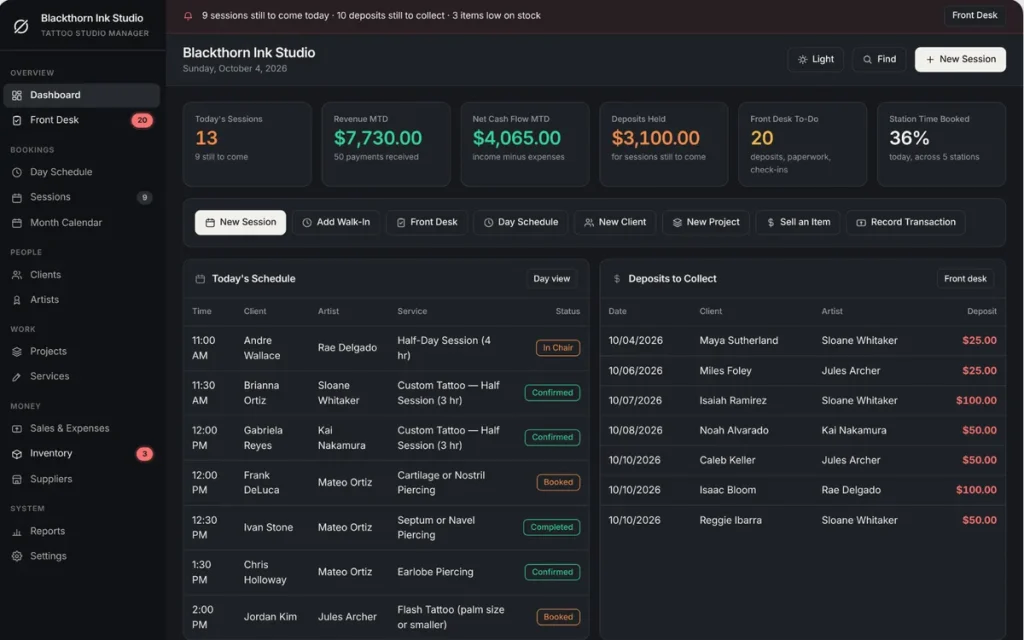
Deposits owed, clients missing consent or ID this week, and healed check-ins due — one live list that clears itself.
No cloud account
Client records stay on your own computer — nothing to sign up for, nowhere for a breach to happen.
What it does
Everything a tattoo studio touches, in one tattoo management software.
Dashboard with live studio KPIs • Front Desk checklist • day schedule per artist • sessions & month calendar • clients with allergies, consent and ID • artists with commission • multi-session projects • services with deposits • inventory with reorder alerts • suppliers • sales, tips & expenses • reports with no-show rate and deposits kept.
A deposit on every session, tracked to the dollar
Each service carries its own deposit, or uses the default from Settings. A new session is born Deposit Pending; Mark Paid records the income once and moves it to Booked. Check Out takes only the balance and the tip, so the deposit is never counted twice. The dashboard shows the deposits you are holding for sessions still to come.
Multi-session projects for sleeves and back pieces
A back piece is never one appointment. Enter the total quote, link each session, and the project shows sessions done, billed so far, left to bill and progress. One button books the next session with the client, artist and placement filled in.
Consent, ID and healed check-ins on the Front Desk
Three live lists: deposits still owed, sessions in the next 7 days whose client has no consent date or ID check, and completed sessions waiting for a healed-photo check-in after the number of days you set. Fix the item and it drops off. Print it as a counter checklist. Need a form to start from? Build a free tattoo consent form for adults or minors.
A day schedule with a column for every artist
Tattoo studio management software should show the whole floor at a glance. The Day Schedule lays the day out by artist, sessions can run from 20 minutes to a full day, and a warning appears before you double-book an artist or a client. Print the day sheet for the front desk.
Tattoo booking software
Tattoo booking software for the front desk, not the website.
A client messages on Instagram, you quote the piece, and the deposit has to arrive before the slot is real. Here is how the app handles that, from the first message to the chair.
Enter the session
Client, artist, service, date and time, plus where the booking came from: Instagram DM, phone, email, walk-in or in person. Price and length come from your service menu.
Collect the deposit
The session waits as Deposit Pending. The Front Desk shows exactly what is owed, and Mark Paid books it as income once.
Book the next one
Book Next puts the same client back in 2 to 12 weeks, leaving room for healing, and a project keeps the total quote and what is left to bill.
It does not take bookings from your clients by itself: there is no public booking page and no booking widget for your website. You or your front desk enter the session; the app makes it fast and keeps your artists from being double-booked.
Features and data model
What is inside: fourteen modules, one connected set of records.
The records point at each other, so nothing is typed twice. A session links a client, an artist, a service and, for big pieces, a project — and every total you see is worked out from those links.
Clients
Contact details, date of birth for the 18+ reminder, ID checked, consent signed on, allergies and skin notes, style ideas and last session.
Artists
Role (such as piercer or apprentice), station, commission percentage, and a performance view with revenue and commission owed.
Services
Name, category, duration, price and deposit, from a touch-up to a full-day session to a piercing.
Sessions
Every appointment with its artist, price, deposit, status, source and project link, plus the printable session sheet with your aftercare text and signature lines.
Projects
Multi-session pieces with a total quote, sessions done, billed, left to bill, progress and status.
Inventory and suppliers
Needles, ink, gloves, aftercare, jewelry and merch with cost, retail price and reorder level, plus who you buy from.
Plus Sales & Expenses, Reports for any date range, a Month Calendar, a Find box that searches everything at once, CSV export of every list and a JSON backup you can restore on any computer.
One app, every station
Built for every kind of tattoo studio.
A "service" is whatever you sell by the session — the same screens run a one-artist shop or a full crew.
Solo tattoo artists
One artist, one station, a deposit on every booking and a record of every client.
Multi-artist shops
Artists on commission, a resident piercer, an apprentice, one column each.
Piercing studios
Piercing services, jewelry stock with reorder levels and healed check-ins after the session.
Walk-in flash days
Add Walk-In opens the form at the next slot, and Reports shows how bookings arrive.
Why studios switch
You're not really choosing between two tattoo studio apps.
You're choosing between paying once and paying per artist or per location, every month, for online booking and payment features a studio that books through Instagram and the phone may never open.
| OwnDesk Tattoo | A subscription tattoo studio platform | |
|---|---|---|
| Price | Original price was: $149.00.$49.00Current price is: $49.00. once | A monthly fee, usually by plan or by artist |
| Day schedule, open times, double-booking warnings | Included | Included |
| Deposits, multi-session projects, consent and ID checks | Included, as a record | Included, often with online payment |
| Your data | Stays on your own computer | Lives in their cloud |
| Online client booking, text reminders, e-signed waivers, card processing | Not included — pair it with your own tools | Often included, at a price |
| Setup | Unzip, open, go | Account sign-up, onboarding |
Pricing for subscription platforms varies by company and plan — check current pricing on each site. OwnDesk Tattoo does not take online bookings, send reminders, store e-signed consent forms or photos, or process card payments itself, and does not sync live between two computers; it is single-computer by design, with a backup file to move between devices.
From payment to your first session
Three steps, about two minutes.
Pay with card
Checkout runs on Stripe. Your card details never touch this site.
Download and open
The link appears the moment payment clears. Double-click the file — it opens in your browser, no install, no internet needed after that.
Clear the sample studio, add your own
It opens with a sample studio already loaded — five artists, thirteen services with deposits, six multi-session projects and about 160 clients — so you can see how it works. Remove the sample in one click from Settings, set your studio hours and default deposit, and book your first client.
If OwnDesk Tattoo isn't right for your studio, email me and you get a refund — no questions. If something's confusing, you're writing to the person who built it, not a queue. English and Spanish, both spoken here.
Custom build
Need it to work exactly the way your studio does?
I can adapt OwnDesk Tattoo to the way your studio works: your own fields, your consent forms, your reports, or two OwnDesk products combined into one. It’s still a one-time payment, it still runs offline, and it’s yours. I built the software, and I build your version myself.
- Your consent form, printed with the client details filled in
- Splits that differ per artist or per project
- A flash day sheet with fixed prices and a running count
Custom builds start at $490, paid in two halves: 50% to start, 50% after you’ve tested it.
Tell me about your businessQuestions
Before you buy.
What is the best tattoo shop management software for a studio that does not want a subscription?
Is this tattoo booking software? Can clients book online?
How does deposit tracking work for tattoo sessions?
Can I track a tattoo that takes several sessions, like a sleeve or a back piece?
Does it handle discount codes, promo codes or coupons?
Is it tattoo design software? Can I draw or make stencils in it?
Is there free tattoo management software, or a free version of this?
What is in it? Which features and records does it cover?
Does it store consent forms, send reminders or take card payments?
Can more than one person use it at the same time?
What is the best tattoo studio software in 2026?
What do you get, and what do you need to run it?
Can you customize it for my tattoo business?
See your own tattoo studio in it before you decide.
The live demo has real screens and a sample studio loaded — no credit card. If it fits, buying takes about a minute.
14-day money-back guarantee · instant download · one-time payment