
Auto detailing software for detailers and mobile detailing businesses: bookings, jobs, invoices and inventory in one offline file.
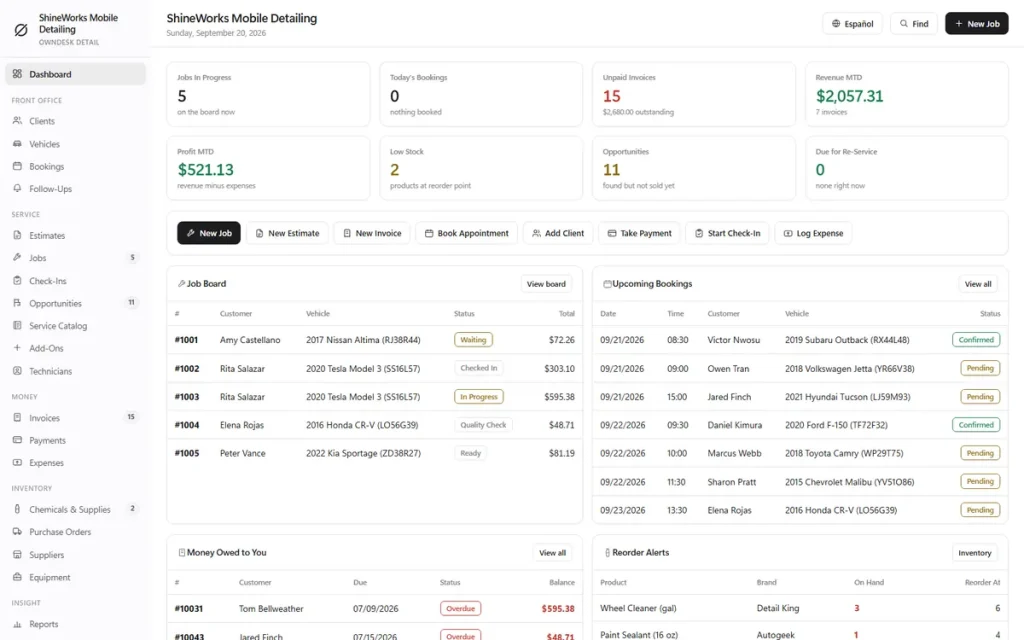
Auto detailing software that runs the business side of a detailing shop or a mobile detailing business: a bookings calendar, a job board, check-in photos, estimates, invoices and chemical stock, with prices that scale by vehicle size on their own. Pay once, no monthly fee.
Key benefits
One-time payment
No monthly fee and no yearly renewal. The price you see is the whole price.
Vehicle-size pricing
Price a service once and it scales for Small, Medium, Large and XL vehicles automatically.
A job board, not a to-do list
Every job moves from Waiting to Completed on one board, then becomes an invoice.
Check-in photos
Record the condition of the car at drop-off, and keep every upsell you found but did not sell.
What this auto detailing software does
Everything a detailing business handles, in one place.
You get a dashboard, client and vehicle files, a bookings calendar, follow-ups, estimates, jobs, invoices and a job board.
It also covers check-ins with photos, opportunities, a service catalog with add-ons, technicians, payments and expenses, chemicals, purchase orders and equipment, and reports.
You can export to CSV or JSON backup. The app runs in English and Spanish, with eight colour themes.
Price once, charge right every time
Set a base price for each service and the software scales it for Small, Medium, Large and XL vehicles from multipliers you control. Any service can carry its own price for a size, so a truck no longer means re-typing the quote by hand.
Auto detailing scheduling and booking
A bookings calendar with day and week views, a technician and a status on every booking, marked as at your shop or mobile at the customer’s location. One click turns a booking into a job.
You enter bookings yourself; there is no customer self-booking page.
Auto detailing CRM and client tracking
A file for every client with their vehicles, bookings, estimates, jobs, invoices and payments, plus tags like VIP or ceramic and a preferred contact method. Follow-ups list the callbacks and review requests due, so repeat customers do not drift away.
Estimates, jobs and invoices
The paper trail from quote to cash, with one-click conversion from one document to the next, a customer signature and a clean print or PDF from your browser. Record payments by cash, card, Zelle, Venmo or Cash App and see what is still owed.
Check-ins and lost upsells
A checklist-driven condition report at drop-off, with photographs. Anything found at check-in or declined on an estimate goes to Opportunities, so the callback is made before the customer forgets the scratch you pointed out.
Chemicals, equipment and reports
Chemical and supply stock with reorder alerts, purchase orders and suppliers, and your machines with their next service date. Reports show revenue mix, job profitability, technician performance and unpaid invoices by age.
Running a mobile car detailing business
Built for the mobile detailing business, not just the shop.
A mobile car detailing business lives out of a van and a phone. The paperwork should not need an office.
Shop or mobile, on every booking
Each booking says whether the job is at your shop or at the customer’s location, so the day’s schedule shows exactly where you are supposed to be.
Quote and invoice from one job
Write the estimate, run the job, then convert it into an invoice and record the payment the same day, in the driveway if that is where the work was.
Works with no signal
The file runs offline in your browser, on a laptop or tablet. Nothing needs a connection once it is downloaded.
What it does not do
No route planning, no van tracking, no online customer booking and no automatic texts. It is the business record of the operation, not a dispatch system.
How a detailing job runs
From booking to paid in four steps.
Book it
Add the client and their vehicle, then a booking with the service, the day and the location. The size of the vehicle is stored once and drives every price after it.
Check it in
On the day, start a check-in to record the condition and photos, or turn the booking straight into a job. Add services and add-ons from your catalog.
Move it across the board
Waiting, Checked In, In Progress, Quality Check, Ready, Completed. One click advances it to the next stage.
Invoice and follow up
Convert the finished job into an invoice and record the payment. Whatever was found but not sold shows under Opportunities for the callback.
Why detailers switch
You are not really choosing between two auto detailing software packages.
Most detailing software is rented by the month, and the records live on somebody else’s server. Paper and spreadsheets are free but cannot scale a price by vehicle size or keep a job board.
This car detailing software is a file you own, with the detailing-specific parts built in.
| OwnDesk Detail | Subscription detailing software | Paper & spreadsheets | |
|---|---|---|---|
| Price | $ 49.00 once | Monthly fee, for as long as you use it | Free, but it costs your evenings |
| Price scales by vehicle size | Built in | Varies | By hand, every quote |
| Job board from booking to paid | Included | Usually | No |
| Works offline | Yes | Often needs a connection | Yes |
| Your records if you stop paying | Still yours | Access ends | Still yours |
| Online booking page for customers | Not included | Often included | No |
| Sends texts or emails for you | Not included | Often included | No |
| Several people at once | Not included — one computer at a time | Usually included | Only through a cloud drive |
The subscription column is a general description of detailing software sold by the month, not a claim about any single company — features and pricing differ, so check each site.
OwnDesk Detail is single-computer software: it does not sync between devices, take online bookings, send messages or process card payments.
From payment to your first booking
Three steps, about two minutes.
Pay with card
Checkout runs on Stripe. Your card details never touch this site.
Download and open
The link appears the moment payment clears. Double-click the file — it opens in your browser, no install, no internet needed after that.
Look around, then start fresh
It opens with a sample detailing business already loaded. Clear it from Settings, which keeps your shop name, logo and tax rate, and add your own services and clients.
If OwnDesk Detail isn't right for how you run your detailing business, email me and you get a refund — no questions. If something's confusing, you're writing to the person who built it, not a queue. English and Spanish, both spoken here.
Questions
Before you buy.
What is auto detailing software?
Is this car detailing software for a mobile detailing business?
Does it work as an auto detailing CRM?
Is it auto detailing scheduling software or auto detailing booking software?
Does it send text or email reminders?
How does vehicle-size pricing work?
Can I use it for ceramic coating and paint correction?
Can it take card payments?
Can my technicians use it at the same time?
Where are my records stored, and is there a subscription?
Run a job through it before you decide.
The live demo has real screens and a sample detailing business loaded — no sign-up, no credit card. If it fits, buying takes about a minute.
14-day money-back guarantee · instant download · one-time payment