Desktop accounting software without subscription a complete set of books in one workbook.

OwnDesk Accounting is accounting software without subscription for a small business or a self-employed owner: a 22-sheet Excel workbook, also usable in Google Sheets, with invoices, bills, bank reconciliation, payroll figures, inventory and a live profit and loss, balance sheet and cash flow. A QuickBooks alternative you buy once, and the file is yours.

QuickBooks Online lists its entry plan at $38 a month, which is $456 a year at that rate, and the charge continues for as long as you keep books. Here there is one payment and no renewal, and your records stay in a file you control.
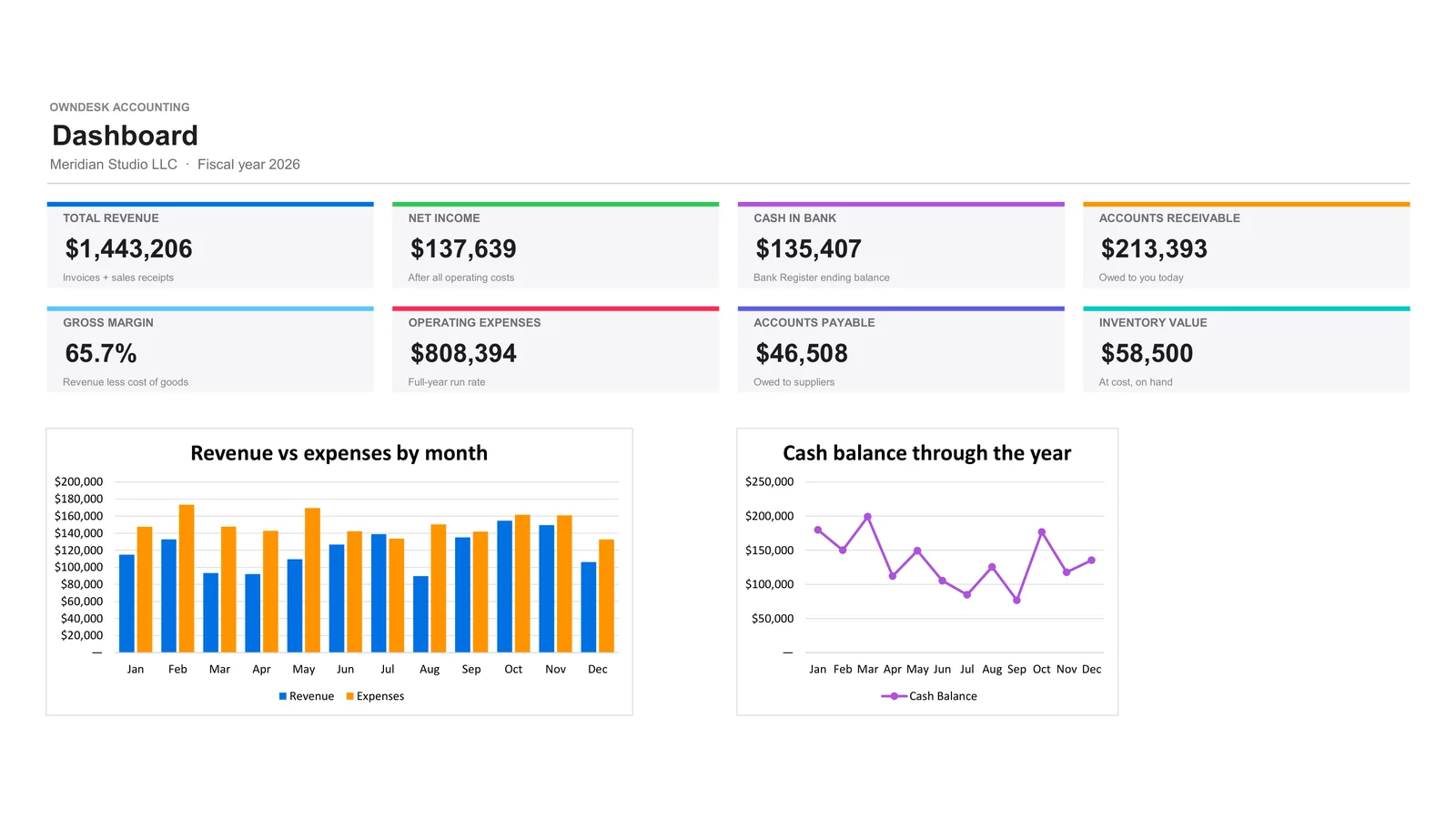
OwnDesk Accounting dashboard: revenue, net income, cash in bank, receivables, and monthly revenue against expenses
Excel & Google Sheets 22 linked sheets No macros One-time payment
💵

No subscription

Small business accounting software without a subscription: one payment, no renewal.

📄

A real set of books

40 accounts, registers and three statements that update from what you enter.

🔒

Your file, your data

On your own computer or in your own Google Drive. There is no account with us.

✅

Checks you can trust

The balance sheet, cash flow and bank reconciliation each show a line that must read $0.00.

What this accounting workbook does

Enter the work once. The statements build themselves.

Dashboard • chart of accounts • customers • vendors • invoices • bills • estimates • sales receipts • expenses • payroll • inventory • purchase orders • bank register • reconciliation • profit & loss • balance sheet • cash flow • budget • tax center.

Invoices, bills and estimates in one place

Enter a subtotal and the sales tax, total, balance due and status calculate themselves. Open balances for each customer and vendor add up automatically, and the dashboard ages what you are owed from current to over 90 days.

Bank reconciliation down to $0.00

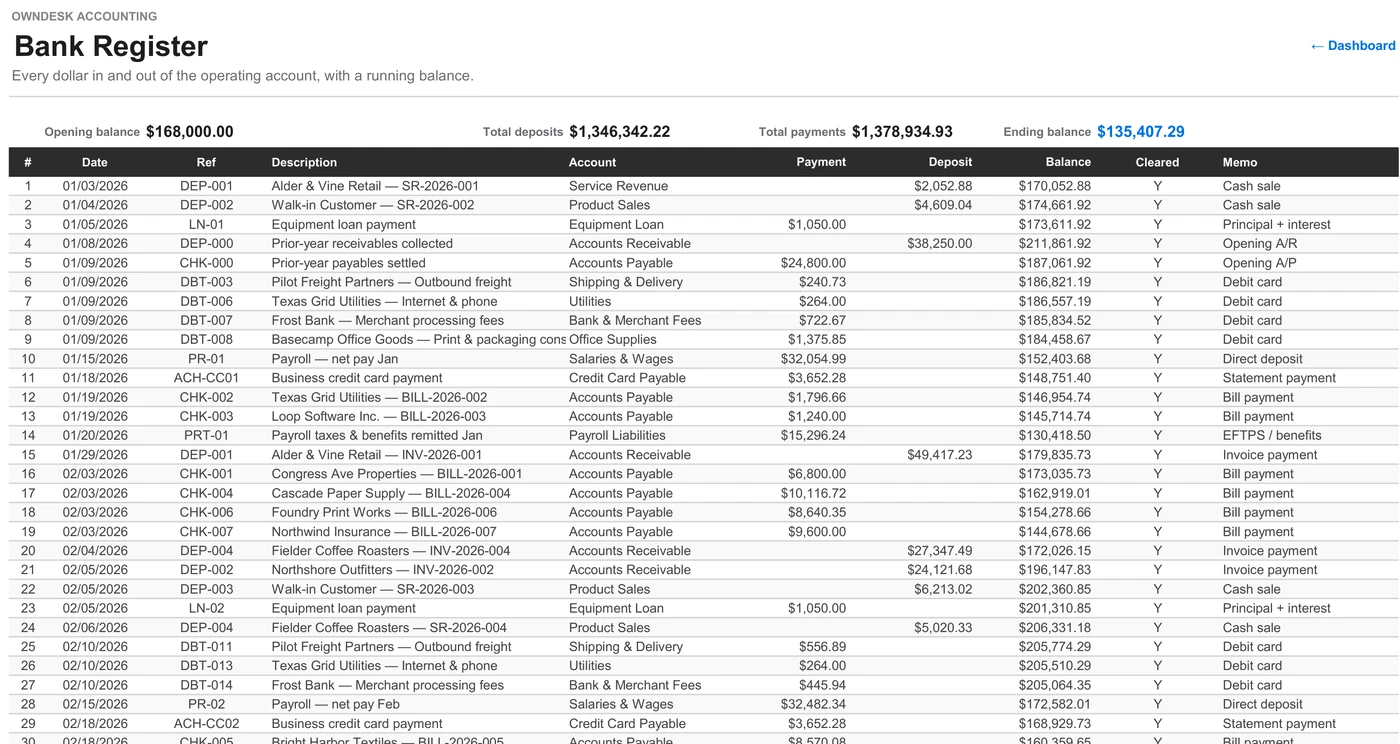
Enter each line from your statement in the Bank Register and mark what has cleared. The Reconciliation sheet shows the difference until it reaches zero, and the guide explains what to check when it will not.

Profit and loss, balance sheet and cash flow

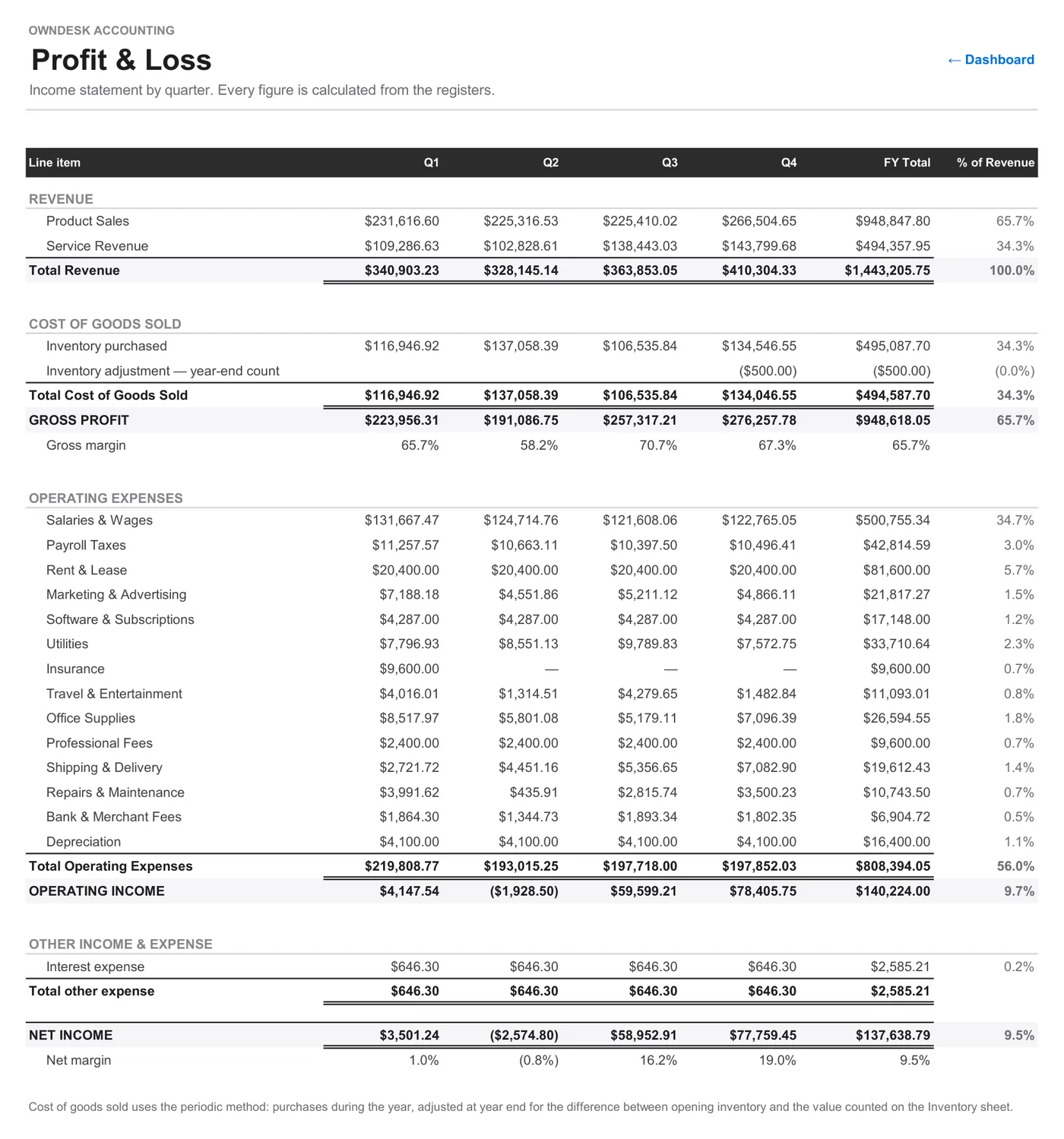
A profit and loss by quarter with gross and net margin, a balance sheet comparing the start of the year with today, and a cash flow statement that explains why profit and the bank balance disagree.

Payroll figures, inventory and a tax center

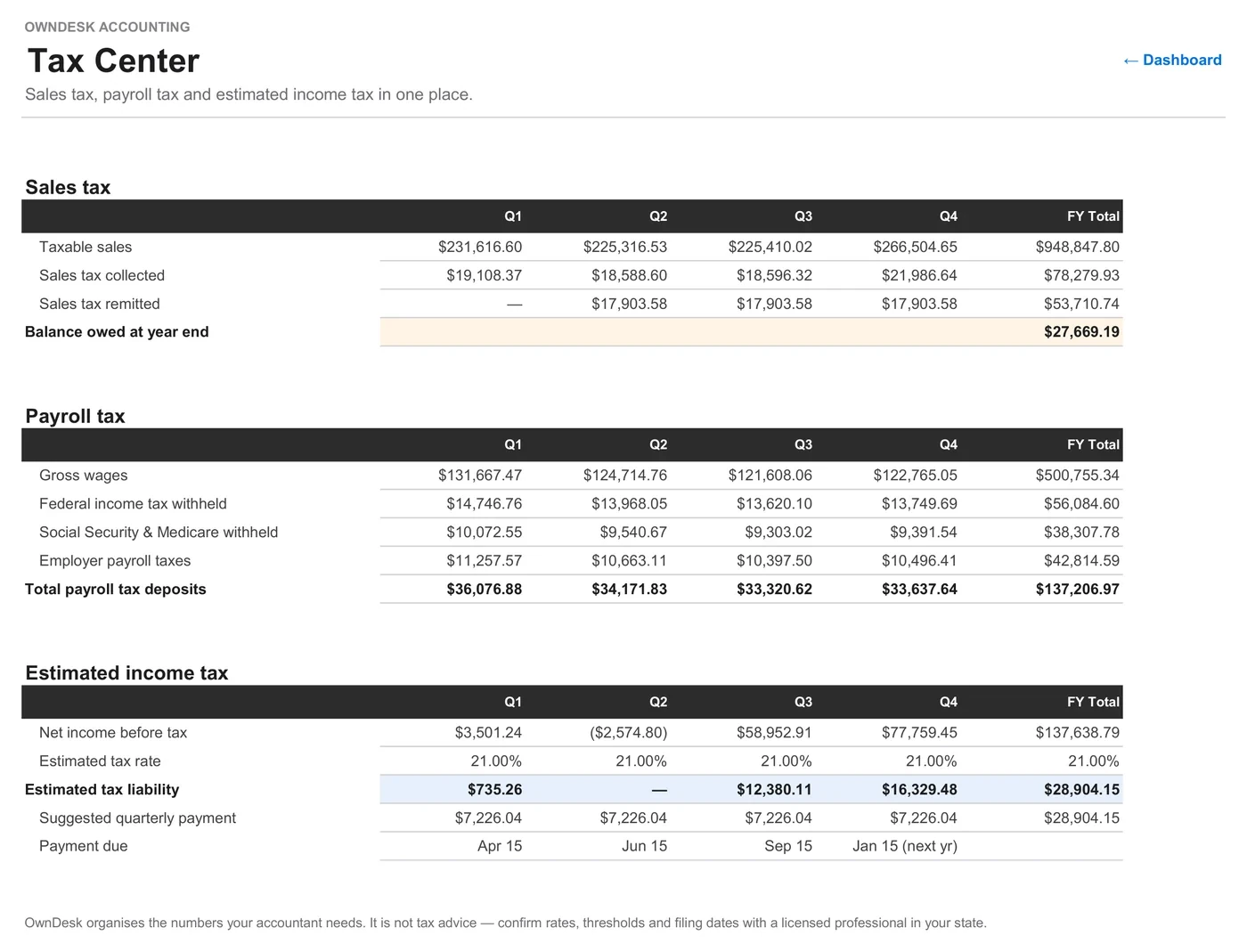
Gross pay, overtime and deductions per pay period, stock with reorder flags, purchase orders, a monthly budget against actuals, and sales tax, payroll tax and estimated income tax by quarter. It organizes the numbers; you or your accountant file them.
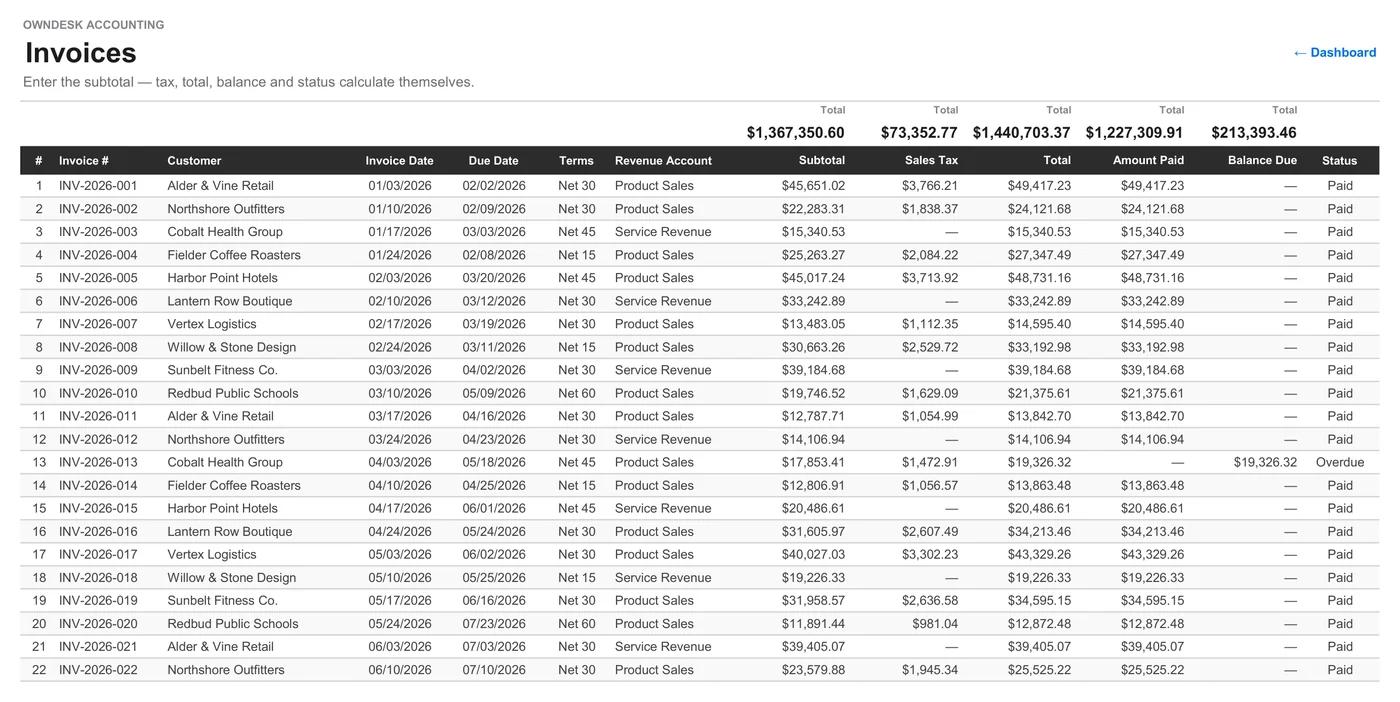
Invoices sheet of the accounting workbook: subtotal, sales tax, total, amount paid, balance due and status for each invoice
Bank Register sheet: every deposit and payment with a running balance and a cleared flag
Profit and Loss sheet: revenue, cost of goods sold, operating expenses and net income by quarter
Tax Center sheet: sales tax, payroll tax and estimated income tax by quarter, with payment due dates

Bookkeeping for self employed owners and small teams

About twenty minutes a month.

Self employed bookkeeping does not need a software plan. Leave payroll empty if it is just you, record your draws, and let the tax center suggest what to set aside each quarter.

1

Set it up once

Enter your company, sales tax rate and opening balances on one sheet. It takes about fifteen minutes.

2

Record the month

Invoices, bills, sales receipts and expenses, then type each bank statement line into the register.

3

Reconcile and read

Bring the difference to $0.00, then read the dashboard: cash, receivables, margin and the month by month picture.

Alternatives to QuickBooks

A QuickBooks alternative you pay for once.

Most QuickBooks alternatives are other subscriptions. This one is a different trade: you give up the automation and you stop paying every month.

 OwnDesk AccountingQuickBooks OnlineBlank spreadsheet
Price Original price was: $149.00.Current price is: $49.00. once Lists from $38/mo Free
Financial statements P&L, balance sheet, cash flow Yes You build them yourself
Your records A file you keep Hosted by the vendor A file you keep
Connects to your bank No — you enter each line Yes No
Sends invoices & takes payments No — records them only Yes No

QuickBooks Online price is the Simple Start list price shown on quickbooks.intuit.com on November 1, 2026; promotions apply and prices change, so check their site. QuickBooks is a trademark of Intuit Inc. OwnDesk is independent and not affiliated with Intuit. OwnDesk Accounting is a bookkeeping aid, not tax advice.

14-day money-back guarantee Plus support from Adrián, usually the same working day

If OwnDesk Accounting isn't right for how you keep your books, email me and you get a refund — no questions. If something's confusing, you're writing to the person who built it, not a queue. English and Spanish, both spoken here.

14-day refund Reply usually same working day Blank + demo workbook + PDF guide

Questions

Before you buy.

Is there accounting software without a subscription?
Yes. OwnDesk Accounting is one payment for a complete set of books: no renewal, no monthly fee and nothing that stops working if you never talk to us again. It is a workbook rather than an installed program, which is what makes that possible: the file sits on your own computer or in your own Google Drive, and there is no account for anyone to switch off.
Is this desktop accounting software or a spreadsheet?
It is a spreadsheet, and we would rather say so now. OwnDesk Accounting is an .xlsx workbook with 22 linked sheets that opens in Microsoft Excel 2016 or newer on your desktop, or in Google Sheets. There are no macros and nothing to install beyond the spreadsheet program itself. You get the structure of accounting software, with registers that feed three financial statements, but you type into cells rather than screens.
What is the best QuickBooks alternative for a small business?
It depends what you use QuickBooks for. If you rely on automatic bank feeds, online invoice payments or several people working at once, stay with a subscription product, because this workbook does none of those on its own. If you mainly want clean books, a real profit and loss statement, a balance sheet and cash flow for your accountant, and you are happy to enter transactions yourself, a one-time workbook does that job without the monthly bill.
Is there a free QuickBooks alternative?
Free accounting tools and free plans do exist, usually with limits on features, or paid add-ons. OwnDesk Accounting is not free: it is a single payment. What that buys you is a finished workbook with no limits set by a plan and no account behind it. You can browse the whole sample workbook in the demo before you decide.
Does it work for self employed bookkeeping?
Yes. A sole owner can leave Payroll and Employees empty and use Invoices, Expenses and the Bank Register, with an Owner’s Draws account for what you take out of the business. The Tax Center estimates income tax at a rate you set and suggests a quarterly payment, with the usual due dates. It does not produce a Schedule C or file anything, so your tax preparer still works from the reports.
Is there free bookkeeping software for self employed people?
There are free options, and if you only need to total income and expenses, a simple free spreadsheet may be all you need. This one costs one payment and is worth it when you want more than a list: invoices with balances due, a bank reconciliation, and a profit and loss, balance sheet and cash flow that build themselves.
Can I use it for self employment bookkeeping in Google Sheets?
Yes. Upload the .xlsx file through File, Import, choose Replace spreadsheet, then set File, Settings, Locale to United States before you enter anything. Charts, colors and number formats carry over, and the formulas are ones both programs support. Google may swap the font, which does not affect a single number.
Can I use it as personal or home accounting software?
You can, but it is built for a business: customers, vendors, sales tax, payroll and a balance sheet. It suits a home-based business very well. For a household budget with no invoices to track, OwnDesk Budget is the better fit.
Does it connect to my bank?
No, and this is the biggest difference from QuickBooks. You type each line from your statement into the Bank Register and mark it cleared, then the Reconciliation sheet shows the difference until it reads $0.00. For most small businesses that takes about twenty minutes a month, but if you have hundreds of card transactions, an app with bank feeds will save you real time.
Can I send invoices and take payments from it?
No. The Invoices sheet is a register: it tracks each invoice’s subtotal, sales tax, total, amount paid, balance and status, and feeds your receivables and reports. It does not include a printable customer invoice, email anything or collect payment. Keep billing your customers the way you do today and record each invoice here.
Does it run payroll or file my taxes?
No. The Payroll sheet works out gross pay, overtime and deductions for up to 20 employees per pay period using simple flat formulas, and the Tax Center totals sales tax, payroll tax and estimated income tax by quarter. It does not pay anyone or file anything, and the rates are estimates: confirm them with your payroll provider or accountant. It is not tax advice.
What do I need, and is it only for the United States?
Microsoft Excel 2016 or newer, or a Google account for Google Sheets. Excel is not included, so if yours is a Microsoft 365 plan, that bill is separate; Google Sheets is free. This is the United States edition: dollars, sales tax, EIN and US payroll lines. It is not set up for VAT.
What happens next year? Do I buy it again?
No. Save a copy of the finished year as your archive, change the report year on the Setup sheet, carry your closing balances forward and clear the registers. The guide walks through it step by step, and the same license keeps working for that business.
How much can it hold?
Each register comes with 60 rows ready to use and the Bank Register with 120. If you need more, copy the formulas down: the reports read as far as row 500, which is the practical limit for one year. A business with more than that is better served by dedicated software.
Where is my data?
In your own file, on your computer or in your own Google Drive. We never see it. Back it up the way you back up any other important file, and keep each finished year as a copy.

Browse the whole workbook before you decide.

The read-only demo shows all 22 sheets filled in with a year of sample data for a fictional design studio. If it fits, buying takes about a minute.

14-day money-back guarantee · instant download · one-time payment

More for budgets and planning