
Workshop management software for Australian mechanical workshops.
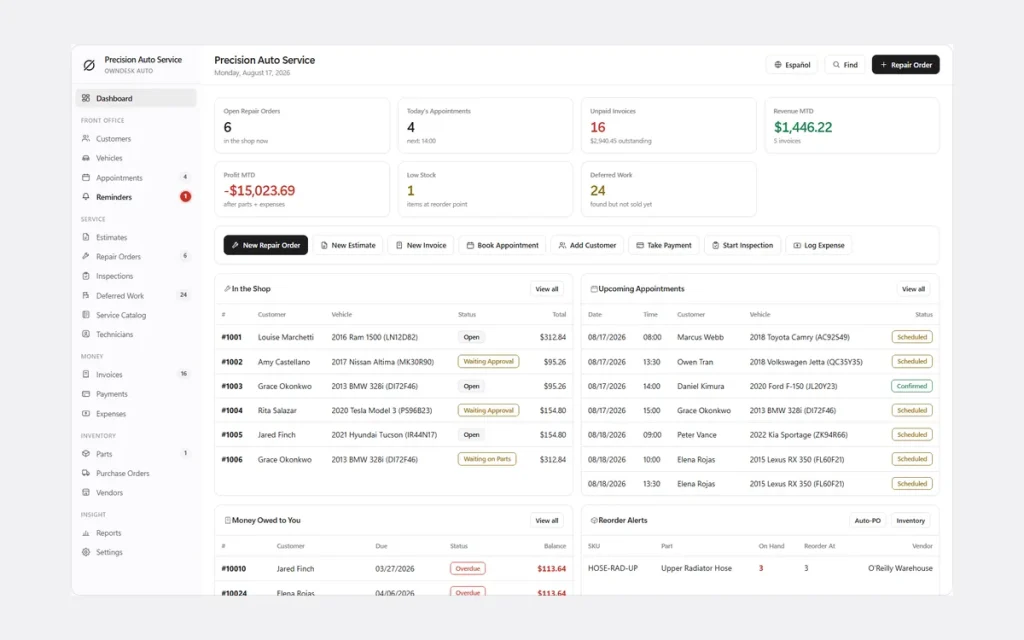
It is half past five, the last ute has just rolled out, and you are still at the counter. The job cards are on the back of a quote pad, half the invoices are in a spreadsheet and the other half are in your head. OwnDesk Auto PRO is workshop software that puts job cards, quotes, vehicle inspections, service reminders and invoices in one file that opens with a double-click. Pay once. Works offline. No monthly fee.
The demo opens with US dollar sample data, and you switch to A$ in Settings.
Sound familiar?
The paperwork starts when the work stops.
Most workshop software solves that by charging you every month, for every user, for as long as you trade. If the NBN drops out, so does your system. Stop paying and you can lose easy access to your own customer history.
So plenty of small workshops never get as far as buying any. The tools look built for a chain of fifty sites, and you are a workshop of one to five.
The quote that vanishes
Priced on a pad, never followed up. The brake pads the customer said no to last time are not written down anywhere.
Who is due a service?
You find out when the customer rings, or when they have already taken the car somewhere else.
Another monthly bill
A subscription that never stops, for features a small workshop never opens.
What it is
Mechanical workshop software that lives in one file on your computer.
OwnDesk Auto PRO is mechanic workshop software you open with a double-click. There is nothing to install, no account to create and no server behind it. Your records stay on your own computer.
It is for independent mechanical workshops, logbook servicing and auto electrical businesses, small tyre and brake shops and mobile mechanics who want one tidy place for job cards, quotes, customer and vehicle history, parts stock and invoices. You pay once, not monthly.
It is not for groups that need live syncing between sites. The comparison below is straight about that.
See it running
5-minute walkthrough of OwnDesk Auto PRO.
Repair orders (job cards), vehicle inspections, service reminders and the customer signature step, start to finish. It uses the US sample data, so you will see dollars and American spellings.
What it does
Everything a job card touches, on one screen.
Job cards • quotes • vehicle inspections with photos • service reminders • customer sign-off • invoices and credit notes • parts stock • appointment diary • customer and vehicle history • technicians.
From quote to invoice without retyping
Write the quote, convert it to a job card when the customer says yes, invoice it when the work is done. Customers, vehicles, parts and mechanics all sit alongside it, not in a second spreadsheet.
Inspections with photos
Mark each point pass, watch or fail, add a note and up to six photos that print on the customer report. What the customer declines today is saved as deferred work, ready to quote next time.
Customer history by rego
Every vehicle has its plate, VIN, engine and odometer reading. Press Ctrl+K and type part of a plate, a name or a phone number to pull up the car, the owner and everything you have ever done to it.
Service reminders
Set a due date, a due odometer reading or both. When it comes round, it shows on the dashboard for you to ring. It is a list you work from, not automatic texts.
Customer sign-off on screen
The customer signs on the screen to approve a quote or confirm finished work, and the signature is saved on the document. No printer, no separate e-signature subscription.
Labour rates and parts pricing
Keep several labour rates, such as standard and diagnostics, plus a parts price matrix for your mark-up. It fills in blanks without overwriting a price you typed by hand.
Parts stock and your diary
See what is on the shelf and what needs reordering. The appointment diary runs across your opening hours, for the bookings you take yourself.
Reports your bookkeeper can use
Revenue by service, mechanic output and outstanding work. Print them, or export to CSV and open them in Excel or Google Sheets.
Built for Australian workshops
A$, GST, kilometres and Australian dates.
Four settings do most of the work. Each takes a minute, once.
A$ and dd/mm/yyyy
Choose Australian Dollar (A$) from the 13 currencies in Settings, and the DD/MM/YYYY date format. They apply to every quote, job card and invoice.
GST on parts and labour
Set a tax rate of 10% for parts and a separate rate for labour, tick whether labour is taxable, and mark customers as tax exempt if you need to. Put your ABN in the Tax ID field and it prints at the top of your documents. The app adds the tax you have set. It does not lodge a BAS and it does not check your invoices against ATO rules, so keep your usual bookkeeping for that.
Kilometres
Type the odometer in kilometres. The built-in service intervals come set in miles, so change them to kilometres once in Settings, for example a service every 10,000 km or 6 months, whichever comes first.
Your own service types
Press “Add service type” in Settings and add “Logbook service” or “Rego reminder” with its own interval. From then on, picking it on a reminder fills in the due date for you.
One honest note: the app’s own screens use US wording and come in English (US) or Spanish. You will see “repair order” where you would say job card, “estimate” for quote, “labor” and “license plate”. They are the same documents and fields; only the labels differ. Nothing in the app is specific to any state, and it does not look up a rego or produce roadworthy or safety certificates.
Automotive workshop management software compared
Pay once, or pay every month?
Cloud automotive workshop software and a one-off workshop system suit different workshops. This is how they differ in practice.
| OwnDesk Auto PRO | Typical cloud workshop software | |
|---|---|---|
| Payment | One-off: Original price was: $179.00.$79.00Current price is: $79.00. | Monthly or annual subscription |
| Works offline | Yes | Usually not |
| Login | None | Account and password |
| Where your data lives | On your computer | On the provider’s servers |
| Users | No seats to count | Often priced per user |
| Setup | Unzip, double-click | Account, onboarding, sometimes training |
| Online booking, texts, rego lookups | No | Often yes |
| Several sites or people editing live | No | Often yes |
Cloud systems are the better fit if you run several sites, have staff logging in from different places, or want online booking and texts built in. OwnDesk Auto PRO is the better fit if you run one workshop, want to own your records and do not want another monthly bill. If you are not sure, the demo costs nothing.
From payment to working
Three steps, about two minutes.
Pay by card
Checkout runs on Stripe. Your card details never touch this site.
Download straight away
The link appears the moment payment clears, and arrives by email too.
Unzip and double-click
It opens with sample data loaded. Settings > Clear All Data & Start Fresh empties it, then set A$, Australian dates and your GST rate.
If OwnDesk Auto PRO is not right for your workshop, email me and you get a refund, no questions. If something is confusing, you are writing to the person who built it, not a queue. Support is in English and Spanish. There is no renewal fee and no per-user fee.
Custom build
Need it to work exactly the way your workshop does?
I can adapt OwnDesk Auto PRO to the way your workshop works: your own fields, your job cards, your reports, or two OwnDesk products combined into one. It’s still a one-off payment, it still runs offline, and it’s yours. I built the software, and I build your version myself.
- Fleet accounts for tradies and ute fleets, with one monthly statement
- Extra inspection items for 4WDs, utes or diesel work
- OwnDesk Auto PRO and OwnDesk Tire combined, if you also fit tyres
Custom builds start at $490, paid in two halves: 50% to start, 50% after you’ve tested it.
Tell me about your businessQuestions
What Australian workshop owners ask before buying.
What is the best workshop management software for a small Australian mechanical workshop with inventory?
Is there workshop software I can pay for once instead of a monthly subscription?
Is there a workshop software login?
Can it handle GST and Australian dollars?
Can it do job cards, quotes and vehicle inspections?
Can it remind me when a customer’s service is due, and does it work in kilometres?
Does it work offline, and can my mechanics use it too?
Does it do roadworthy or safety certificates, or look up a rego?
Can you customise it for my workshop?
See your own job cards in it before you decide.
The live demo has real screens and sample data loaded, with no sign-up and no card. If it fits, buying takes about a minute.
14-day money-back guarantee · instant download · one-off payment