
Property management software for South African landlords.
It is the 3rd of the month. A tenant has sent a proof-of-payment screenshot on WhatsApp, another says the EFT is “on its way”, and you are scrolling a spreadsheet to see who paid last month. OwnDesk Property is property management software that keeps tenants, leases, rent, arrears and maintenance in one file that opens with a double-click. Pay once. Works offline. No monthly fee.
The demo opens with US dollar sample data, and you switch to rand (R) in Settings.
Sound familiar?
Rent is easy to collect and hard to keep track of.
Most rental software fixes that by charging you every month, often per unit, for as long as you own the property. If the fibre drops or the power goes, so does your access. Stop paying and your tenant history can disappear with the subscription.
So plenty of small landlords never get as far as buying any. The platforms look built for a managing agent with a big portfolio, and you own a few flats and a house.
Proof of payment everywhere
WhatsApp screenshots, emailed PDFs and a bank app. Nobody can say for sure what was paid for which month.
Leases that quietly run out
A fixed-term lease ends, the tenant stays on, and you only notice when the rent or the terms are already out of date.
Load shedding and downtime
A cloud login is useless when the router is off. Your own file on your own device still opens.
What it is
Rental property management software that lives in one file on your computer.
OwnDesk Property is rental management software you open with a double-click. There is nothing to install, no account to create and no server behind it. Your records stay on your own device.
It is for owner-landlords with a few flats, townhouses or houses, and for small rental agents who keep the books on a handful of properties. You pay once, not monthly.
It is not for body corporates or large managing agents. The comparison below is straight about that.
What it does
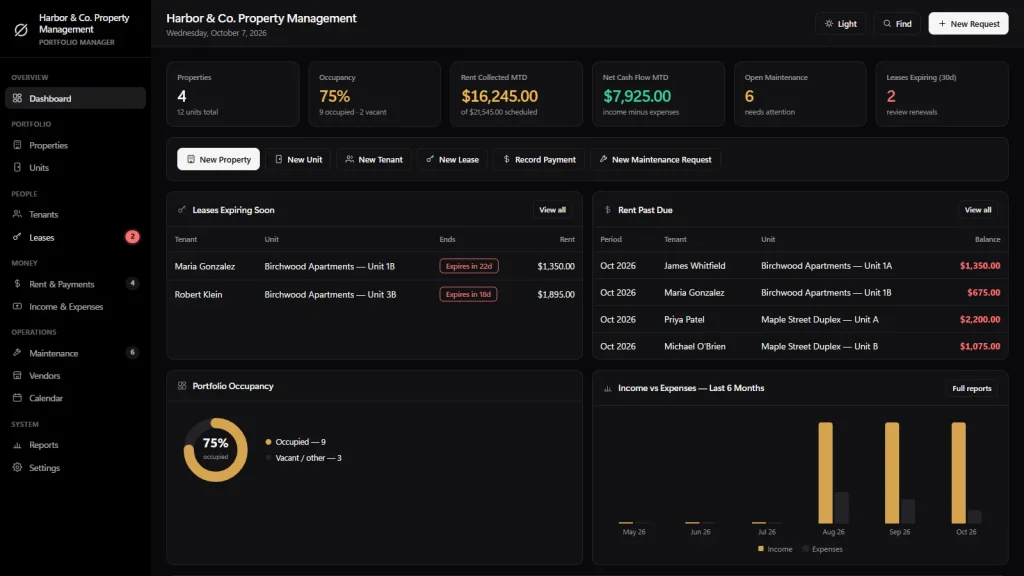
Everything a small portfolio touches, on one screen.
Dashboard • properties and units • tenants and leases with renewal flags • monthly rent roll and payments • arrears • maintenance and contractors • income and expenses • calendar • cash-flow reports.
A rent roll that works out arrears
One line per lease per month: rent due, amount paid and the balance. Paid, Partial, Due and Past Due are tagged for you. Record an EFT and the tenant balance, the dashboard and the reports all update together.
Leases with renewal flags
Start and end dates, fixed term or month-to-month, rent due day, monthly rent and deposit amount. Leases ending within 30, 60 or 90 days are colour-coded in the lease list, and anything ending within 30 days is also flagged on the dashboard.
A rollup for every property
Click into any property and see its units, tenants, active leases and this month’s income and expenses on one screen. Occupancy and vacancies show at a glance.
Maintenance that logs its own cost
Log a plumber or electrician job against a unit, keep your contractors in one list, and mark it complete with a cost. That cost posts into the property’s expenses, so you only enter it once.
Expenses and cash flow per property
Record rates, utilities, insurance, repairs and your bond repayment as expenses, and see what each property really nets after costs.
Print and export anything
Rent rolls, tenant lists, maintenance logs and cash-flow reports print with your name and address, and every table exports to CSV for Excel, Google Sheets or your accountant.
Built for South African landlords
Rand, South African dates and the way you really collect rent.
Two settings do most of the work. Each takes a minute, once.
Rand and local dates
Choose South African Rand (R) from the currencies in Settings, and DD/MM/YYYY or YYYY-MM-DD for dates. They apply to every lease, rent line and report.
Rent by EFT
Capture each EFT against the right lease and month. Partial payments are fine, and the balance carries until the line is settled. The app does not link to your bank, so you capture what you see in your statement.
Rates, utilities and levies
Log municipal rates and water and electricity as expenses against each property. There is no levy category, so levies go under Other with a note. The app does not bill or collect levies.
Square metres
The size field is labelled “Square Footage”, but it is just a number. Type the size in square metres if that is how you measure.
One honest note: the app’s own screens are in English (US) and use US wording, such as “Rent Roll”, “Security Deposit” and “Property Tax”. They are the same documents and fields; only the labels differ. It does not add or calculate VAT, track deposit interest or apply any rental legislation. For those, speak to your accountant or attorney.
Property management software compared
Pay once, or pay every month?
Cloud rental platforms and a one-off property management system suit different landlords. This is how they differ in practice.
| OwnDesk Property | Typical cloud platform | |
|---|---|---|
| Payment | One-off: Original price was: $149.00.$49.00Current price is: $49.00. | Monthly or annual subscription, often per unit |
| Works offline | Yes | Usually not |
| Where your data lives | On your device | On the provider’s servers |
| Setup | Unzip, double-click | Account, onboarding |
| Arrears and lease renewal flags | Yes | Often yes |
| Credit checks, online rent collection, levy billing | No | Often yes, at a price |
| Several people editing live | No | Often yes |
Cloud platforms are the better fit if you manage for many owners, need credit checks and online collection built in, or have staff logging in from different places. OwnDesk Property is the better fit if you own the properties, want your records on your own device and do not want another monthly bill. If you are not sure, the demo costs nothing.
From payment to your first property
Three steps, about two minutes.
Pay by card
Checkout runs on Stripe. Your card details never touch this site.
Download straight away
The link appears the moment payment clears, and arrives by email too.
Unzip and double-click
It opens with a sample portfolio loaded. Clear it in one click from Settings, then set rand, your date format and add your first property.
If OwnDesk Property is not right for your portfolio, email me and you get a refund, no questions. If something is confusing, you are writing to the person who built it, not a queue. Support is in English and Spanish. There is no renewal fee and no per-unit fee.
Custom build
Need it to work exactly the way your portfolio does?
I can adapt OwnDesk Property to the way your portfolio works: your own fields, your tenant statements, your reports, or two OwnDesk products combined into one. It’s still a one-off payment, it still runs offline, and it’s yours. I built the software, and I build your version myself.
- A monthly statement for each owner, if you manage for family or a few clients
- Lease schedules with your own annual escalation percentages
- Rates, levies and water recoveries on the tenant statement, the way you bill them
Custom builds start at $490, paid in two halves: 50% to start, 50% after you’ve tested it.
Tell me about your businessReviews
Real reviews, not written by me.
From verified buyers, moderated by someone who isn’t me. Dates and wording exactly as written.
★★★★★
“Really enjoying this property software so far. It’s simple to use and makes managing everything much easier. Great little tool!”
Johan van der Merwe · 10 November 2026
★★★★★
“Just what I was looking for! Everything is well organised and easy to keep track of. Very happy with it.”
Anika Botha · 24 October 2026
★★★★★
“Works really well for managing my properties. Saves me time and keeps things in one place. Definitely worth it.”
Thabo Nkosi · 8 October 2026
★★★★★
“I love how straightforward this software is. No complicated setup, just practical features that make my daily work easier.”
Mariska de Villiers · 19 September 2026
★★★★★
“Very impressed so far. It’s easy to navigate and has everything I need to stay on top of my property management. Highly recommended!”
Kabelo Molefe · 12 August 2026
Questions
What South African landlords ask before buying.
What is the best property management software in South Africa for a small landlord?
Is there property management software I can pay for once instead of every month?
Does it work in rand, and does it keep working during load shedding?
Can it track rent paid by EFT and show who is in arrears?
Does it handle VAT, municipal rates and levies?
Can it replace my rental spreadsheet and keep track of leases and deposits?
Is it for body corporates and managing agents with many owners?
Does it do tenant screening, online rent collection or lease contracts?
Can you customise it for my rental portfolio?
See your own portfolio in it before you decide.
The live demo has real screens and a sample portfolio loaded, with no sign-up and no card. If it fits, buying takes about a minute.
14-day money-back guarantee · instant download · one-off payment