
Photography business management software that runs from one file.
Photography business software for solo photographers and small studios: sessions, packages and deposits, client balances, printable session invoices and a delivery workflow board that shows where every gallery stands — business photography software you pay for once. No subscription, no logins, no cloud account.
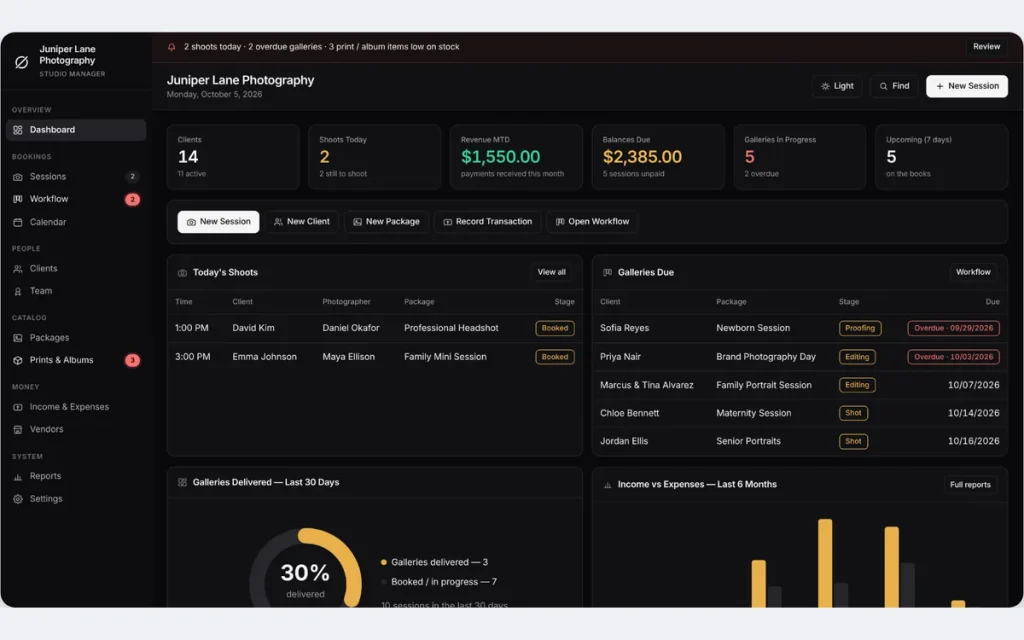
Most photography business software is rented by the month, and the bill grows with every feature you switch on. A booking-and-gallery subscription is easy to start and hard to stop, because your clients, contracts and deadlines all end up inside it. Here the whole business is one file you own.
One-time payment
Never another monthly bill. The price you see is the whole price, and the license is for life.
A board for every gallery
Inquiry, Booked, Shot, Editing, Proofing, Delivered. Late galleries turn red before a client has to ask.
Balances that add up
Price, paid and balance on every session, and a dashboard total of what clients still owe on shoots already done.
No cloud account
Client records stay on your own computer — nothing to sign up for, nowhere for a breach to happen.
What it does
Everything a photography business touches, in one place.
Dashboard with live studio numbers • sessions with price, paid and balance • delivery workflow board • calendar of shoots and gallery deadlines • clients • team with pay share • packages with deposits • prints & albums stock • income & expenses • vendors • reports with delivery rate and average turnaround.
The delivery workflow board
Photography is not finished when the shutter clicks. The board shows every job in the stage it is in right now, with the client, package, photographer, gallery due date and what the client still owes. Click the arrow on a card to move it forward. Cards past their due date turn red and the Workflow menu item shows the overdue count.
Deposits and balances on every session
Pick a package and the price fills in. Enter what the client has paid and the balance is worked out; every new payment is logged to your income once, so editing a session never counts it twice. The dashboard adds up the balances still unpaid on shoots already done.
A one-click session invoice
The document icon on any session prints an invoice with the package, shoot date, location, session total, paid to date and balance due, on your own studio letterhead. Choose Save as PDF in the print dialog to email it to the client.
Turnaround you can measure
Reports shows your delivery rate and the average number of days from shoot day to delivered gallery, so you can promise turnaround times you really keep. Income and expenses are broken down by category for any date range.
Managing photography business operations
From first inquiry to delivered gallery, without a subscription.
Software for managing photography business operations should follow a job from the first message to the last payment. Here is how the app handles that.
Set up packages once
Weddings, family, newborn, headshots and brand days, each with shoot time, edited images, turnaround days, deposit percentage and price.
Book the session
Client, photographer, package, date, location and gallery link on one record. The price and the gallery due date fill in from the package.
Move it to delivered
Shot, Editing, Proofing, Delivered, one click each. Money still owed is flagged when you deliver, and the invoice prints from the same record.
It does not take bookings from your clients by itself: there is no public booking page, no client portal and no online gallery. You enter the session; the app keeps the money and the deadlines straight.
What is inside
Twelve modules, one connected set of records.
The records point at each other, so nothing is typed twice. A session links a client, a photographer and a package, and every total you see is worked out from those links.
Clients
Contact details, how they found you, style notes and how many sessions each client has booked.
Sessions and calendar
Every shoot with its price, balance and gallery due date, plus one monthly calendar of shoots and deadlines coloured by stage.
Packages
Your price list by category, with shoot time, edited images, turnaround days and deposit percentage.
Team and pay share
Photographers, second shooters, editors and assistants, each with a pay share percentage and a performance summary.
Prints & albums and vendors
Products you sell with cost, price, stock and a low-stock alert, plus the print labs, album makers and suppliers behind them.
Income, expenses and reports
Every payment in and every cost out by category, with reports for any date range and CSV export of every list.
Plus a Find box that searches everything at once, a dark and a light theme, your own logo on every printout, and a JSON backup you can restore on any computer.
One app, every kind of shoot
Built for photographers who run their own business.
A package is whatever you sell by the session — the same screens run a one-person studio or a small team.
Wedding photographers
Long lead times, a deposit up front, a final balance and a gallery promised weeks later.
Portrait and family
Mini sessions, newborn and maternity packages and the fall rush, each with its own turnaround.
Headshots and brand
Professional headshots and brand photography days with a set number of edited images.
Small studios
Second shooters and editors on a pay share, with a performance summary for each.
Why photographers switch
You're not really choosing between two photography apps.
You're choosing between paying once and renting every month, for online booking, client portal and gallery features that a photographer who books through Instagram, email and the phone may never open.
| OwnDesk Photo | A subscription photography platform | |
|---|---|---|
| Price | Original price was: $149.00.$49.00Current price is: $49.00. once | A monthly fee that rises with the plan |
| Sessions, packages, balances and session invoices | Included | Included |
| Gallery delivery tracking with deadlines | Workflow board, due dates, overdue flags | Included |
| Your data | Stays on your own computer | Lives in their cloud |
| Online booking page, client portal, hosted galleries, e-signed contracts, card processing | Not included — pair it with your own tools | Often included, at a price |
| Setup | Unzip, open, go | Account sign-up, onboarding |
Pricing for subscription platforms varies by company and plan — check current pricing on each site. OwnDesk Photo does not take online bookings, host galleries, store photos or contracts, send reminders or process card payments itself, and does not sync live between two computers; it is single-computer by design, with a backup file to move between devices.
From payment to your first session
Three steps, about two minutes.
Pay with card
Checkout is secure and your card details never touch this site.
Download and open
The link appears the moment payment clears. Double-click the file — it opens in your browser, no install, no internet needed after that.
Clear the sample studio, add your own
It opens with a sample studio already loaded — sixteen sessions moving through the workflow board, fourteen clients, ten packages and six months of income and expenses — so you can see how it works. Remove the sample in one click from Settings, add your studio name and logo, and book your first client.
If OwnDesk Photo isn't right for your studio, email me and you get a refund — no questions. If something's confusing, you're writing to the person who built it, not a queue. English and Spanish, both spoken here.
Custom build
Need it to work exactly the way your studio does?
I can adapt OwnDesk Photo to the way your studio works: your own fields, your session invoices, your reports, or two OwnDesk products combined into one. It’s still a one-time payment, it still runs offline, and it’s yours. I built the software, and I build your version myself.
- School or sports shoot order forms, with packages per child
- A pay sheet for second shooters per session
- OwnDesk Photo and OwnDesk Wedding combined, if you also plan the day
Custom builds start at $490, paid in two halves: 50% to start, 50% after you’ve tested it.
Tell me about your businessQuestions
Before you buy.
What is the best photography business management software for a photographer who does not want a subscription?
Is there free photography business management software, or a free version of this?
How does it help me track gallery delivery and deadlines?
Does it track deposits and client balances?
Is this a photography CRM? What does it keep about each client?
Is it accounting software for a photography business?
Can clients book online or see their gallery through it?
Can I print an invoice with my studio logo?
What is in it? Which features and modules does it cover?
Does it send reminders, store contracts or take card payments?
Can more than one person use it at the same time?
What do you get, and what do you need to run it?
Can you customize it for my photography business?
See your own photography business in it before you decide.
The live demo has real screens and a sample studio loaded — no credit card. If it fits, buying takes about a minute.
14-day money-back guarantee · instant download · one-time payment