
Legal practice management software for solo attorneys and small law firms who want to own it, not rent it.
Matter management, a conflict check, time tracking, invoicing and a trust ledger in one offline app — not a spreadsheet, not a browser tab that logs you out. No subscription, no login, no internet required.
One-time payment
Never another monthly bill per seat. The price you see is the whole price.
A real matter pipeline
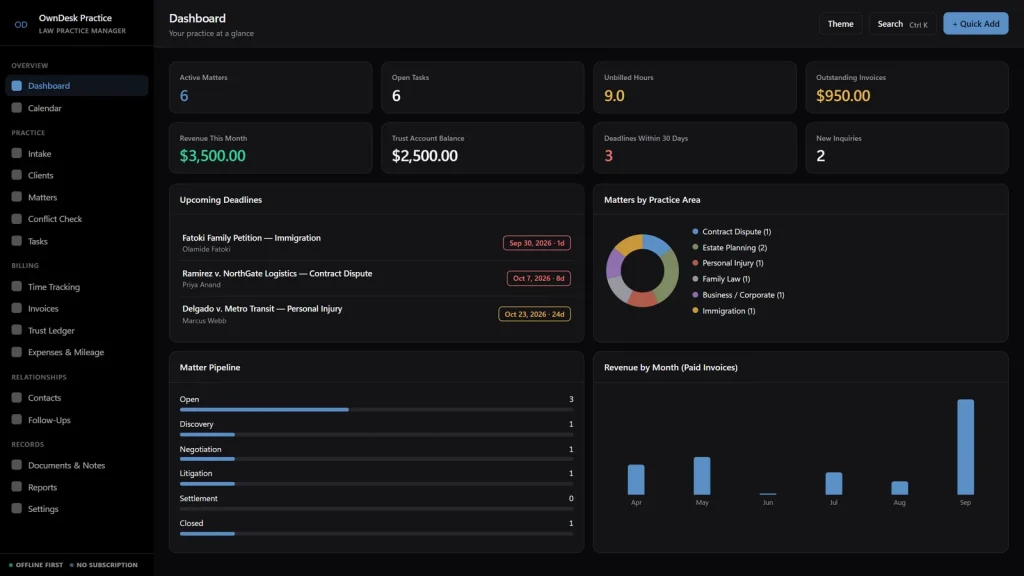
Every case moves through named stages on a board, with a critical-deadline field that flags statutes of limitations before they get close.
Time to invoice, automatically
Log billable hours by matter, then pull them straight into an invoice with one click — nothing to retype.
No cloud account
Client and case data stay on your own computer — nothing to sign up for, nowhere for a breach to happen.
What it does
Everything a small practice tracks, on one screen.
Dashboard • intake & conflict check • client CRM • matter management • tasks • time tracking • invoicing • trust ledger • expenses & mileage • contacts • follow-ups • documents, notes & templates • reports. Legal software built around how one attorney or a small firm actually runs a practice.
Invoicing built on your time entries, not a blank form
Log hours against a matter as you work. When you’re ready to bill, click “Import Unbilled Time” and every unbilled hour becomes an invoice line automatically — add tax and discount, then print a branded PDF. Flat-fee, retainer and contingency matters are billed just as easily.
A conflict check and a deadline tracker, not just a case list
Before you take a new client, search every existing client, matter and contact — including opposing counsel — in one box. Every matter also carries a critical-deadline field, flagged in amber and red on the Dashboard and Calendar as a statute of limitations or filing date approaches.
A trust ledger, in view next to your billing
Deposits, withdrawals and fee transfers per client, with a running balance and a firm-wide trust liability total — the daily “what am I actually holding for this client” question, answered without a separate spreadsheet.
One search bar for your entire practice
Press Ctrl/Cmd+K and see matches across matters, clients, invoices, documents and notes at once, instead of hunting through folders.
Why firms switch
You're not really choosing between two case management apps.
You're choosing between paying once and paying monthly, per seat, for legal practice management software built for a firm size you don't have.
| OwnDesk Practice | Typical legal practice management software | |
|---|---|---|
| Price | $ 49.00 once | $39–$89+/user/mo |
| Matter & case management | Included | Included |
| Time tracking & invoicing | Included, linked together | Often included |
| Trust ledger | Included | Often a paid add-on tier |
| Conflict of interest check | Included | Often a paid add-on tier |
| Your data | Stays on your own computer | Lives in their cloud |
| Multi-attorney seats | Not included — built for one user | Often included, at a price |
| Setup | Unzip, open, go | Account sign-up, onboarding |
Competitor pricing is a general market range for legal practice management software, not a quote from any single company — check current pricing on each site. OwnDesk Practice does not provide legal advice and is not a substitute for compliant trust accounting or your bar’s conflict-check procedures; it does not sync live between two computers, it is single-computer by design, with a backup file to move between devices.
From payment to your first matter
Three steps, about two minutes.
Pay with card
Checkout runs on Stripe. Your card details never touch this site.
Download and open
The link appears the moment payment clears. Unzip and double-click the file — it opens in your browser, no install, no internet needed after that.
Clear the sample data, add your own
It opens with a full sample practice — matters, clients, invoices, a trust ledger — already loaded so you can see how it works. Clear it in one click from Settings and add your first matter.
If OwnDesk Practice isn't right for your practice, email me and you get a refund — no questions. If something's confusing, you're writing to the person who built it, not a queue. English and Spanish, both spoken here.
Questions
Before you buy.
Is this a subscription?
Does it work offline?
Is this cloud-based legal practice management software?
Does it give legal advice or draft legal documents for me?
Does it calculate billing and invoices automatically?
Is the Trust Ledger a compliant IOLTA accounting system?
What is the best legal practice management software for a solo attorney or small firm on a budget?
Can it check for conflicts of interest before I take a new client?
Can two attorneys or paralegals share the same file at the same time?
Is there a limit on how many matters, clients or invoices I can add?
See your own practice in it before you decide.
The live demo has real screens and a sample practice loaded — no sign-up beyond your name and email, no credit card. If it fits, buying takes about a minute.
14-day money-back guarantee · instant download · one-time payment