
Wedding planner software and wedding business software for independent planners and small studios who would rather own it than rent it.
This is wedding planner computer software in one file. Quote a wedding from line items, get it signed and one click books it, with a 22-step planning timeline seeded automatically — due dates worked backward from the wedding date.
Guest list, seating chart, vendor budgets and the day-of run of show all live in the same place. No monthly fee, no login, and it works with the Wi-Fi off.
Key benefits
22-step planning timeline
Seeded on every new wedding automatically, due dates worked backward from the date.
Guest list & seating, connected
RSVPs feed auto-seat by party, and the same headcount reaches the run of show.
One-time payment
No monthly fee and no yearly renewal. The price you see is the whole price.
Profit, per wedding
Vendor quotes against what was actually paid, and margin per booking — not just per invoice.
Wedding business software for an independent planner or small studio
Everything a wedding planning business runs on, in one place.
You get a dashboard, clients, weddings, consultations, leads, guest list, seating and run of show.
It also tracks tasks, quotes, invoices, payments, budget & expenses, vendors, venues, services & packages, reports and settings. English and Spanish are both in the same file.
Quotes that become bookings, with a real budget behind them
Build a quote from line items — services, rentals, vendor pass-through, fees — with quantity, unit cost and markup, tax on top.
Get it signed and one click creates the wedding booking with the budget already filled in. No retyping the same numbers twice.
A 22-step planning timeline, on every wedding
From “set the overall budget” at 12+ months out to “send thank-you notes” after the last vendor is paid, seeded automatically with due dates worked backward from the wedding date.
Filterable by phase, status, priority and owner, so a planner running six weddings always knows what is due this week on each.
Guest list, RSVPs and a visual seating chart
Party, side, RSVP status, plus-ones, meal choice and dietary notes for every guest, printable for the caterer and the venue.
“Auto-seat by party” fills the seating chart from confirmed RSVPs, grouped by who they are attending with.
A run of show every vendor can follow
Minute by minute: vendor setup, ceremony, photos, dinner service, speeches, the first dance, breakdown — who owns each moment and where it happens.
Prints for the photographer, the caterer, the DJ and the venue coordinator, so the day does not depend on one person’s memory.
A vendor and venue book, plus a lead pipeline
Florists, caterers, photographers, bands and every vendor category, with pricing, your own rating and booking status; venues with capacity, day rate and music curfew.
Leads move from first enquiry to Won or Lost, and one button converts a lead into a client and a wedding.
Real budget against real vendor quotes
What each vendor quoted against what has actually been paid, by category, with the running total always visible.
Reports adds studio profit, invoiced vs. collected, and profit per wedding — not just per invoice.
From enquiry to wedding day in four steps
Enquire. Book it. Plan it. Run it.
Good wedding planner software has to keep four things in the same place: what you quoted, what the wedding needs, what it is costing and what happens on the day.
Enquire
A lead comes in with wedding type, date, guest count and budget. One button turns it into a client and a wedding.
Book it
Build the quote from line items, get it signed, and one click books the wedding with the budget already filled in.
Plan it
The 22-step timeline, the guest list and the vendor budget run alongside each other from booking day to the final week.
Run it
Print the seating chart and the run of show for every vendor. Invoice the balance and see what the wedding actually made.
Consultations — site visits, tastings, design reviews, the final walkthrough — are tracked separately, so a busy week of client meetings does not get mixed in with the planning timeline.
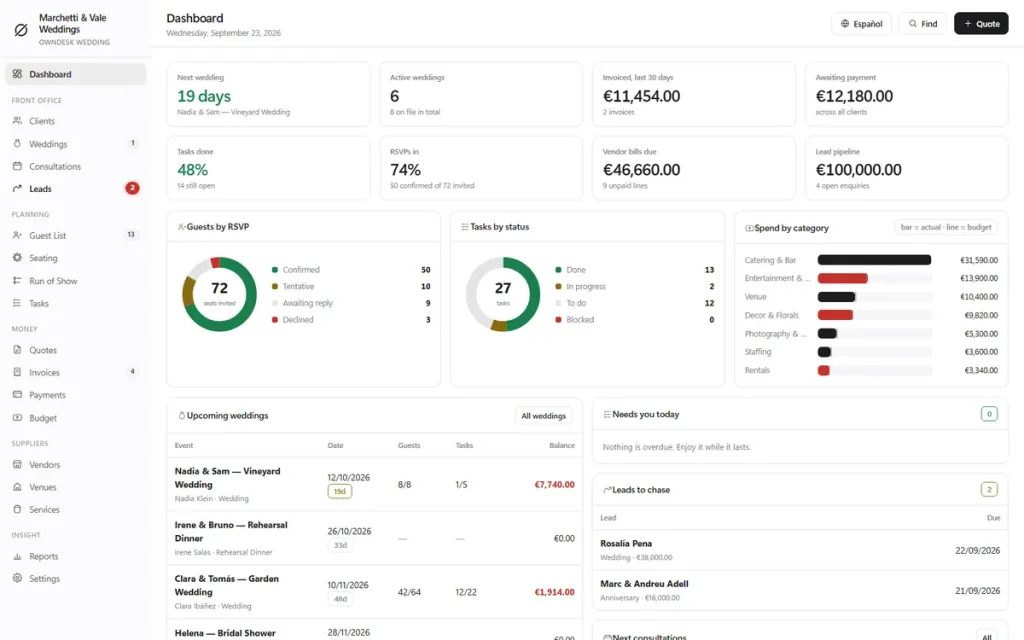
The numbers, on the first screen
Seven figures a wedding planner actually steers by.
Next wedding, active weddings, invoiced and outstanding for the last 30 days, tasks done, RSVPs in, vendor bills due and lead pipeline — plus guests-by-RSVP, tasks-by-status and spend-by-category charts.
Upcoming weddings, at a glance
Every booking coming up, with guest count, tasks done and outstanding balance in one row, so nothing sneaks up on you.
Needs you today
Overdue tasks and leads to chase, all in one list, so nothing gets chased by memory.
Profit per wedding
Invoiced, event spend and studio margin, per wedding — vendor bills you rebill to the client are never held against you.
Budget vs. actual, by category
Venue, catering & bar, decor & florals, photography, entertainment and more, colour-coded, so a category running over shows up before the invoice does.
Design, accounting and the field, honestly
The business side of wedding planning, without the monthly fee.
A wedding planner works from a laptop at the studio and a phone at a venue walkthrough. Wedding planner software should keep the bookings, the money and the paperwork straight. It should also tell you where its limits are.
Is this wedding planner design software?
No. Style, Theme and Colour Palette are text fields you fill in on each wedding, not a drag-and-drop floor-plan or mood-board tool. If you need visual design software, pair this with one; if you need the operations side handled, this is it.
Is it accounting software for a wedding studio?
It covers the booking side: quotes, invoices, payments, budget & expenses and profit per wedding, with every list exportable to CSV for your accountant.
It is not a general ledger. There is no payroll, no bank feed and no tax filing, so keep your bookkeeping program for those.
Does it have a client-facing portal?
No, and it says so up front. There is no login for the couple to check their own guest list or timeline, and no automatic text or email reminders. Everything is run by the planner, from the planner’s own screen.
Works with no signal
The file runs offline in your browser, on a laptop or tablet, at a venue walkthrough or a vendor meeting. Nothing needs a connection once it is downloaded.
What it does not do
No online payments or card processing, no bank feeds, no payroll filing, no client-facing portal, no automatic text or email reminders, no drag-and-drop floor-plan or mood-board designer, and no two people editing at once.
It is the studio’s own record of the business, not a marketplace or a guest-facing app.
Consultations, kept separate from the timeline
Discovery calls, site visits, tastings, vendor meetings, design reviews and the final walkthrough each get their own date, time, location and status, apart from the 22-step planning checklist.
Choosing wedding planner software
You are not really choosing between two software packages.
Most wedding planner software is rented by the month, priced by active project or by seat — commonly $30 to $170 a month before it climbs with a busier season. Spreadsheets are free but cannot turn a signed quote into a booking or seed a 22-step planning timeline.
This is wedding business software you own, with the planning-timeline and vendor-budget parts built in.
| OwnDesk Wedding | Subscription wedding software | Paper & spreadsheets | |
|---|---|---|---|
| Price | $ 49.00 once | Monthly fee, for as long as you use it | Free, but it costs your evenings |
| Quotes that become bookings in one click | Built in | Usually | By hand, every quote |
| 22-step planning timeline, seeded automatically | Included | Varies | A checklist you build yourself |
| Guest list, RSVPs and auto-seat by party | Included | Varies | A separate spreadsheet |
| Profit per wedding, not just per invoice | Included | Rarely | Your own formulas |
| Works offline | Yes | Often needs a connection | Yes |
| Your records if you stop paying | Still yours | Access ends | Still yours |
| Client-facing portal, floor-plan or mood-board designer | Not included | Sometimes included | No |
| Several people at once | Not included — one computer at a time | Usually included | Only through a cloud drive |
The subscription column is a general description of wedding planner software sold by the month, checked 23 September 2026 against published pricing (examples: Aisle Planner about $39.99–$169.99/month tiered by active project count plus $10/month per extra seat; HoneyBook about $32.50–$59/month depending on plan and billing term; Dubsado about $43.75/month on its Premier tier) — not a claim about any single company; features and pricing differ, so check each site. OwnDesk Wedding is single-computer software: it does not sync between devices, offer a client-facing portal, send automatic reminders, process card payments or design a floor plan or mood board.
From payment to your first booking
Three steps, about two minutes.
Pay with card
Checkout runs on Stripe. Your card details never touch this site.
Download and open
The link appears the moment payment clears. Double-click the file — it opens in your browser, no install, no internet needed after that.
Look around, then start fresh
It opens with a sample wedding planning studio already loaded. Clear it from Settings → Data, then add your own studio details, clients and weddings.
If OwnDesk Wedding isn't right for how you run your studio, email me and you get a refund — no questions. If something's confusing, you're writing to the person who built it, not a queue. English and Spanish, both spoken here.
Questions
Before you buy.
What is the best wedding planner software for a solo planner or small studio who does not want a subscription?
Is this wedding planner software for professionals, or a checklist app for planning my own wedding?
Is this wedding planner design software — will it design my floor plan or mood board?
Does it handle the guest list and seating chart, not just tasks and invoices?
Does every wedding get its own planning timeline, or do I have to build one each time?
Does it handle invoicing?
Can more than one person use it at the same time?
Is there a subscription?
Build a quote in it before you decide.
The live demo of this wedding planner software has real screens and a sample wedding planning studio loaded — no sign-up, no credit card. If it fits, buying takes about a minute.
14-day money-back guarantee · instant download · one-time payment