
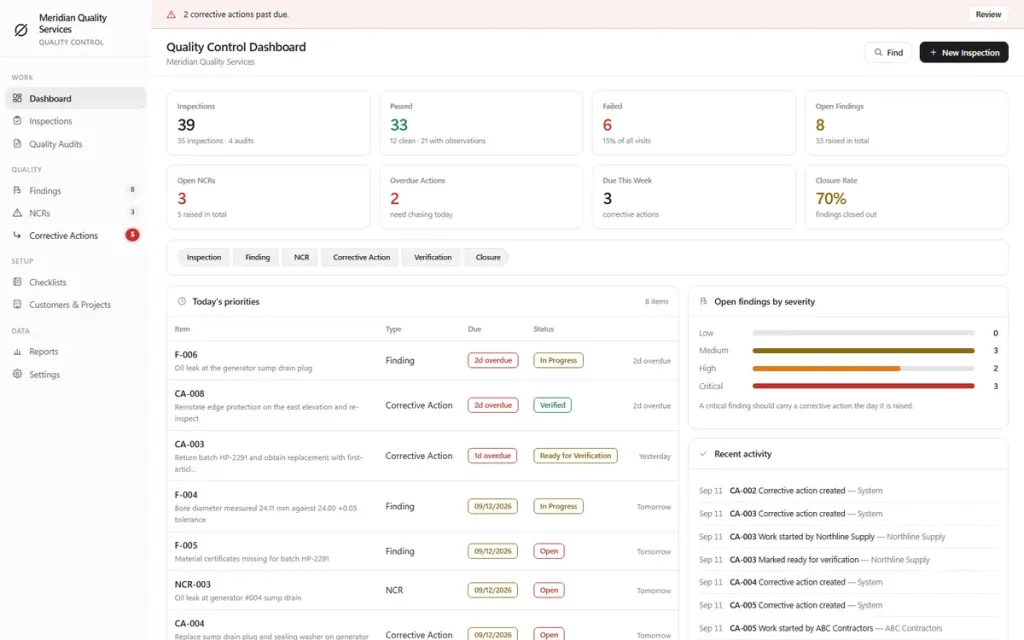
Quality control software for inspections, findings, NCRs and verified corrective actions.
Quality management system software that carries a failed check all the way to a verified close: inspections, findings, NCRs and corrective actions that cannot be marked closed until someone has verified the fix and put their name to it.
One-time payment
Never another per-user monthly bill. The price you see is the whole price.
Checklists you build yourself
Reusable checklists, critical checks, required comments and required photos on failure.
Nothing closes unverified
A corrective action cannot jump from open to closed without a name and a note on the fix.
Photo evidence, printed
Photos on checks, findings and corrective actions print automatically in the report.
What this quality control software does
Everything a quality team tracks, in one file.
Dashboard • inspections & checklists you build yourself • quality audits • findings with photo evidence • NCRs with root cause & containment • corrective actions with a verification gate • customers & projects • CSV export & JSON backup • printable reports with your logo • eight colour themes.
Nothing gets lost after the inspection
A failed check must have a finding raised against it before the inspection can be completed. There is no setting to switch that off, because an inspection that closes with a loose failure on it is exactly how problems disappear.
Verification, not a ticked box
A corrective action cannot jump from open to closed. It records who verified the work, on what date, with what note and what evidence. Anyone can say a thing was fixed; a client or an auditor asks who looked at it.
Checklists you build yourself
Reusable checklists with your own sections and questions. Any check can be marked critical, can demand a comment when it does not pass, and can require a photograph when it fails.
Reports you hand to a client
Printable inspection and NCR reports with your logo, the customer and project, every check and its result, each finding with its photographs, and a signature block to close the document.
Why teams switch
You're not really choosing between two quality management systems.
Enterprise quality management software prices per user, per month, and often assumes a workflow-configuration project before you inspect anything. OwnDesk Quality does the part a small team touches every day — checklists, findings, NCRs, verified corrective actions — for one payment.
| OwnDesk Quality | Typical quality management software | |
|---|---|---|
| Price | $ 49.00 once | $29–$149+/user/mo |
| Verification gate before closure | Included | Often a higher tier |
| Photo evidence in printed reports | Included | Often included |
| Works offline | Yes | Limited or none |
| Team seats / multi-user | Not included — one computer at a time | Often included, at a price |
| Setup | Open the file, go | Account setup, workflow configuration |
Competitor pricing is a general market range for quality management software, not a quote from any single company — check current pricing on each site. OwnDesk Quality is single-computer software: it does not sync between devices, and it is not a substitute for a certification body's own audit requirements.
From payment to your first inspection
Three steps, about two minutes.
Pay with card
Checkout runs on Stripe. Your card details never touch this site.
Download and open
The link appears the moment payment clears. Double-click the file — it opens in your browser, no install, no internet needed after that.
Clear the sample company, build your first checklist
It opens with a sample company and five ready-made checklists loaded. Clear the demo data from Settings, edit a checklist or start from scratch, and run your first inspection.
If OwnDesk Quality isn't right for how your team inspects and closes problems, email me and you get a refund — no questions. If something's confusing, you're writing to the person who built it, not a queue. English and Spanish, both spoken here.
Questions
Before you buy.
What does quality control software like this actually do?
Is this a full quality management system (QMS), or just an inspection app?
Can I track findings and NCRs?
Is this construction quality management software, or built for manufacturing?
Can it track a quality issue against a supplier or contractor, not just my own team?
Can I use photographs during an inspection?
Does it handle quality audits as well as inspections?
Can several people work in it at once?
Is there a subscription?
See your own checklist in it before you decide.
The live demo has real screens and a sample company loaded — no sign-up, no credit card. If it fits, buying takes about a minute.
14-day money-back guarantee · instant download · one-time payment