
Employee management software for a small business that doesn’t want to pay per employee, per month.
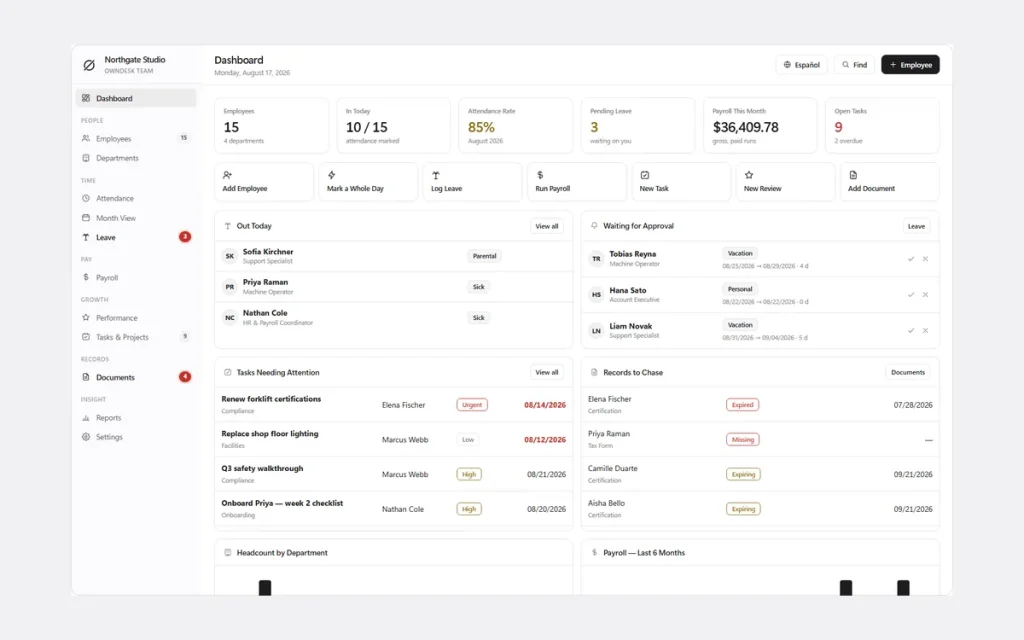
Employee records, attendance, leave, payroll figures, performance reviews and documents — one offline app for a company under 25 people, built to replace six spreadsheets, not to replace your payroll provider.
One-time payment
Never another per-employee, per-month bill. The price you see is the whole price.
Employee data, one record
Contact info, pay rate, department, documents and history per employee — not six spreadsheets that disagree with each other.
Performance reviews with a paper trail
Cycles, goals and notes stay attached to the employee record, not a folder nobody can find.
No cloud account
Employee records stay on your own computer — nothing to sign up for, nowhere for a breach to happen.
What it does
Employee data, attendance, leave, payroll figures and performance — on one screen.
Dashboard with team KPIs • employee records & departments • attendance & leave calendar • payroll figures • performance reviews • documents with expiry reminders • tasks & reports.
One employee record, not six spreadsheets
Contact details, pay rate, department and documents live on the same record, so "what do we pay her" and "when does his ID expire" are both a click away, not a search across files.
Attendance and leave that agree with each other
Day view, month view and a leave calendar built from the same records, so the holiday balance is never argued about.
Payroll figures, not payroll software
Hours, overtime, deductions and totals per period, ready to hand to your accountant. It calculates; it does not pay.
Performance reviews with a paper trail
Review cycles, goals and notes stay attached to the employee record instead of a folder nobody can find.
Why small companies switch
You’re not really choosing between two employee management apps.
You’re choosing between paying once and paying per employee, per month, for a self-service portal a 15-person company never opens.
| OwnDesk Team | A full employee management platform | |
|---|---|---|
| Price | $ 49.00 once | $6–$12/employee/mo |
| Employee records & attendance | Included | Included |
| Performance reviews | Included | Often included |
| Your data | Stays on your own computer | Lives in their cloud |
| Staff self-service portal & phone app | Not included — a manager enters records | Often included, at a price |
| Setup | Unzip, open, go | Account sign-up, onboarding |
Competitor pricing is a general market range for small-business HR/employee management platforms (BambooHR, Gusto, Rippling, Deputy and similar), not a quote from any single company — check current pricing on each site. OwnDesk Team does not run payroll, file taxes, administer benefits, or give employees their own login; it is single-computer by design, with a backup file to move between devices.
From payment to your first employee
Three steps, about two minutes.
Pay with card
Checkout runs on Stripe. Your card details never touch this site.
Download and open
The link appears the moment payment clears. Double-click the file — it opens in your browser, no install, no internet needed after that.
Clear the sample team, add your own
It opens with a sample team already loaded so you can see how it works. Clear it in one click from Settings and add your first employee.
If OwnDesk Team isn’t right for your team, email me and you get a refund — no questions. If something’s confusing, you’re writing to the person who built it, not a queue. English and Spanish, both spoken here.
Questions
Before you buy.
What is the best employee management software for a small business?
Is there simple employee data management software for a small team?
What is employee performance management software, and does this include it?
Is this the same as employee experience management software?
How does it handle employee leave management?
Is it cloud based?
Is there free employee management software?
Does it calculate payroll?
What do you get, and what do you need to run it?
See your own team in it before you decide.
The live demo has real screens and a sample team loaded — no sign-up, no credit card. If it fits, buying takes about a minute.
14-day money-back guarantee · instant download · one-time payment