
Contractor management software for general contractors, builders and every trade on the crew.
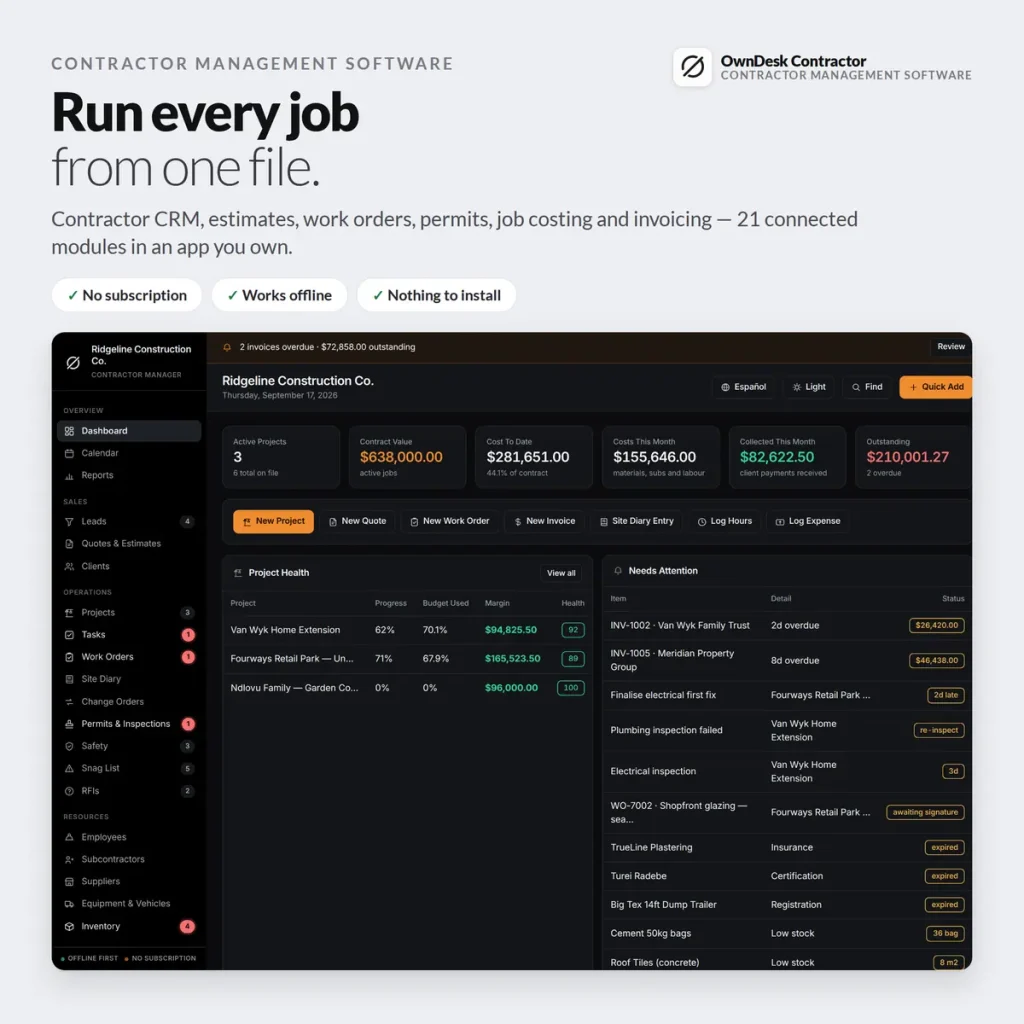
Contractor project management software built as a real application, not a spreadsheet: CRM, estimates, work orders with client e-signature, permits and inspections, job costing and invoicing — 21 connected modules in one offline file. No subscription, no login, no internet required.
One-time payment
Never another monthly bill. The price you see is the whole price.
Job costing that builds itself
Contract plus change orders, minus expenses and labour, equals margin — live, per job.
Permits & inspections tracked
Every permit and inspection, expiry warnings and failed-inspection follow-up built in.
No cloud account
Records stay on your own computer — nothing to sign up for, nowhere for a breach to happen.
What it does
Everything a job site touches, on one screen.
Dashboard • leads, quotes & clients • projects & tasks • work orders with e-signature • site diary & change orders • permits & inspections • contractor safety management, snags & RFIs • crew & subcontractors • equipment, vehicles & inventory • invoices, purchase orders, expenses & timesheets • reports.
It works out your real margin by itself
Contract plus approved change orders, minus expenses and timesheet hours times rate, equals your margin — live, per job. No template to keep updating by hand; it builds the number from records you already entered.
Change orders that actually change the contract
Approve one and the contract value, the margin and the printed job cost sheet all move with it — original contract, changes, revised contract, on one page a client can sign.
Permits and inspections that chase themselves
Every permit with its number, authority, fee and expiry. Every inspection with its date, inspector and result. A failed inspection gets a “Book re-inspection” button, and it knocks points off the project’s health score until it’s cleared.
Safety, snags and RFIs — the compliance trio
Toolbox talks, site inspections, near misses and corrective actions for contractor safety management, snag lists that print for client sign-off, and RFIs with the question, who it went to, the reply-by date and the cost impact.
One app, every trade
Built for general contractors and every trade on the job.
A "project" carries the same job costing, permits and safety records whichever trade is running it.
General contractors & builders
Contractor project management software for the full job, from quote to closeout.
Electrical contractors
Electrical contractor job management software for permits, inspections and work orders.
Plumbing & HVAC
Job costing and scheduling for service and install work, not just new-build projects.
Roofing & remodeling
Estimates, change orders and a client-signed work order for every job you run.
Why contractors switch
You're not really choosing between two job apps.
You're choosing between paying once and paying for project management software built for a back office you don't have.
| OwnDesk Contractor | Typical contractor management software | |
|---|---|---|
| Price | $ 49.00 once | $50–$400+/mo |
| Job costing & change orders | Included | Often included |
| Permits & inspections tracking | Included | Often a higher tier |
| Your data | Stays on your own computer | Lives in their cloud |
| Multi-user live sync | Not included — single-operator by design | Often included, at a price |
| Setup | Unzip, open, go | Account sign-up, onboarding |
Competitor pricing is a general market range for contractor and construction management software, not a quote from any single company — check current pricing on each site. OwnDesk Contractor does not do payroll, tax filing or online payments, and does not sync live between two computers; it is single-computer by design, with a backup file to move between devices.
From payment to your first job
Three steps, about two minutes.
Pay with card
Checkout runs on Stripe. Your card details never touch this site.
Download and open
The link appears the moment payment clears. Double-click the file — it opens in your browser, no install, no internet needed after that.
Run the setup wizard, clear the sample jobs
A one-minute wizard takes your company and first client. Sample projects are already loaded so you can see how it connects — one button clears them when you're ready.
If OwnDesk Contractor isn't right for your business, email me and you get a refund — no questions. If something's confusing, you're writing to the person who built it, not a queue. English and Spanish, both spoken here.
Questions
Before you buy.
What is the best construction management software without a monthly subscription?
How do I track job costs and profit on a construction project?
Can my client sign a work order on a tablet or phone?
Can I track building permits and inspections for each job?
Can two people use it at the same time?
Does it do payroll, tax filing or online payments?
Who is this actually for?
Is there project management software built specifically for general contractors, or is this generic?
See your own jobs in it before you decide.
The live demo has real screens and sample projects loaded — no sign-up, no credit card. If it fits, buying takes about a minute.
14-day money-back guarantee · instant download · one-time payment