
Restaurant POS system for waiters, kitchen and multiple locations.
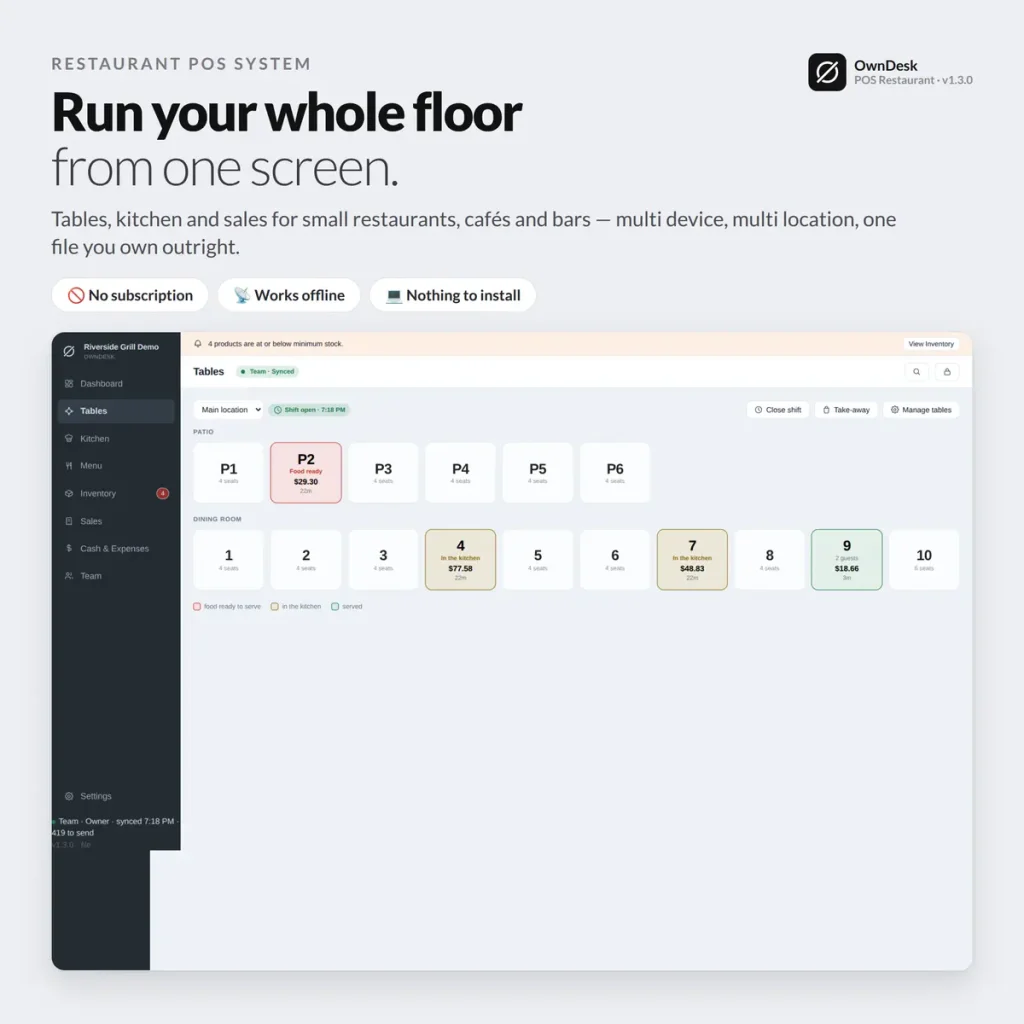
A cloud based restaurant POS system with a floor plan, a separate kitchen screen and per-table payment that all stay in sync across every device — one payment, no monthly fee per terminal, no matter how many locations you run.
See it running
Walkthrough of OwnDesk POS Restaurant, our restaurant POS software.
Floor plan, order taking, the kitchen screen and per-table payment, recorded start to finish — the same restaurant POS system you can try yourself in the live demo below.
One-time payment
Never another monthly bill per terminal. The price you see is the whole price.
Floor and kitchen, in sync
A dish marked ready in the kitchen lights up on the floor plan in real time.
A role for each screen
Waiter, kitchen, cashier or admin — everyone signs in with their own PIN.
Works offline
Every device keeps taking orders through a dropped connection, no exceptions.
What this restaurant POS software does
Everything a service touches, on one screen each.
Floor plan & table status • order taking with modifiers & notes • a separate kitchen screen • bar drinks that skip the kitchen • per-table payment • team roles with PIN login • a dashboard across every location. Everything you'd expect from cloud based restaurant POS systems, without a recurring bill for any of it.
One floor plan every device agrees on
A waiter opens a table, sends the order to the kitchen, and the moment a dish is marked ready it shows on the floor plan — nobody walking to the pass to check, nobody shouting across the kitchen.
A kitchen screen that only shows what needs cooking
Bar drinks go straight to "served" instead of queuing next to real dishes, and modifiers and notes travel with the ticket — so the kitchen sees exactly what to make, not a beer someone already has in hand.
Payment and reporting, table by table
Close a table with an itemized check, and a dashboard rolls sales, top dishes and totals up across every location — filtered by date range, printed or exported to CSV.
Roles that match a real floor
Waiter, kitchen, cashier, admin and owner each see only what their job needs, with their own PIN — and only an owner or admin can clear data for the whole team.
Why restaurants switch
You're not really choosing between two POS apps.
Most pos systems for restaurants bill per terminal, per location, every month, forever. This one doesn't — you're choosing between paying once and paying forever.
| OwnDesk POS Restaurant | Toast / Square for Restaurants / Clover | |
|---|---|---|
| Price | $ 299.00 once | $60–$165+/mo per terminal |
| Works offline | Yes, every device | Limited or none |
| Separate kitchen screen | Included | Often a higher tier |
| Multi-location | Included | Often a higher tier |
| Team roles / PIN login | Included | Often per-seat pricing |
| Setup | Unzip, activate, go | Onboarding call, account setup |
Competitor pricing is publicly listed and current as of this page's last update — check their sites for today's figure. OwnDesk POS Restaurant does not process card payments itself and does not split a check between guests in this version; pair it with your own card reader.
From payment to seating your first table
Three steps, about two minutes.
Pay with card
Checkout runs on Stripe. Your card details never touch this site.
Download and activate
The link appears the moment payment clears. Activating a device needs a connection once — after that it works offline.
Add the rest of your devices in minutes
It opens with a demo restaurant loaded. Clear it in one click, add your team, and every waiter tablet, kitchen screen and register you activate joins the same synced floor.
If OwnDesk POS Restaurant isn't right for your floor, email me and you get a refund — no questions. If something's confusing, you're writing to the person who built it, not a queue. English and Spanish, both spoken here.
Questions
Before you buy.
What is the best POS system for a restaurant with waiters, a kitchen and more than one location?
Is OwnDesk POS Restaurant a cloud based restaurant POS system?
Can a waiter's tablet, the kitchen screen and the register all work at the same time?
Does it work without an internet connection?
Can it split a bill between the guests at one table?
Does the kitchen screen show every order, including drinks from the bar?
Does it handle a team with different roles, or does everyone see everything?
What do you need to run it?
See your own floor plan in it before you decide.
The live demo has real screens and a demo restaurant loaded — no sign-up, no credit card. If it fits, buying takes about a minute.
14-day money-back guarantee · instant download · one-time payment