
Order tracking software for a small business selling in more than one place.
Track stock by movement, purchase orders, sales orders, suppliers and low-stock alerts — in one offline app. No subscription, no login, no internet required to run it.
Sound familiar?
Every small business tracking orders hits the same wall.
Not enough order volume to justify a $30–$300/month platform — more than enough chaos to keep trusting a spreadsheet.
Paying every month to track your own orders
Cloud order tracking and inventory software runs $30–$300/mo once you're past the free tier — for something that just needs to remember what you sold and what's left.
Your stock count doesn't add up
A quantity cell in a spreadsheet only knows what someone remembered to type. When the number is wrong, there's no way to find out why.
Purchase orders nobody can find
Half a delivery arrives, the rest is still outstanding, and three weeks later nobody remembers what was actually ordered from which supplier.
Running out of stock without warning
By the time a customer asks why an order is delayed, the item's already been out of stock for a week.
One-time payment
Never another monthly bill. The price you see is the whole price, for as long as you use it.
Works offline
Stockroom, market stall, a basement with no signal — no internet required to open it or run it.
Your data stays on your PC
No cloud, no server, nothing to leak. Order and supplier records live on your own disk, not someone else's.
Double-click and go
No install, no account. Unzip it and it opens in the browser you already have.
What it does
Order tracking software built for a business that sells in more than one place.
Purchase order tracking • sales & customer order tracking • suppliers • work orders for what you build • restock alerts • reports.
Stock that reconciles
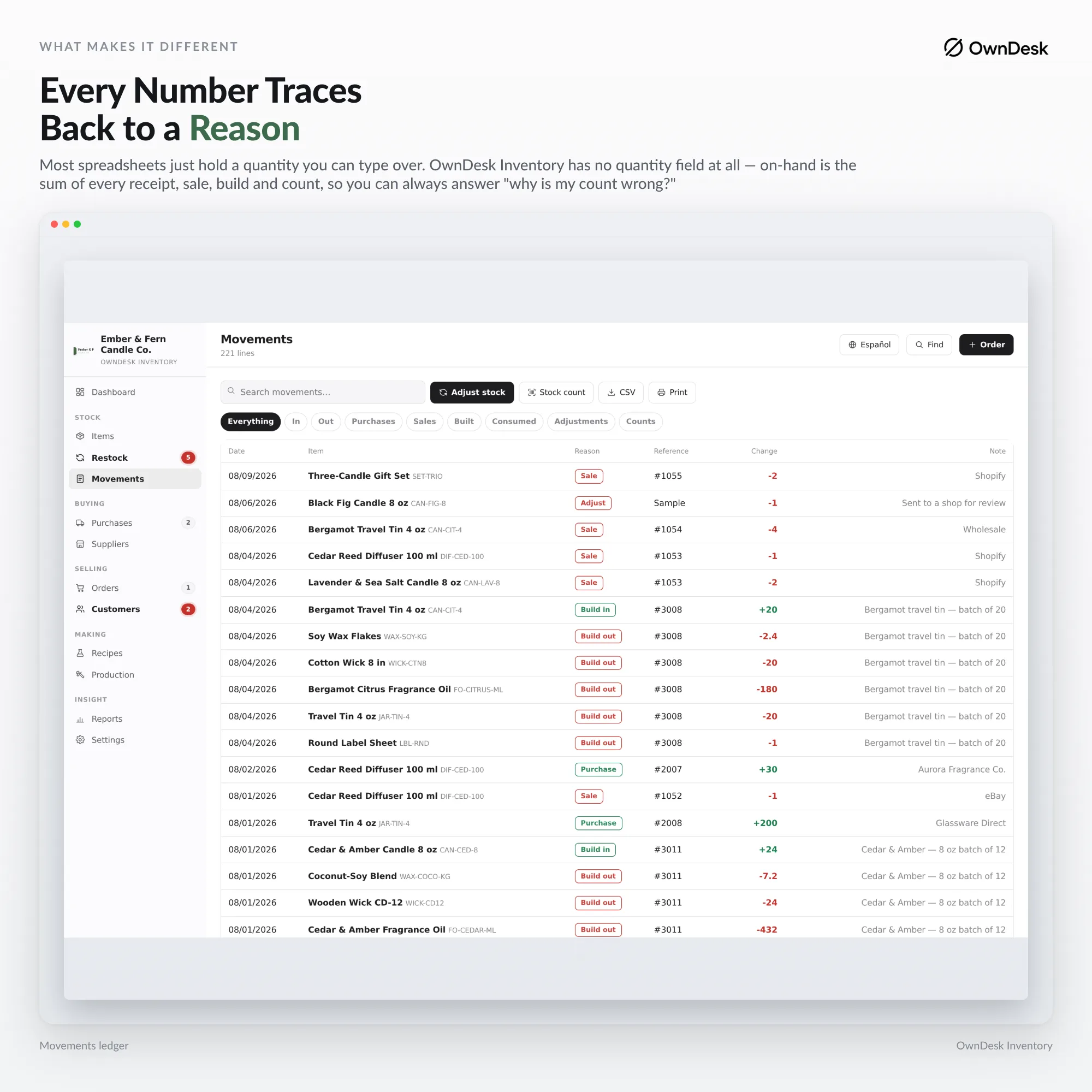
Every change is a movement in and out — a purchase, a sale, a build, a count, a correction — so the balance can always be explained rather than just overwritten.
Orders end to end
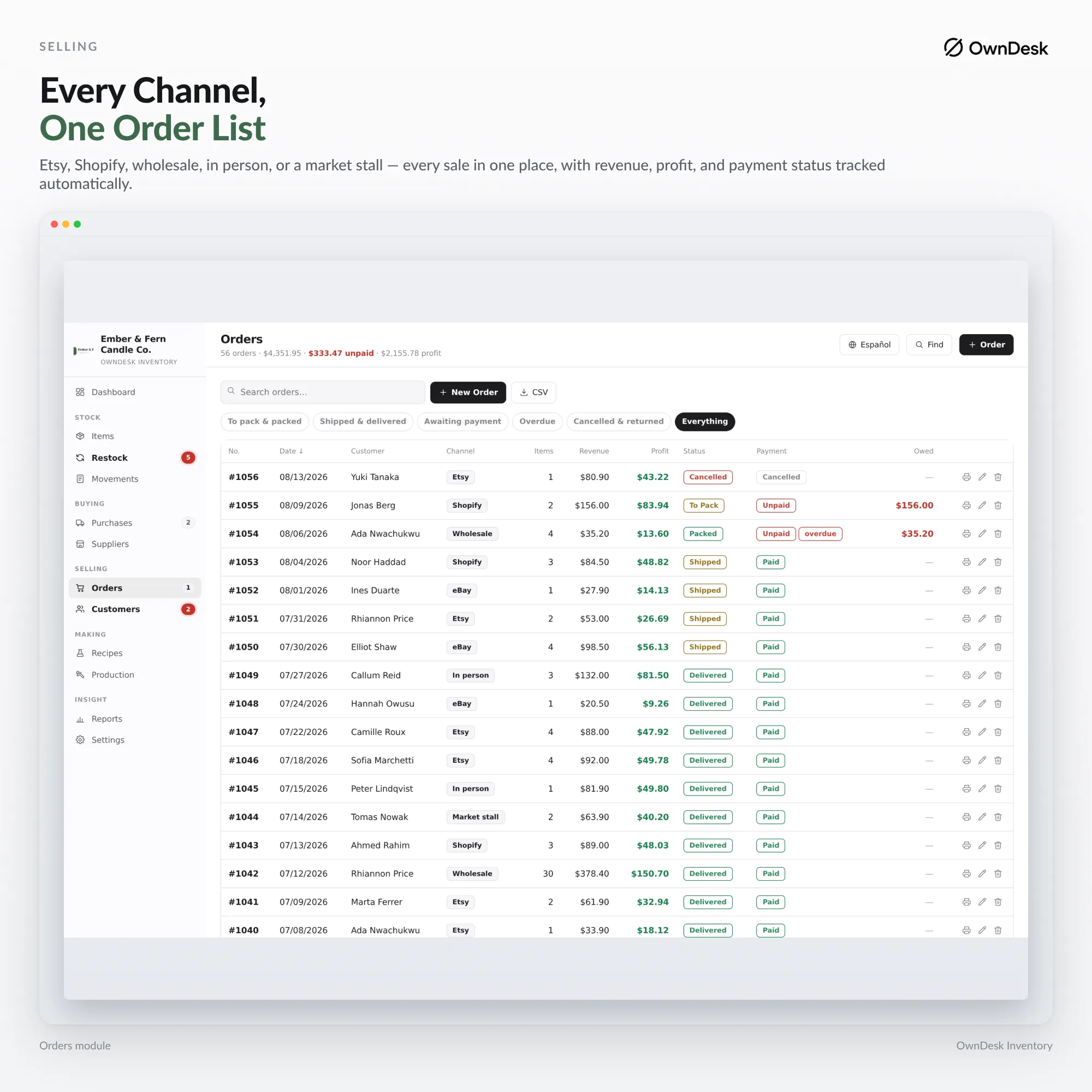
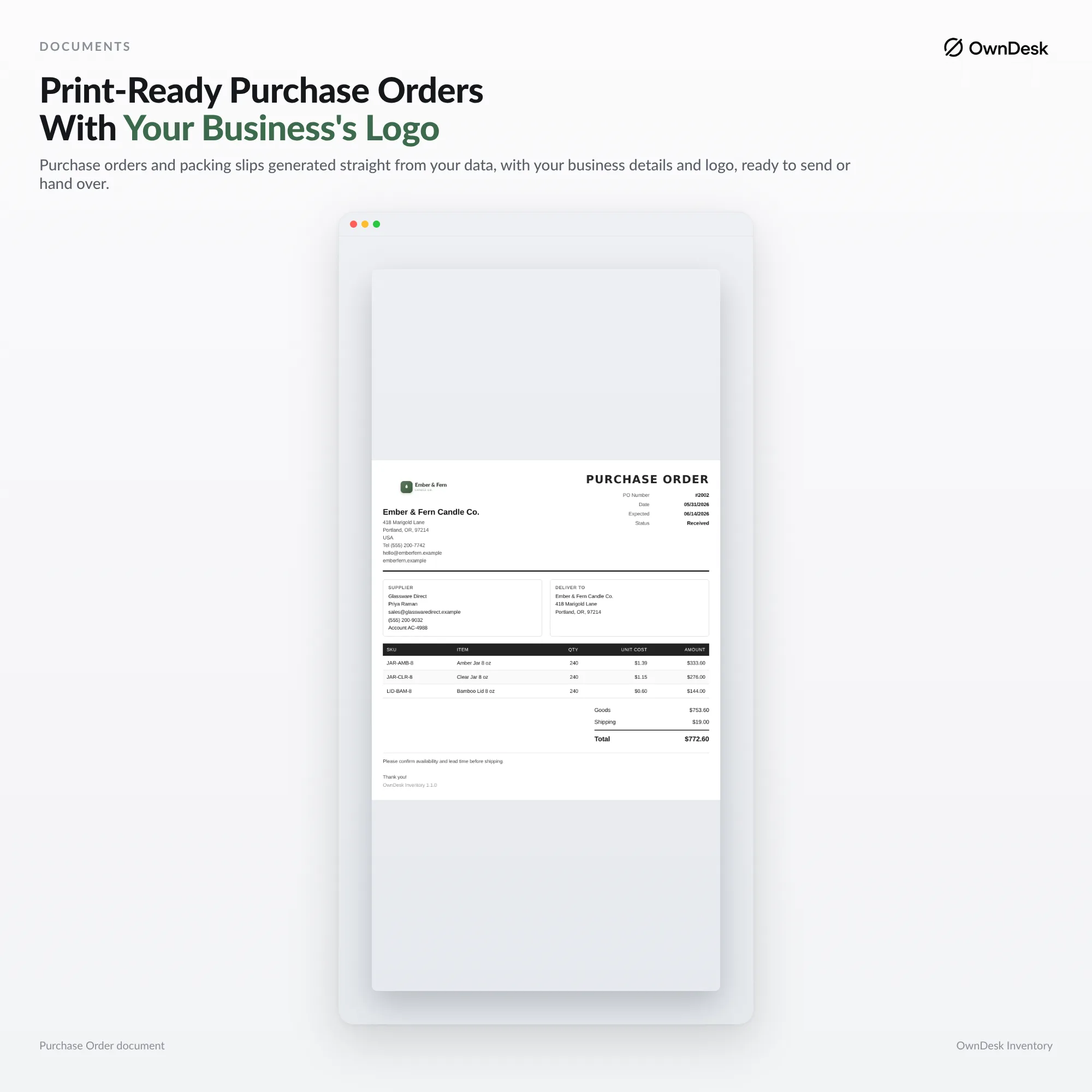
Raise a purchase order, receive it partially or in full, and see what's still outstanding with each supplier. Sales orders track packing, shipping and payment the same way.
Warnings before the gap
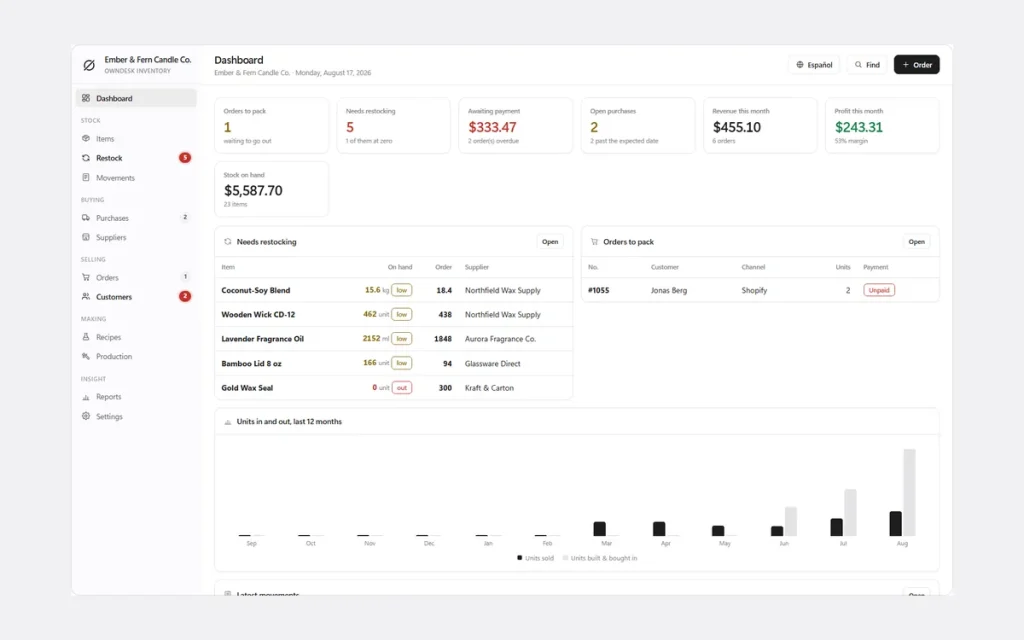
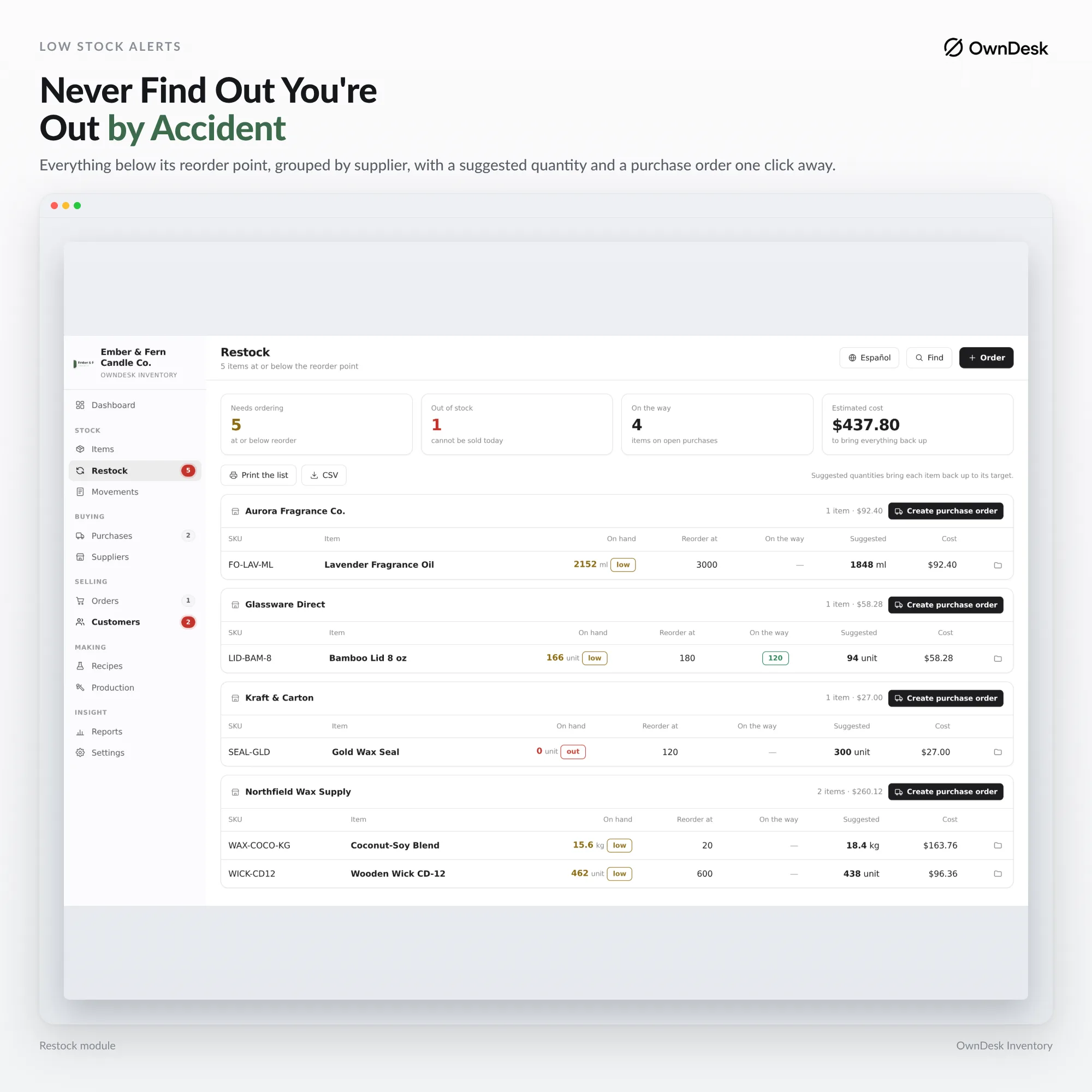
Set a minimum per item and the reorder list appears on your dashboard — grouped by supplier, with a suggested quantity — instead of living in your memory.
Work orders for what you build, not just resell
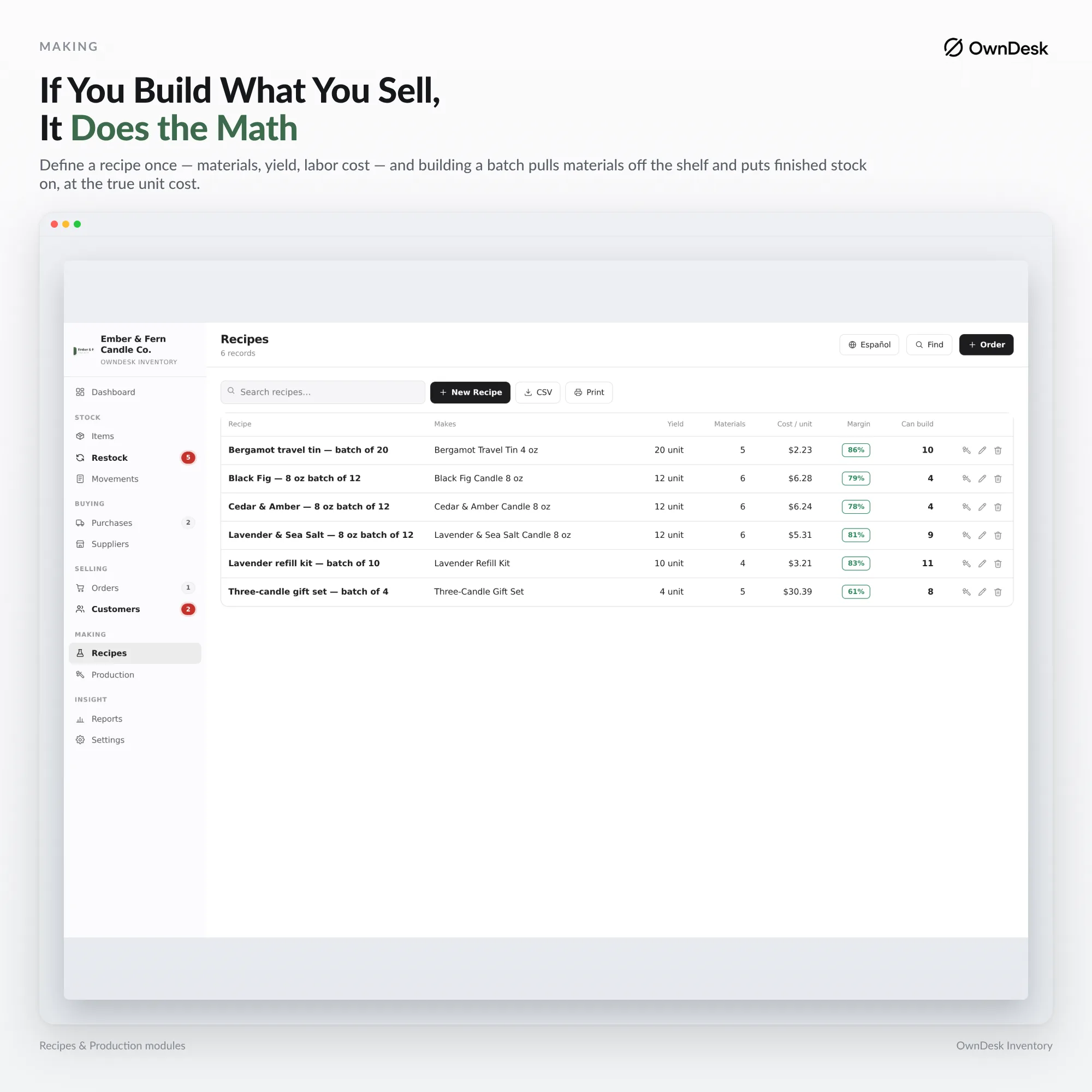
Define a recipe or bill of materials, run production, and it consumes components and posts finished stock in one step — with true cost per unit built from what the parts actually cost.
- Dashboard — orders to pack, restocking and stock value
- Items — products and materials, cost, price and margin together
- Movements — every stock change in and out, with a reason
- Restock — items at or below their reorder point, by supplier
- Purchases & purchase orders — raise, receive in full or in part
- Suppliers — lead time and on-time percentage from real history
- Orders — sales orders across every channel, packing and payment status
- Customers — who bought what, and what's still owed
- Recipes — bill-of-materials costing per finished product
- Production — runs that consume components and build stock
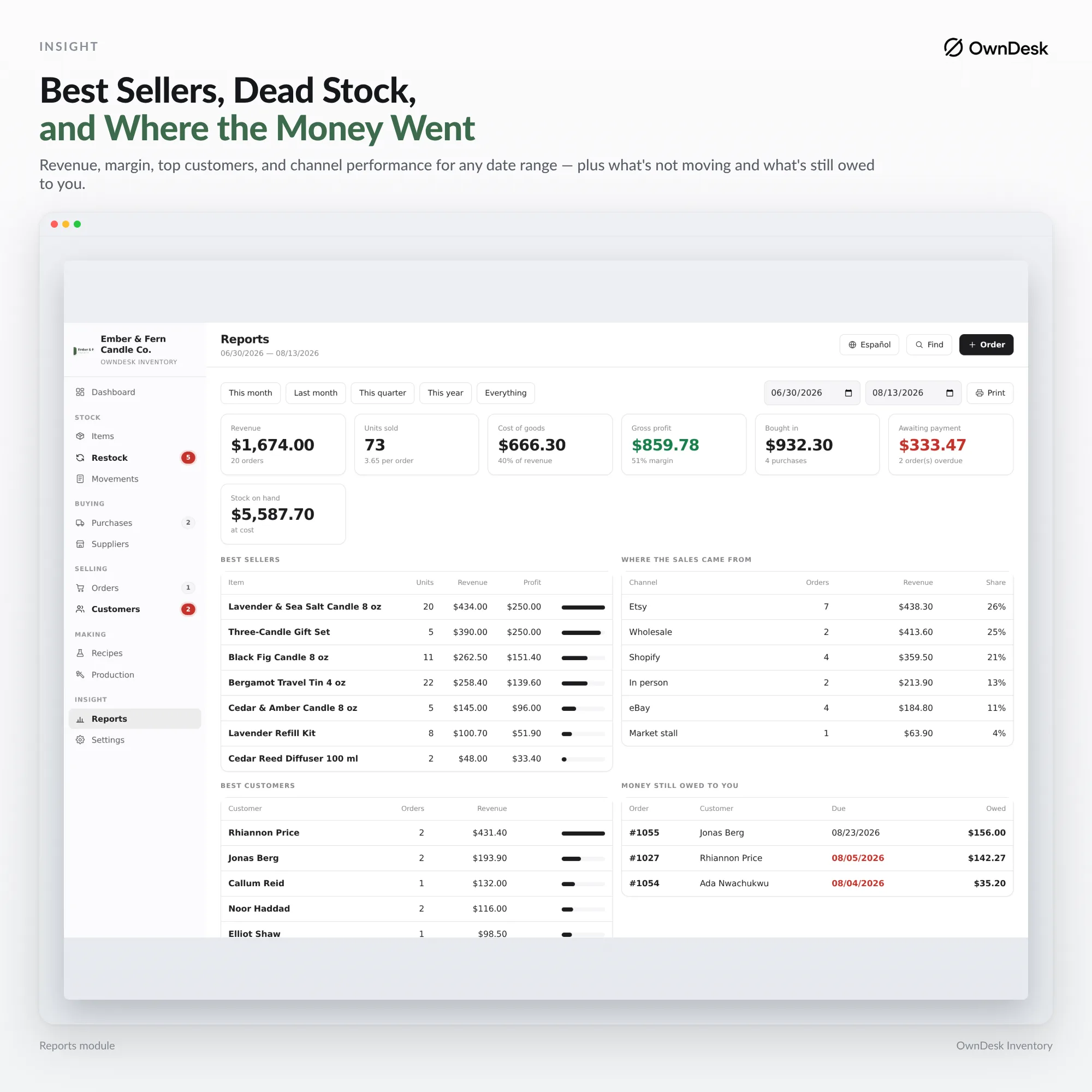
- Reports — revenue, margin, best sellers, channel breakdown — export to CSV
- Settings — business details, backup, language and theme
Why small businesses switch
You're not really choosing between two order tracking apps.
You're choosing between paying once and paying every month, forever, for integrations you may never use.
| OwnDesk Inventory | Cloud order & inventory platforms | |
|---|---|---|
| Price | $ 49.00 once | roughly $30–$300/mo |
| Works offline | Yes | No |
| Your data stays on your PC | Yes | No — lives on their servers |
| Item limit | None | Often capped on free/entry plans |
| Setup | Unzip, double-click | Account, onboarding, channel connections |
Platforms like Sortly, Katana, inFlow or Cin7 earn their monthly fee if you need to sync stock with Shopify, Amazon or a fulfilment partner — if that's you, buy one of those. OwnDesk Inventory is for the business that doesn't need channel sync: no API, no integrations, orders are entered rather than imported. Competitor pricing is publicly listed and may change — check their sites for today's figure.
Reviews
Real reviews, not written by me.
Left on Etsy, where they're moderated by someone who isn't me, across the OwnDesk product line. Names, dates and wording exactly as written.
★★★★★
“I’ve tried several similar programs, but this one is by far the most complete. It’s intuitive, user-friendly and works perfectly. Thank you so much.”
Aday · 7 August 2026 · OwnDesk customer
★★★★★
“Exactly what i was looking for. Was just one area i wanted to edit and Adrian messaged me back fast and upgraded it. Very Happy.”
Troy · 2 August 2026 · OwnDesk customer
★★★★★
“Great customer service from Adrian, I just downloaded and the first impression was very good. Looking forward to use it for the business real soon”
Francisco · 7 August 2026 · OwnDesk customer
★★★★★
“Really easy to use and makes managing employees much simpler”
Nicolas · 11 August 2026 · OwnDesk customer
From payment to working
Four steps, about two minutes.
Pay with card
Checkout runs on Stripe. Your card details never touch this site.
Download straight away
The link appears the moment payment clears, and arrives by email too.
Run the one-minute setup
Your business, your first item, your first supplier — that's it.
Start tracking orders
Sample data is already loaded so you see how it connects. One click clears it for your own stock.
If OwnDesk Inventory isn't right for your business, email me and you get a refund — no questions. If something's confusing, you're writing to the person who built it, not a queue. English and Spanish, both spoken here — and so is the app.
Questions
Before you buy.
What is the best order tracking software for a small business?
Is there free order tracking software for a small business?
Does it work as purchase order tracking software, including partial deliveries?
Can I track sales orders and customer orders in the same place?
Can it double as work order tracking software for a business that also makes what it sells?
Why does stock have to be tracked by movement instead of a quantity field?
Does it connect to Shopify, Amazon or my shipping carrier?
Do I need the internet or a monthly subscription to run it?
See your own orders and stock in it before you decide.
The live demo has real screens and sample data loaded — no sign-up, no credit card. If it fits, buying takes about a minute.
14-day money-back guarantee · instant download · one-time payment