
POS inventory system for multi-location retail.
Ring up sales at every register, keep stock accurate per location, and watch it all catch up automatically the moment each device reconnects — one payment, no monthly fee per register.
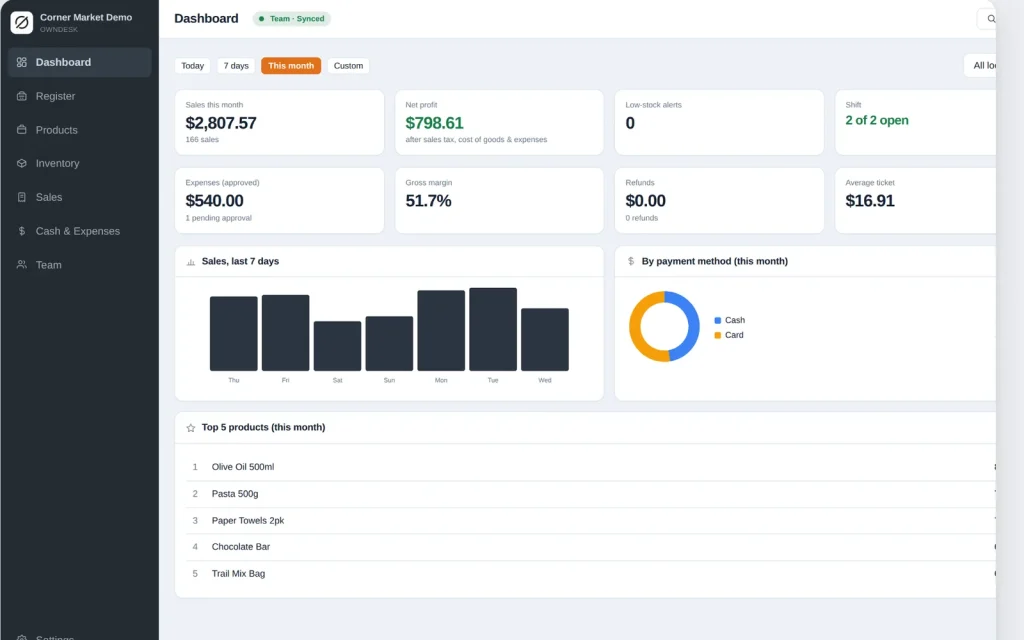
See it running
Walkthrough of OwnDesk POS.
Checkout, stock by location, shift cash reconciliation and the manager dashboard, recorded start to finish.
One-time payment
Never another monthly bill per register. The price you see is the whole price.
Every location, in sync
Ring up a sale at one site and the others catch up the moment they reconnect.
Stock by location
Each item carries its own quantity per store, not one number that hides the truth.
Works offline
Every register keeps selling through a dropped connection, no exceptions.
What it does
Everything a multi-location shop touches, on one screen.
Checkout & barcode scanning • stock by location • purchase & transfer flow • team accounts with PIN login • shift cash reconciliation • expense approvals • a manager dashboard across every store.
One counter or five, always in agreement
Every register and every location shares the same product catalog and stock count. Ring up a sale at one site and the others catch up the moment they reconnect — nobody reconciles two stores by phone at closing time.
Stock that knows which shelf it is on
Every item carries its own quantity per location instead of one combined number, so the dashboard can tell you Downtown is out while Westside has six on the shelf — not a figure that hides which store actually needs the reorder.
Real cash handling, not a formula you hope is right
Open a shift with a starting float, close it by counting the drawer, and see the exact difference. Expenses go through an approval step before they leave the record, so nothing walks out of the till unexplained.
A dashboard a manager actually reads
Net profit, margin, top sellers and sales across every location, filtered by date range — printed or exported to CSV, whichever your accountant asks for.
Why shops switch
You're not really choosing between two POS apps.
You're choosing between paying once and paying per register, per location, every month, forever.
| OwnDesk POS | Square for Retail / Lightspeed / Vend | |
|---|---|---|
| Price | $ 249.00 once | $69–$199/mo per location |
| Works offline | Yes, every register | Limited or none |
| Multi-location stock | Included | Often a higher tier |
| Team accounts / PIN login | Included | Often per-seat pricing |
| Setup | Unzip, activate, go | Onboarding call, account setup |
Competitor pricing is publicly listed and current as of this page's last update — check their sites for today's figure. OwnDesk POS does not process card payments itself or push your catalog to an online store; pair it with your own card reader if you need one.
From payment to selling
Three steps, about two minutes.
Pay with card
Checkout runs on Stripe. Your card details never touch this site.
Download and activate
The link appears the moment payment clears. Activating a device needs a connection once — after that it works offline.
Add your next register in minutes
It opens with demo data loaded. Clear it in one click, add your team, and every device you activate joins the same shared stock and sales.
If OwnDesk POS isn't right for your shop, email me and you get a refund — no questions. If something's confusing, you're writing to the person who built it, not a queue. English and Spanish, both spoken here.
Questions
Before you buy.
What is the best POS inventory system for a small business with more than one location?
Can two registers or two locations really use it at the same time?
Does it work without an internet connection?
How does it track stock across more than one location?
Does it handle employees and cash handling, or just ring up sales?
What happens if two registers sell the last unit at the exact same moment, both offline?
What do you need to run it?
See your own stock and sales in it before you decide.
The live demo has real screens and demo data loaded — no sign-up, no credit card. If it fits, buying takes about a minute.
14-day money-back guarantee · instant download · one-time payment