
Software for tree service business with per-tree estimates, crew scheduling and machine costs.
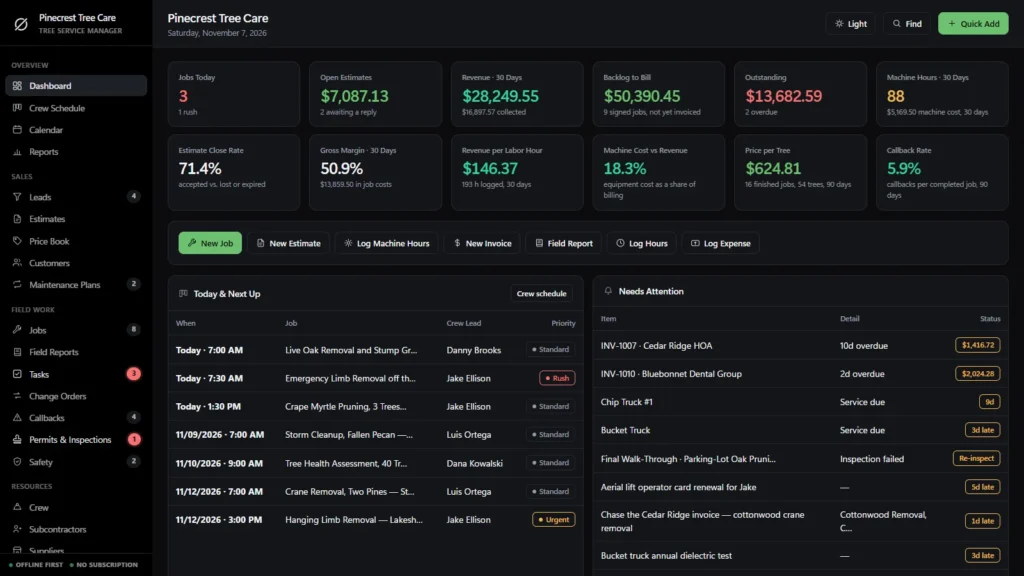
Tree service business software in one offline file: an estimator that prices each tree from species, trunk size, risk and debris and shows your cost and margin, a CRM for leads and customers, a crew schedule with one row per crew leader, invoicing, and a log that puts crane, chipper and bucket truck hours into the cost of every job. Business management software for small tree service companies and arborists, bought once, with no monthly fee.
Most software for a tree service business is rented by the month, and the records live on somebody else’s server. This one is a file you own, with the tree-specific parts built in.
Key benefits
One-time payment
No monthly fee, no per-user charge and no yearly renewal. The price you see is the whole price.
Priced tree by tree
Species, height, trunk diameter, risk and debris in; price, your cost and margin out, for every tree.
Machines in the job cost
Log crane, chipper and bucket truck hours and see the real margin, not just the crew’s.
One board for every crew
One row per crew leader, one column per day, and an empty slot is one click from a booked job.
What this tree service business software does
Everything a small tree company runs on, in one place.
You get a dashboard, a crew schedule, a calendar and reports, plus leads, estimates, a price book and customers, so the CRM and the scheduling live in the same file. Jobs, field reports, tasks, change orders, callbacks, permits and safety records sit alongside them.
Crew, subcontractors, suppliers, tools and vehicles and materials are tracked, and invoices, purchase orders, expenses and timesheets are included. Every list prints and exports to CSV, and you can keep a JSON backup.
The per-tree estimator
Add one row per tree: species, height, trunk diameter at chest height, the service (removal, pruning, crown reduction, storm cleanup or stump grinding only), the risk (open yard, near the house, over power lines, crane required) and what happens to the debris. Tick Stump to add the grinding.
Each row shows the price, your cost, the margin and the machine hours it expects to use. Add to estimate and every tree becomes a line that keeps its margin. The rates behind it are yours to edit in My rates; they are examples until you set your own.
Equipment use, costed by the hour
Set the cost per hour of each machine once: crane, bucket truck, chipper, stump grinder, trucks. Log the hours each one ran on each job. The job cost sheet shows crew, machines and everything else, and the dashboard shows machine hours, machine cost and machine cost as a share of billing.
Print an entry for the job’s equipment sheet. For rented machines, use the rental cost per hour so the cost is not counted twice.
CRM: leads and customers
Every call becomes a lead with the tree and the stage it is at. One button turns a lead into a customer, who keeps their jobs, invoices, payments and notes such as the gate code. The Customers list shows what each one has paid you over the years.
Crew schedule and calendar
One row per crew leader, one column per day, with urgent and rush calls colored and what is still unassigned in view. The monthly calendar adds permits, inspections, plan visits, invoice due dates and machine service dates.
Estimates, invoicing and real margin
Estimates print on your letterhead with a signature line, and an accepted one becomes a job in one click. Job price is the estimate plus approved change orders. Cost is expenses plus crew hours times their rate plus machine hours times their cost per hour, so a job spending faster than it is being finished is visible early.
Annual tree care plans
Recurring plans for seasonal pruning, tree health monitoring and storm readiness, each with its next visit, renewal date and annual price. The plans renewing in the next 30 days are listed on the dashboard so nobody lapses by accident.
The tree-specific paperwork
Permits, crane lifts and certifications are tracked too.
Tree work has paperwork that a generic job tracker leaves out. These are your own records, kept next to the job they belong to.
Permits & inspections
Tree removal permits, protected-tree approvals, street closures for crane lifts, utility coordination, HOA approvals and final walk-throughs. A failed inspection raises an alert.
Safety records
Toolbox talks, rigging and crane lift plans, aerial lift inspections, line clearance checks, near misses and corrective actions.
Crew and certifications
Cost rate, role, truck, certification (ISA, aerial lift card, signal person) and its expiry date, plus hours worked in the last 30 days.
What it does not do
It prices from the numbers you type: it does not identify species, judge tree health or risk, or measure from satellite or drone images. No GPS, no photo library, no texts or emails sent from the app, no client portal, no card processing, no payroll and no two people editing at once.
How a tree job runs
From the first call to paid in four steps.
Log the lead and price the trees
Turn the call into a lead, walk the yard and price each tree with its risk and debris plan. Send the printed estimate.
Accept it and book the crew
An accepted estimate becomes a job in one click, with its price and cost budget. Drop it into the crew leader’s day.
Log hours and machine time
Timesheets set the labor cost and Equipment Use sets the machine cost. The job cost sheet and margin update on their own.
Invoice and collect
Bill a deposit, progress or final invoice, record the payment and see what is still owed.
Why tree companies switch
Tree care businesses outgrow notebooks and generic field service software.
Generic field service software is usually rented by the month and prices a visit, not a tree, and the machines never reach the job cost. Spreadsheets are free but cannot price a tree with its risk, count crane hours or tell you which job made money.
This tree service business software is a file you own, with the tree-specific parts built in.
| OwnDesk Tree Service | Subscription field service software | Paper & spreadsheets | |
|---|---|---|---|
| Price | $129.00 once | Monthly fee, for as long as you use it | Free, but it costs your evenings |
| A price for each tree, with its risk, your cost and margin | Built in | Usually a flat line item | Your own formulas |
| Crane, chipper and bucket truck hours inside the job cost | Included | Rarely | A separate sheet |
| Crew schedule by leader and day, plus a job calendar | Included | Usually | A whiteboard |
| Leads, customers, estimates and invoices in one place | Included | Varies | Retyped between files |
| Works offline | Yes | Often needs a connection | Yes |
| Your records if you stop paying | Still yours | Access ends | Still yours |
| Crew phone app, GPS, customer texts, online payments, client portal | Not included | Often included | No |
| Several people at once | Not included — one computer at a time | Usually included | Only through a cloud drive |
The subscription column is a general description of field service software sold by the month, not a claim about any single company — features and pricing differ, so check each site.
OwnDesk Tree Service is single-computer software: it does not sync between devices, track trucks by GPS, send messages, keep photos, process card payments, run payroll or measure trees from images.
From payment to your first estimate
Three steps, about two minutes.
Pay with card
Checkout runs on Stripe. Your card details never touch this site.
Download and open
The link appears the moment payment clears. Double-click the file — it opens in your browser, no install, no internet needed after that.
Look around, then start fresh
It opens with a sample tree service already loaded. Remove the sample data from Settings, set your machine costs and rates, and add your customers and jobs.
If OwnDesk Tree Service isn't right for how you run your tree business, email me and you get a refund — no questions. If something's confusing, you're writing to the person who built it, not a queue.
Custom build
Need it to work exactly the way your tree company does?
I can adapt OwnDesk Tree Service to the way your tree business works: your own fields, your estimates, your reports, or two OwnDesk products combined into one. It’s still a one-time payment, it still runs offline, and it’s yours. I built the software, and I build your version myself.
- Your own per-tree rate tables and service names
- An estimate or job sheet laid out the way your customers and insurers expect
- Your landscaping or lawn care work in the same file as your tree work
Custom builds start at $490, paid in two halves: 50% to start, 50% after you’ve tested it.
Tell me about your businessQuestions
Before you buy.
What is software for a tree service business?
Is this tree service business software for small companies?
Is it all-in-one business management software for tree service teams?
Does it have a CRM and scheduling for a tree service?
How does the per-tree estimator work?
Can I track crane, chipper and bucket truck costs on each job?
Can it do estimates and invoicing for a tree service?
What is the best software for managing a tree service and arborist business?
What is the best tree service business software for scheduling and invoicing?
Is it tree care software for arborists as well as tree removal?
Does it handle permits, safety records and utility coordination?
Can it take card payments, send texts or run payroll?
Can several people use it at the same time?
Does it store photos or measure trees from satellite images?
Where are my records stored, and is there a subscription?
Can you customize it for my tree service?
Price a tree in it before you decide.
The live demo has real screens and a sample tree service loaded — no sign-up beyond your name and email, no credit card. If it fits, buying takes about a minute.
14-day money-back guarantee · instant download · one-time payment