
Concrete contractor software with cubic-yard estimates, tool tracking and invoicing.
Concrete contractor estimating software and job management in one offline file: a takeoff that turns length, width and depth into cubic yards and trucks, estimates from your own price book, pour dates on the calendar, a crew schedule, tool tracking that shows who has every trowel, saw and screed, materials and stock, job costing and invoicing. Bought once, with no monthly fee per user.
Most construction software is rented by the month, priced per seat, and built for general contractors running every trade on a building. This one is built around a concrete crew, and the file is yours.
Key benefits
One-time payment
No monthly fee, no charge per user and no yearly renewal. The price you see is the whole price.
Yards, not guesses
Length, width and depth become cubic yards with waste, rounded to the quarter yard, with the trucks it takes.
Who has the saw?
Every tool checked out to a person and a job, with a due-back date and the overdue ones flagged.
Margin per job
Price plus change orders against ready-mix, materials, subs and crew hours, and what each yard really sold for.
Concrete contractor management software
Everything a concrete company runs on, in one place.
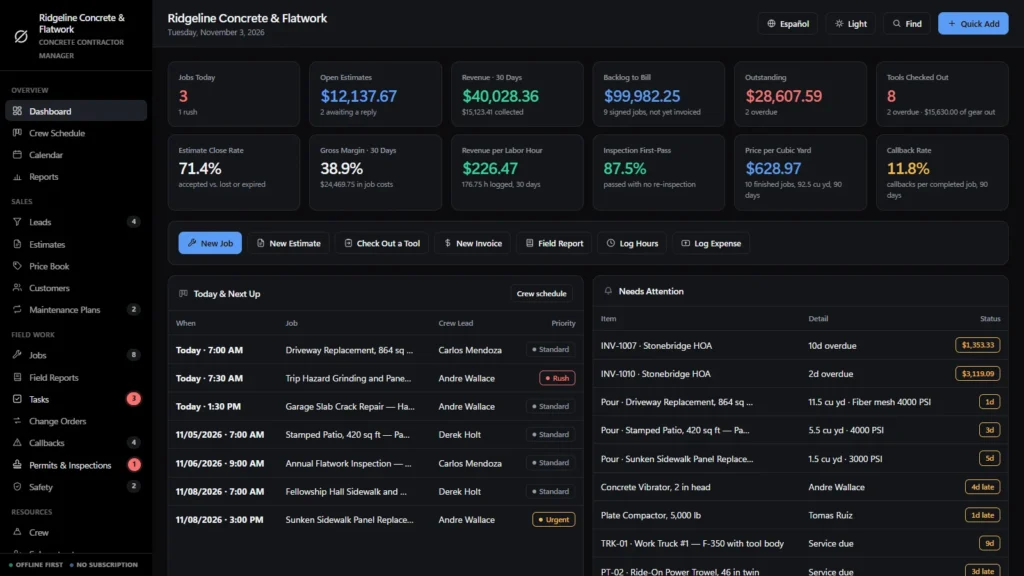
You get a dashboard, a crew schedule, a calendar, leads, estimates with a concrete takeoff, a price book, customers, sealing and maintenance plans, jobs, field reports, tasks, change orders, callbacks, permits and inspections, safety, crew, subcontractors, suppliers, tools and equipment, a tool checkout log, materials and stock, invoices, purchase orders, expenses, timesheets and reports.
It works in dollars by default with other currencies available, switches between English and Spanish, exports CSV and a full backup file, and prints estimates, invoices, purchase orders, change orders, field reports, checkout slips and the job cost sheet on your letterhead.
Concrete contractor estimating software
Measure each pour in feet and the depth in inches. The takeoff works out the cubic yards, adds the waste allowance, rounds up to the quarter yard and shows the 10-yard trucks; a 36 × 24 ft driveway at 4 in comes out at 11.75 yards with 8% waste. Mesh, vapor barrier, finishing and sealer come from the same area, forms and joints from the length, base rock in tons.
Every line comes from your price book with your cost, markup and crew hours, so the estimate shows the margin before you send it. An accepted estimate becomes a job in one click.
Tool tracking for concrete contractors
Give each trowel, saw, screed, vibrator, compactor and laser an asset tag, then check it out to a person and a job with a due-back date. The register shows who has it and on which job; the dashboard shows how many tools are out, the replacement value on job sites and which ones are late.
Check-in records the condition. A tool that comes back damaged or needing service goes to In Repair, so nobody takes it to the next pour. Print a checkout slip for the crew lead to sign.
Asset management for your equipment
Owned, hired or leased; serial number or plate; home location; purchase price or replacement value; rental rate per day; engine hours; last and next service or blade change. Services coming due turn amber, then red, in the register and show on the calendar and in Needs Attention, and search finds any machine by its tag.
Inventory tracking for materials
Rebar, mesh, chairs, form lumber, stakes, sealer, color hardener and blades, each with a minimum level, unit cost, stock value and supplier. Low stock raises an alert, and receiving a purchase order adds to stock and books the cost against the job.
Project management for concrete jobs
Jobs carry cubic yards, mix, finish and pour date. Pours in the next seven days are listed on the dashboard; the crew schedule lays out the week by crew lead; tasks run on a kanban board; field reports record weather, delays and the yards placed.
Permits and inspections cover footing, pre-pour, slab and final inspections and cylinder break tests, with failed inspections flagged.
Concrete contractor invoicing software
Deposit, progress billing, final invoice, change order or credit memo, with sales tax and your payment terms. Record full or partial payments and see what is outstanding and what is overdue.
Real margin on every job
Job price is the estimate plus approved change orders. Cost is ready-mix, materials and subs from expenses plus crew hours times rate. The job cost sheet shows price, cost, margin, budget used and the tools out on that job.
Crew, subs, suppliers and safety
Certifications with expiry dates, subcontractor insurance expiry, supplier accounts and spend, and safety records for silica dust control, trenches, pump truck setup and concrete burns.
Concrete contractor software, honestly
Built for the concrete company run from one office.
If your estimates live in a spreadsheet, your pour dates on a wall calendar and your tools on a whiteboard, this puts them in one place. It should also say where its limits are.
Tool tracking by checkout, not by GPS
Tools are tracked by the checkouts you record. There is no GPS, no barcode or QR scanning and no Bluetooth tag; the asset tag is a label you search for.
A takeoff from your measurements
You type in the lengths, widths and depths. It does not read plans or PDFs, and it does not design reinforcement or slab thickness.
Works with no signal
The file runs offline in your browser on a laptop, desktop or tablet. Nothing is uploaded anywhere.
What it does not do
No cloud sync, no several people editing at once, no automatic stock deduction for material used on a job, no ordering from the ready-mix plant, no card processing, no payroll and no client portal.
How a job runs
From the measurement to the final invoice.
Measure and estimate
Type the dimensions into the takeoff, pick the mix, mesh, base and finish, and print the estimate with your markup.
Schedule the pour
The accepted estimate becomes a job. Set the crew lead, the dates and the pour day; order the ready-mix with a purchase order.
Send the tools
Check the trowel, saw and compactor out to the crew lead for that job, with the date they are due back.
Bill and close
Deposit, progress and final invoices; check the tools back in; the job cost sheet shows what the job made.
Why concrete contractors switch
Concrete contractor software you own, or construction software you rent per seat.
Subscription construction platforms bring cloud access, mobile apps and many users, and charge every month, often per user. Spreadsheets are free but cannot check out a tool, flag a late return or turn a slab into trucks of concrete.
This concrete contractor software is a file you own, with the concrete parts built in.
| OwnDesk Concrete | Subscription construction software | Paper & spreadsheets | |
|---|---|---|---|
| Price | Original price was: $179.00.$129.00Current price is: $129.00. once | Monthly fee, often per user | Free, but it costs your evenings |
| Cubic-yard takeoff with waste and trucks | Built in | Varies | Your own formulas |
| Tool checkout: who has it, which job, due back | Built in | Often an add-on | A whiteboard |
| Estimates, job costing and invoices in one place | Included | Usually | Separate files |
| Works offline | Yes | Needs a connection | Yes |
| Your records if you stop paying | Still yours | Access ends | Still yours |
| GPS or barcode tool tracking, mobile crew app | Not included | Often included | No |
| Several people editing at once | Not included — one computer at a time | Usually included | Only through a cloud drive |
The subscription column is a general description of construction software sold by the month, not a claim about any single company — features and pricing differ, so check each site.
OwnDesk Concrete is single-computer software: it does not sync between devices, track tools by GPS or barcode, order from the plant, process card payments or run payroll.
From payment to your first estimate
Three steps, about two minutes.
Pay with card
Checkout runs on Stripe. Your card details never touch this site.
Download and open
The link appears the moment payment clears. Double-click the file — it opens in your browser, no install, no internet needed after that.
Look around, then start fresh
It opens with a sample concrete company already loaded. Remove the sample data from Settings, run the setup wizard and add your price book and tools.
If OwnDesk Concrete isn't right for how you run your concrete company, email me and you get a refund — no questions. If something's confusing, you're writing to the person who built it, not a queue. English and Spanish, both spoken here.
Custom build
Need it to work exactly the way your concrete company does?
I can adapt OwnDesk Concrete to the way your concrete business works: your own fields, your estimate layout, your reports, or two OwnDesk products combined into one. It’s still a one-time payment, it still runs offline, and it’s yours. I built the software, and I build your version myself.
- Your own price book and estimate layout for driveways, slabs or decorative work
- A builder schedule that tracks every lot from footing inspection to final pour
- A pour log with slump, air, temperature and cylinder numbers per truck
Custom builds start at $490, paid in two halves: 50% to start, 50% after you’ve tested it.
Tell me about your businessQuestions
Before you buy.
What is the best concrete contractor software for a small company?
Is it concrete contractor estimating software?
Is it tool tracking software for concrete contractors?
Does it work as asset management or asset tracking software for concrete contractors?
Is it tool management software for concrete contractors?
Is it inventory management software for concrete contractors?
Is it concrete contractor invoicing software?
Is it project management software for concrete contractors?
Is it construction management software for concrete contractors, or general contractor software?
How does it handle pour dates?
Can several people use it at the same time?
Where are my records stored, and is there a subscription?
Is there a free trial?
Can you customize it for my concrete company?
Run a takeoff and check out a tool before you decide.
The live demo has real screens and a sample concrete company loaded — no sign-up beyond your name and email, no credit card. If it fits, buying takes about a minute.
14-day money-back guarantee · instant download · one-time payment