
Electrician software for UK electricians and small electrical firms.
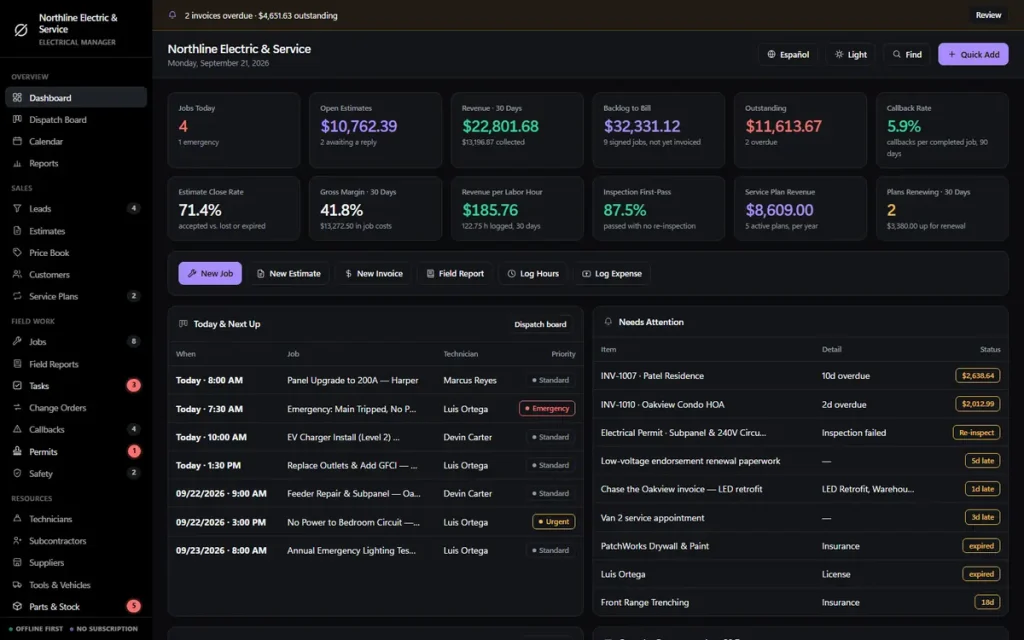
You are halfway up a loft ladder when the phone goes, the quote you promised for a rewire is on the back of an envelope, and last month’s invoices still have not gone out. OwnDesk Electrical is electrician software that keeps quotes, jobs, your diary, job costing and invoices in one file that opens with a double-click. Pay once. Works offline. No monthly fee.
The demo opens with dollar sample data, and you switch to £ in Settings.
Sound familiar?
The office is the passenger seat of the van.
Quotes written on a pad and priced from memory. A price for the same job that is different every time you give it. Materials bought on the card and never added to the job, so you do not find out it lost money until the end of the month.
Most electrician software fixes that by charging you every month, for as long as you trade, for features built for a firm with a back office and twenty vans. You are one electrician, or a few, with a laptop.
Quotes that take all evening
Priced item by item every time, and never the same twice. Unsent because it is late.
Materials nobody costed
Cable, a consumer unit, a trip to the wholesaler. It all comes out of your margin and not one job shows it.
Another monthly bill
A subscription that never stops, for features a small firm never opens.
What it is
Business software for electricians, in one file on your computer.
OwnDesk Electrical is software for electricians that you open with a double-click. There is nothing to install, no account to create and no server behind it. Your records stay on your own computer, and it works in the loft, the plant room or anywhere else with no signal.
It is for sole traders and small electrical firms who want one tidy place for quotes, jobs, customers, materials and invoices. You pay once, not monthly.
It is not for a firm that needs everyone editing the same job live. The comparison below is straight about that.
Electrician business software
Everything a small electrical firm runs on, in one place.
Dashboard • dispatch board • calendar • leads • quotes • price book • customers • jobs • variations • field reports • callbacks • service plans • inspections • electricians • subcontractors • suppliers • vans and tools • stock • purchase orders • invoices • expenses • timesheets • CSV export and backup.
Quotes from your own price book
Set your services, consumer units, cable, accessories and fittings once, each with a cost and a sell price. On a quote, choose “Add from price book” and the line lands with your cost and the mark-up that reaches your price. Cost and margin update as you build, and the quote prints on your own letterhead with a signature line. Quote status runs draft, sent, accepted, rejected or expired, with a close rate on the dashboard.
A takeoff that also counts your time
Enter the cable, ten sockets and twelve downlights, add a waste percentage, and the takeoff shows what to order, rounded up to whole units. Give each item a fitting time and it adds one labour line at your own cost and charge-out rate. It works from numbers you type. It does not read plans.
Electrician dispatch software
One row per electrician, one column per day. Each job is a card with its arrival window, marked standard, urgent or emergency. Click an empty cell to book a job into that slot and see what is still unassigned. You enter and move the jobs yourself.
Job management software for electricians
Every job keeps its customer, its electrician, its price, its cost budget, its variations and its field reports together. Job price plus approved variations, minus expenses and electrician hours, gives your margin, and a 0 to 100 health score flags the jobs going wrong.
Invoices, deposits and stage payments
Service, deposit, progress, final, variation and credit-memo invoices (what you would call a credit note), with Paid, Partial and Overdue worked out for you. Bill time and materials, or a fixed price per job. It prints on your letterhead and your browser saves it as a PDF to email.
Materials and van stock
Stock has a minimum level and a low-stock alert. A purchase order marked “Received” writes the cost to the right job and tops up the matching part, once. That is the difference between knowing what a job really cost and finding out later.
Callbacks, service plans and inspections
Callbacks and snagging items with an owner and a due date. Service plans with renewal dates for customers you look after regularly. A log of inspections and notifications with their reference, who they were with, the date and the result, with an alert on a fail.
Reports your accountant can use
Work still to invoice, revenue per labour hour, margin by job, close rate and callbacks. Print them, or export every list to CSV and open it in Excel or Google Sheets.
Electrician job management software
From quote to paid in four steps.
Electrician management software mostly has to keep four things in one place: what you quoted, who is going, what it cost and what you are owed.
Quote it
Add the customer, build the quote from your price book, use the takeoff for the materials and print it for them to sign.
Book it
Accepted quotes become jobs. Drop the job on the dispatch board against an electrician and a day.
Do it and cost it
Log hours, materials and expenses against the job. The margin updates as you go, not at year end.
Invoice and chase
Invoice from the job, take a deposit or a stage payment, and see at a glance who is overdue.
Longer jobs work at the level of the job: progress, a task board, variations and stage billing. There are no Gantt charts, and it is not meant to run a big multi-trade project.
Built for UK electricians
Pounds, VAT, UK dates and your own registration number.
A few settings do most of the work. Each takes a minute, once.
Pounds and UK dates
Choose British Pound (£) in Settings, and the DD/MM/YYYY date format. They apply to every quote, job and invoice.
VAT on quotes and invoices
Change the tax label from “Sales Tax” to “VAT”, set your default rate, and it adds that percentage to each quote, invoice and purchase order. Each one can carry its own percentage. It adds the tax you set. It does not file VAT or work with Making Tax Digital.
Your registration number on every document
The company profile has a number field that prints on every quote and invoice. It is labelled “Electrical License No.”, so use it for whatever registration number you want shown, such as your competent person scheme number.
Cable by the roll, not by the metre
The unit list is each, ft, box, bag, roll, pack, kit, hour and day. There is no metre unit, so price cable by the roll or by “each”. The automatic 10% cable waste only applies to the “ft” unit, so add the waste yourself on other units.
What it does not do: it does not issue EICRs, Electrical Installation Certificates or Part P notifications, does no wiring-regulations checks or load calculations, and does not calculate CIS deductions or the VAT domestic reverse charge. Use your certification software and your accountant for those. Its own screens use US wording, so you will see “estimate” for quote, “change order” for variation, “labor” and “license”, and the inspection log offers a US list of permit types, where “Other” covers your own. The documents and fields are the same ones you already use.
Electricians accounting software?
It covers the job side, not the whole books.
Invoices, payments, expenses, timesheets, job costing and margin, with every list exportable to CSV for your accountant. That is the part of the books you do from the van and the kitchen table.
It is not a general ledger. It does not file VAT, run payroll, handle CIS or read your bank feed, so keep your bookkeeping software for those. Export a CSV at month end and send it to your accountant.
Software for electricians compared
Pay once, or pay every month?
Cloud electrician software and a one-off file suit different firms. This is how they differ in practice.
| OwnDesk Electrical | Typical cloud electrician software | |
|---|---|---|
| Payment | One-off: $49.00 | Monthly or annual subscription |
| Works offline | Yes | Usually not |
| Where your data lives | On your computer | On the provider’s servers |
| Users | No seats to count | Often priced per user |
| Setup | Unzip, double-click | Account, onboarding, sometimes training |
| Price book, quotes, dispatch board, job costing | Included | Usually included |
| Texts, online booking, certificates, GPS | No | Often yes |
| Several people editing live | No | Often yes |
Cloud systems are the better fit if you have a back office, several vans updating jobs live, or want certificates and texts built in. OwnDesk Electrical is the better fit if you are a sole trader or a small firm, want to own your records and do not want another monthly bill. If you are not sure, the demo costs nothing.
From payment to working
Three steps, about two minutes.
Pay by card
Checkout runs on Stripe. Your card details never touch this site.
Download straight away
The link appears the moment payment clears, and arrives by email too.
Unzip and double-click
It opens with sample data loaded. Settings > Demo Data > Remove Demo Data clears it, then set £, UK dates and your VAT rate.
If OwnDesk Electrical is not right for how you run your electrical business, email me and you get a refund, no questions. If something is confusing, you are writing to the person who built it, not a queue. Support is in English and Spanish. There is no renewal fee and no per-user fee.
Custom build
Need it to work exactly the way your firm does?
I can adapt OwnDesk Electrical to the way your firm works: your own fields, your quotes, your reports, or two OwnDesk products combined into one. It’s still a one-off payment, it still runs offline, and it’s yours. I built the software, and I build your version myself.
- A CIS deduction line on invoices to the main contractors you work for
- A van stock sheet per electrician, with your own reorder levels
- A landlord register with each property and the date its next EICR is due
Custom builds start at $490, paid in two halves: 50% to start, 50% after you’ve tested it.
Tell me about your businessQuestions
What electricians ask before buying.
What is the best electrician software for a small UK electrical business?
Is this job management software for electricians?
Does it work as electrician dispatch software?
Is it accounting software for electricians?
Can I build quotes from my own price book, and does it do a takeoff?
Does it handle VAT, CIS or electrical certificates like an EICR?
Is it a subscription, and does it work without internet?
Can my electricians or office staff use it at the same time?
Can you customise it for my electrical firm?
See your own quotes and jobs in it before you decide.
The live demo has real screens and sample data loaded, with no sign-up and no card. If it fits, buying takes about a minute.
14-day money-back guarantee · instant download · one-off payment