
Junk removal software with load pricing, routes and a dump log.
Junk removal business software for the whole job in one offline file: a load pricing calculator that shows the price, the time, the dump fee and your net dollars per hour as you type, route scheduling with an arrival time at every stop, recurring pickup plans that schedule themselves, a dump and recycling log with your diversion rate, and real margin on every job. Software for a junk removal business, bought once, with no monthly fee.
Most junk removal scheduling software is rented by the month, and the records live on somebody else’s server. This one is a file you own, with the hauling-specific parts built in.
Key benefits
One-time payment
No monthly fee, no per-user charge and no yearly renewal. The price you see is the whole price.
Priced by the load
Cubic yards, material, access and special items in; price, time, dump fee and net dollars per hour out.
Routes with arrival times
Stops in driving order, an ETA at each one and revenue per route hour, from the minutes you enter.
Dump and recycling log
Every scale ticket, every ton, and the share of what you hauled that was recycled, donated or reused.
What this junk removal software does
Everything a small junk removal business runs on, in one place.
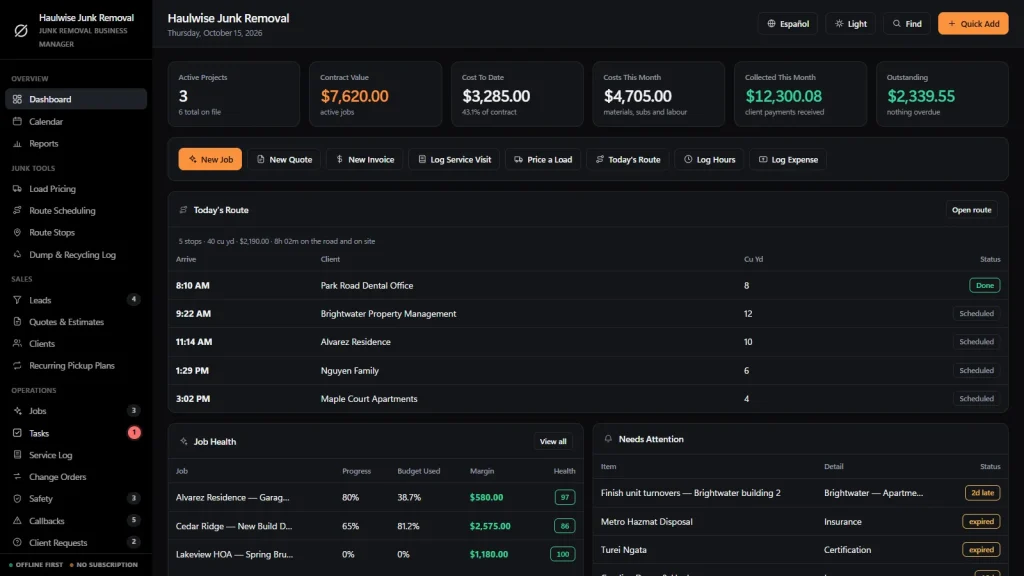
You get a dashboard, a calendar, reports, load pricing, route scheduling, a list of every route stop and a dump and recycling log. Leads, quotes, clients, recurring pickup plans and jobs sit alongside tasks, a service log, change orders, safety records, callbacks and client requests.
Employees, subcontractors, suppliers, trucks and equipment and inventory are tracked, and invoices, purchase orders, expenses and timesheets are included. You can export to CSV or JSON backup, and the app runs in English and Spanish.
Load pricing for junk removal
Type the cubic yards, or tap 1/8, 1/4, 1/2, 3/4 or Full truck to fill it from your truck size. Pick the material, the access and the crew size, and count mattresses, refrigerators, TVs, sofas, tires and other special items separately.
Price, estimated time (with trips to the dump), the dump fee and your net dollars per labor hour update as you type, and the screen warns you when a job falls below your target. The rate card, minimum charge and dump fee per ton are yours to edit.
Junk removal route scheduling
Pick a date, add stops and set the first start time. The app works out the arrival time at every stop from the drive minutes and on-site minutes you enter, and shows stops, cubic yards, work time, drive time, route revenue and revenue per route hour.
Reorder with the arrows and the times recalculate. Print a one-page route sheet for the crew with a box to tick off each stop.
Dump & recycling log
Log each scale ticket with the facility, the job, the material, the weight and the fee, and mark whether it went to landfill or was recycled, donated or reused. Reports shows the tons hauled, the disposal fees and your diversion rate for any date range.
Recurring pickup plans
Property-manager, builder and turnover plans know their cubic yards, minutes and price per visit. A visit that comes due appears under Recurring Visits Due, one click adds it to the day, and marking the stop Done sets the last visit and works out the next one.
Quotes that start from the load
Create Quote on the pricing screen turns the estimate into a draft quote with one line for the load and one per special item, with markup and tax, printed on your own letterhead. Leads move from the first call to won or lost, and one button turns a lead into a client.
Real margin after the dump
Job price is the quote plus approved add-ons. Cost is the expenses booked to the job, dump fees included, plus crew hours times their rate. The job cards show cost against progress, so a job spending faster than it is being finished is visible before it is a problem.
Junk removal software, honestly
Heavy lifting, dump runs and a truck to keep running.
Junk work means lifting, securing loads, scale tickets and the occasional callback for something left behind. The software you choose should track that, and it should say where its limits are.
Callbacks and the service log
Items left behind, mess to sweep up and missed rooms are tracked with who is fixing them and by when. The service log keeps the weather, crew, hours, work done, dump tickets and delays for every visit.
Safety, trucks and equipment
Toolbox talks, lifting and back safety, load securement checks, near misses and corrective actions are logged. Fleet & Equipment keeps your trucks, trailers, dollies and rentals, owned or rented, with the job each is on and its next service date. Bags, straps, tarps and gloves warn you when stock runs low.
Works with no signal
The file runs offline in your browser, on a laptop or tablet, in the office or the truck. Nothing needs a connection once it is downloaded.
What it does not do
No GPS or live fleet tracking, no map or automatic driving directions, no texts or emails sent from the app, no client portal, no online booking form, no photo library, no card processing and no two people editing at once.
How a junk removal job runs
From the phone call to paid in four steps.
Price the load
Enter the cubic yards, material, access and special items. See the price, the time, the dump fee and your net dollars per hour, then turn it into a quote in one click.
Put it on the route
Add the stop to the day, set the drive and on-site minutes, and every arrival time recalculates. Print the route sheet for the crew.
Haul it and log the dump
Mark the stop Done and log the scale ticket. The recurring plan rolls forward, and the service log and timesheets keep the crew and hours behind the job.
Invoice and collect
Raise the invoice, record the payment and see what is still owed. Margin updates as hours and expenses are booked.
Why haulers switch
You are not really choosing between two junk removal business software solutions.
Most junk removal software is rented by the month, and the records live on somebody else’s server. Spreadsheets are free but cannot price a load by the cubic yard, work out an arrival time at every stop or roll a recurring plan forward.
This junk removal software is a file you own, with the hauling-specific parts built in.
| OwnDesk Junk | Subscription junk removal software | Paper & spreadsheets | |
|---|---|---|---|
| Price | Original price was: $149.00.$49.00Current price is: $49.00. once | Monthly fee, for as long as you use it | Free, but it costs your evenings |
| Load pricing by the cubic yard with the dump fee and a dollars-per-hour check | Built in | Varies | Your own formulas |
| Route with arrival times and a printable route sheet | Included | Usually | Retyped, every day |
| Dump tickets and a diversion rate | Included | Varies | A separate sheet |
| Recurring plans that roll forward when a stop is done | Included | Usually | A separate sheet |
| Works offline | Yes | Often needs a connection | Yes |
| Your records if you stop paying | Still yours | Access ends | Still yours |
| GPS fleet tracking, customer texts, online booking, client portal | Not included | Often included | No |
| Several people at once | Not included — one computer at a time | Usually included | Only through a cloud drive |
The subscription column is a general description of junk removal software sold by the month, not a claim about any single company — features and pricing differ, so check each site.
OwnDesk Junk is single-computer software: it does not sync between devices, show a map, track trucks by GPS, send messages, keep photos or process card payments.
From payment to your first quote
Three steps, about two minutes.
Pay with card
Checkout runs on Stripe. Your card details never touch this site.
Download and open
The link appears the moment payment clears. Double-click the file — it opens in your browser, no install, no internet needed after that.
Look around, then start fresh
It opens with a sample junk removal company already loaded. Remove the sample data from Settings, enter your own rate card and add your clients and jobs.
If OwnDesk Junk isn't right for how you run your junk removal business, email me and you get a refund — no questions. If something's confusing, you're writing to the person who built it, not a queue. English and Spanish, both spoken here.
Custom build
Need it to work exactly the way your junk removal business does?
I can adapt OwnDesk Junk to the way your junk removal business works: your own fields, your quotes, your reports, or two OwnDesk products combined into one. It’s still a one-time payment, it still runs offline, and it’s yours. I built the software, and I build your version myself.
- Your own load tiers, with surcharges for mattresses, appliances and stairs
- A donation receipt that prints for the customer
- Realtor and property manager accounts, with one monthly statement
Custom builds start at $490, paid in two halves: 50% to start, 50% after you’ve tested it.
Tell me about your businessQuestions
Before you buy.
What is junk removal software?
Is this software for a junk removal business with one truck?
Is it junk removal route software?
Does it work as junk removal fleet tracking software?
Can it be used as junk removal scheduling software?
What are junk removal business software solutions made of?
Is this junk file removal software for my computer?
Is there free junk removal software, or a free download?
How does load pricing work?
Does it track dump tickets and recycling?
Does it do quotes, job costing and invoicing?
Can it take card payments, send texts or run payroll?
Can several people use it at the same time?
Does it store before-and-after photos?
Where are my records stored, and is there a subscription?
Can you customize it for my junk removal business?
Price a load in it before you decide.
The live demo has real screens and a sample junk removal company loaded — no sign-up beyond your name and email, no credit card. If it fits, buying takes about a minute.
14-day money-back guarantee · instant download · one-time payment