
Appliance repair software for scheduling, dispatch and booking.
Appliance repair scheduling software, dispatch and service software for the whole job in one offline file: a service booking list that becomes a technician’s day in one click, a repair-vs-replace check, parts on order with alerts, warranty claims you can chase and real margin on every job. Appliance repair business software you buy once, with no monthly fee.
Most software for an appliance repair business is rented by the month, often per technician, and the records live on somebody else’s server. This one is a file you own, with the appliance-specific parts built in.
Key benefits
One-time payment
No monthly fee, no per-technician charge and no yearly renewal. The price you see is the whole price.
Booking to dispatch in a click
Appliance, brand, symptom, warranty and arrival window go from the request straight onto a technician’s day.
Repair or replace, scored
Four tests on age, repair cost, history and cost per year say Repair, Borderline or Replace.
Real margin per job
Job price minus parts, expenses and technician hours, from the records you already entered.
What this appliance repair software does
Everything a small repair business runs on, in one place.
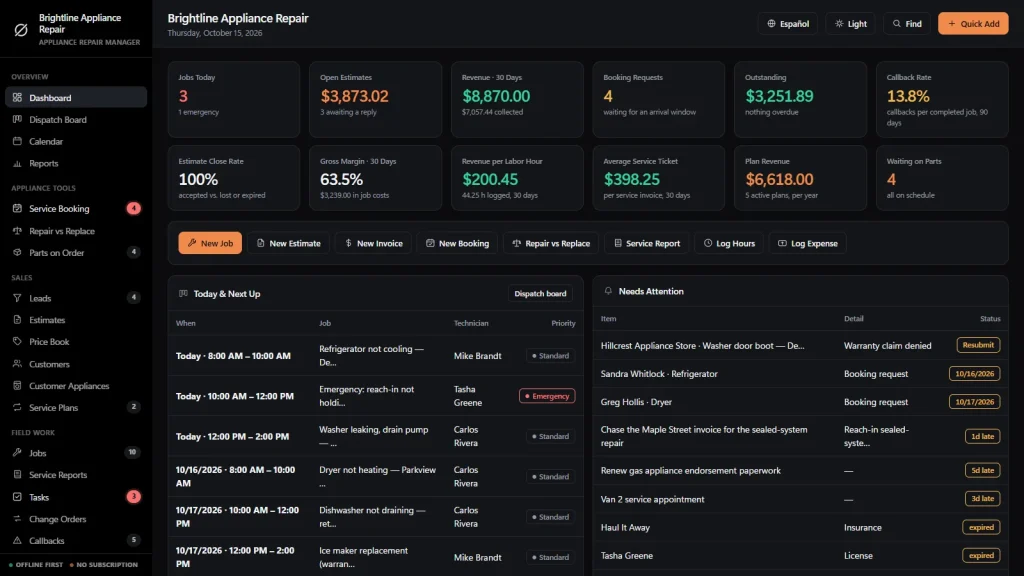
You get a dashboard, a dispatch board, a calendar, reports, service booking, repair vs replace, parts on order, leads, estimates, a price book, customers, customer appliances, service plans, jobs and service reports.
It also tracks tasks, change orders, callbacks, warranty claims, safety, technicians, subcontractors, suppliers, tools and vehicles, and parts and stock.
Invoices, purchase orders, expenses and timesheets are included. You can export to CSV or JSON backup, and the app runs in English and Spanish.
Appliance repair scheduling and booking
Log each request with the customer, appliance, brand, model, the problem as described, warranty coverage, priority and the arrival window they asked for. Requests wait in one list instead of on a sticky note.
One click books it as a job. The customer and the appliance are created if they are not on file yet, and you can print an appointment confirmation.
A dispatch board for your technicians
One row per technician and one column per day. Every job is a card with its arrival window, and emergency and urgent calls are colored. Click the + in an empty cell to book a job straight into that slot.
The month calendar adds parts due, plan visits, warranty payments and invoice due dates. You enter and move the jobs yourself.
Repair vs Replace
Enter the appliance age, its typical life, the repair estimate, the price of a new one and what you repaired in the last two years. It scores life used, repair against replacement cost, repair history and cost per year of use.
Print the customer sheet, or turn either option into an estimate. Typical lives per appliance type are a starting point you can change.
Parts on order
Special-order parts are where repair jobs stall. Log the part, its number, supplier, cost, customer deposit, ETA and tracking. Late parts raise an alert, and Arrived books the return visit two days out for the same customer, appliance and technician.
Customer management, with each appliance on file
Every customer keeps their jobs, invoices and what they have paid you. Every appliance keeps its brand, model, serial number, fuel type, location, purchase date, warranty end and full repair history. Service plans cover annual checkups, landlord portfolios and dryer vent programs, with renewals 30 days out.
Estimates, job costing and invoicing
Estimates come from your flat-rate price book with markup and tax. Job price plus approved change orders, minus expenses and technician hours at their rate. Service, parts deposit, warranty claim, final and credit-memo invoices, with Paid, Partial and Overdue worked out for you.
Appliance repair business software, honestly
The warranty claim in the drawer is money you are owed.
Manufacturer and home warranty work is paid later, and denied once is not denied forever. The appliance repair management software you choose should show what is still waiting to be paid. It should also say where its limits are.
Warranty claims you can chase
Manufacturer, home warranty and retailer claims carry an authorization number, who authorized it, the amount and the payment due date. A claim denied once and resubmitted is flagged, and a denied one raises an alert.
Callbacks and service reports
Callbacks, repair-warranty returns and part failures are tracked with who is fixing them and by when. Service reports keep the symptom or error code, the work performed, parts used and the outcome, and print with a customer signature line.
Works with no signal
The file runs offline in your browser, on a laptop or tablet, in the shop or the van. Nothing needs a connection once it is downloaded.
What it does not do
No online booking form for your website, no customer portal, no texts or emails sent from the app, no GPS tracking, no card processing, no automatic submission to warranty companies and no two people editing at once.
How an appliance repair job runs
From the phone call to paid in four steps.
Book it
Log the request with the appliance, symptom and warranty status, then book it onto a technician’s day in the arrival window the customer picked.
Diagnose it
The technician’s service report records the symptom or error code and the findings. Old appliance? Run Repair vs Replace and print the sheet for the customer.
Order the part, return
Log the part with its supplier, deposit and ETA. When it arrives, one click books the return visit. Margin updates as hours and expenses are booked.
Invoice and collect
Raise the invoice, record the payment and see what is still owed, by the customer and by the warranty company. Plan renewals show up before they lapse.
Why repair shops switch
You are not really choosing between two appliance repair software packages.
Most appliance repair software is rented by the month, and the records live on somebody else’s server. Spreadsheets are free but cannot turn a request into a job on a technician’s day or tell you whether to repair or replace.
This software for an appliance repair business is a file you own, with the appliance-specific parts built in.
| OwnDesk Appliance | Subscription repair software | Paper & spreadsheets | |
|---|---|---|---|
| Price | Original price was: $149.00.$49.00Current price is: $49.00. once | Monthly fee, for as long as you use it | Free, but it costs your evenings |
| Service booking to dispatch board | Built in | Usually | Retyped, every call |
| Repair vs replace check | Included (four tests) | Varies | Your own formulas |
| Parts on order with ETA alerts | Included | Varies | A separate sheet |
| Works offline | Yes | Often needs a connection | Yes |
| Your records if you stop paying | Still yours | Access ends | Still yours |
| Online booking form, customer texts, GPS, technician app | Not included | Often included | No |
| Several people at once | Not included — one computer at a time | Usually included | Only through a cloud drive |
The subscription column is a general description of appliance repair software sold by the month, not a claim about any single company — features and pricing differ, so check each site.
OwnDesk Appliance is single-computer software: it does not sync between devices, put a booking form on your website, track vans, send messages or process card payments.
From payment to your first booking
Three steps, about two minutes.
Pay with card
Checkout runs on Stripe. Your card details never touch this site.
Download and open
The link appears the moment payment clears. Double-click the file — it opens in your browser, no install, no internet needed after that.
Look around, then start fresh
It opens with a sample appliance repair company already loaded. Remove the sample data from Settings and add your own price book, customers and jobs.
If OwnDesk Appliance isn't right for how you run your repair business, email me and you get a refund — no questions. If something's confusing, you're writing to the person who built it, not a queue. English and Spanish, both spoken here.
Custom build
Need it to work exactly the way your repair business does?
I can adapt OwnDesk Appliance to the way your repair business works: your own fields, your work orders, your reports, or two OwnDesk products combined into one. It’s still a one-time payment, it still runs offline, and it’s yours. I built the software, and I build your version myself.
- Fields for the manufacturer warranty programs you service, with claim and authorization numbers on each work order
- An invoice layout that shows your trip charge, diagnostic fee and parts markup the way you bill them
- A monthly report of callbacks by brand and by technician
Custom builds start at $490, paid in two halves: 50% to start, 50% after you’ve tested it.
Tell me about your businessQuestions
Before you buy.
What is appliance repair software?
Is this appliance repair scheduling software?
Is it appliance repair dispatch software?
Is it appliance repair booking software for my website?
Is it appliance repair service software and management software for a small business?
Can it work as customer management software for an appliance repair business?
What is the best appliance repair software?
Is it field service management software for appliance repair?
How does Repair vs Replace work?
Can it track parts on order and warranty claims?
Does it do estimates, job costing and invoicing?
How much does appliance repair business management software cost?
Does it work outside the US, for example in India?
Can it take card payments, sync with accounting software or run payroll?
Can several people use it at the same time?
Where are my records stored, and is there a subscription?
Can you customize it for my appliance repair business?
Book a repair in it before you decide.
The live demo has real screens and a sample appliance repair company loaded — no sign-up beyond your name and email, no credit card. If it fits, buying takes about a minute.
14-day money-back guarantee · instant download · one-time payment