
Yoga studio software for yoga studios, independent teachers and small wellness spaces.
Yoga software with a weekly schedule that repeats itself, a class roster with a waitlist, and memberships and class packs that count down by themselves. Yoga studio management software for the desk: students, instructors, pay, retail and reports in one offline file.
Most yoga software for a studio is rented by the month, for as long as you keep teaching. This one you buy once.
Key benefits
One-time payment
No monthly fee, no per-member charge and no yearly renewal. The price you see is the whole price.
A schedule that repeats
Add a class once and it appears on its weekday every week, with spots booked and the waitlist on each card.
Passes that count themselves
Unlimited memberships and class packs, with classes left worked out from check-ins so they cannot drift.
Reports that say what to move
Class popularity, busiest days and the students who have not been back in 30 days.
What this yoga studio software does
Everything a small studio runs on, in one place.
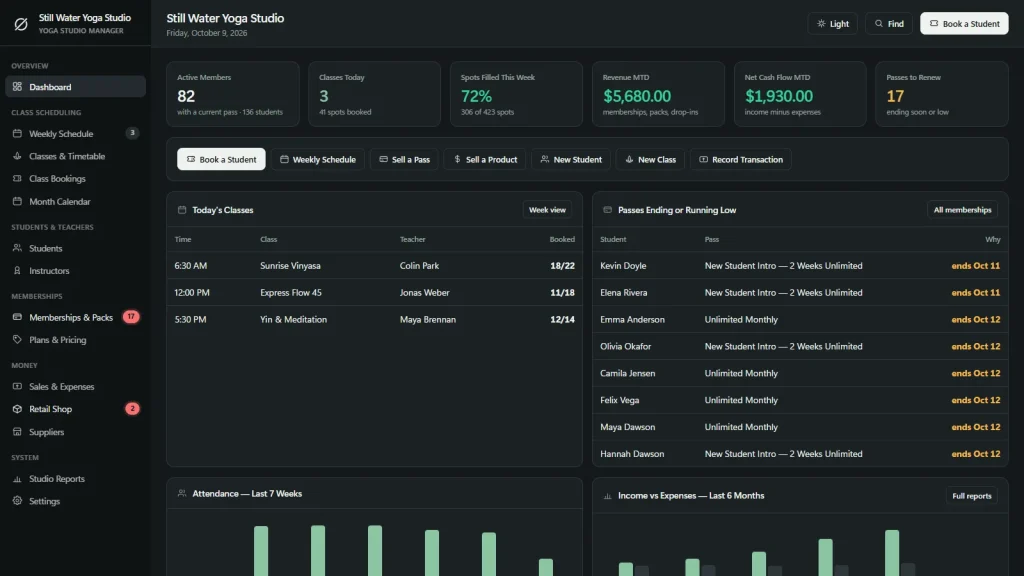
You get a dashboard, a weekly schedule, classes and a timetable, class bookings, a month calendar, students and instructors.
Memberships and packs, plans and pricing, sales and expenses, a retail shop, suppliers and studio reports are included too.
You can print the timetable and the sign-in sheet, export every list to CSV and back up to a JSON file. The app is in US English.
The class roster, from one click
Click any class on the Weekly Schedule. The roster shows the spots booked, who has checked in, who is on the waitlist and the teacher. Add a student, check in one or everyone, cancel a booking, mark a no-show or promote someone from the waitlist.
Students with the notes a teacher needs
Contact details, level, waiver date, injuries and health notes, how they found you, their current pass and classes attended. The notes show right in the roster, so the teacher sees them before class.
Memberships and class packs
Unlimited monthly or annual, class packs, an intro offer, drop-in and workshop tickets, each with start and end dates. Booking picks the best pass for you, and a pack that is empty, expired or paused is never used.
Instructor pay without a spreadsheet
Each teacher is paid per class, per checked-in student or a monthly amount. See classes taught, average class size and the pay owed for any period, with substitutes included.
Money in one place
Selling a pass or checking in a drop-in student logs the income for you. Add your rent and bills, and the dashboard shows revenue and net cash flow for the month.
A retail shop with stock alerts
Mats, blocks, apparel, tea and gift cards with a reorder level. “Sell a Product” records the sale and takes it off the stock.
Yoga class scheduling software for the weekly timetable
Re-creating next Tuesday’s class is not a job for a person.
Yoga scheduling software should hold the week, warn you about clashes and let a substitute step in for a single date. Here is what this one does.
Weekly classes that repeat
Add a class once with its day, time, teacher, room, spots, level and drop-in price. It repeats every week by itself, and a one-off date makes a workshop or a private session.
Clash warnings
It warns you about a double-booked teacher or room before the class goes on the timetable.
Substitutes and cancelled classes
Pick a substitute teacher for one date, or cancel the whole class and release every booking without using any credits.
Print the week
The weekly timetable prints on your own letterhead, and the Month Calendar shows each day’s classes with spots booked, plus the days passes end.
Yoga booking software: what it does and what it does not
The desk books the class. Students cannot book themselves.
If you are looking for yoga studio booking software, this is the one limit to weigh first. Everything behind the desk is here; the part where a student books from a phone is not.
What you can do
Book a student into a class, put them on the waitlist when it is full, promote the first in line when someone cancels, check in one student or everyone, and print a sign-in sheet for the front desk with health notes beside each name.
What it does not do
No student booking page or portal, no app for students, no online payments or automatic monthly billing, no emails or texts, no QR check-in and no video streaming.
Cancellation rules you set
Choose how many hours before class a student may cancel for free, and whether no-shows and late cancels use up a class credit.
Who it suits
A studio where reception or the teacher takes the bookings and the payments, and the owner wants their own records on their own computer for a one-time price.
Why studios switch
You are not really choosing between two yoga software packages.
Most yoga business software is rented by the month, and the student list lives on somebody else’s server. A spreadsheet and a paper sign-in sheet are cheap but count no passes and warn you about nothing.
This yoga software for a studio is a file you own, with the schedule, the roster and the passes built in.
| OwnDesk Yoga | Subscription yoga software | Paper & spreadsheets | |
|---|---|---|---|
| Price | Original price was: $149.00.$49.00Current price is: $49.00. once | Monthly fee, for as long as you use it | Free, but it costs your evenings |
| Weekly schedule that repeats | Included | Usually | Re-typed every week |
| Roster with waitlist and check-in | Included, at the desk | Usually | A paper sheet |
| Passes and packs that count down | Included, from check-ins | Usually | A formula you maintain |
| Works offline | Yes | Often needs a connection | Yes |
| Your records if you stop paying | Still yours | Access ends | Still yours |
| Students book and pay online, automatic billing, emails and texts | Not included | Often included | No |
| Several people at once | Not included — one desk at a time | Usually included | Only through a cloud drive |
The subscription column is a general description of software sold by the month, not a claim about any single company — features and pricing differ, so check each site.
OwnDesk Yoga is single-computer software: it does not sync between devices, take online bookings or payments, or send messages.
From payment to your first class
Three steps, about two minutes.
Pay with card
Checkout runs on Stripe. Your card details never touch this site.
Download and open
The link appears the moment payment clears. Double-click the file — it opens in your browser, no install, no internet needed after that.
Look around, then start fresh
It opens with a sample yoga studio already loaded. Remove the sample data from Settings, then add your instructors, plans, classes and students.
If OwnDesk Yoga isn't right for how you run your studio, email me and you get a refund — no questions. If something's confusing, you're writing to the person who built it, not a queue.
Custom build
Need it to work exactly the way your studio does?
I can adapt OwnDesk Yoga to the way your studio works: your own fields, your class rosters, your reports, or two OwnDesk products combined into one. It’s still a one-time payment, it still runs offline, and it’s yours. I built the software, and I build your version myself.
- Teacher training hours tracked per student
- Workshop and retreat sign-ups, with deposits and balances
- Instructor pay rules that match yours: per class, per head, or a base rate plus a bonus
Custom builds start at $490, paid in two halves: 50% to start, 50% after you’ve tested it.
Tell me about your businessQuestions
Before you buy.
What is yoga studio software?
Is this yoga studio management software for a small studio or a solo teacher?
Is it yoga booking software? Can students book themselves online?
Is it yoga studio booking software with a waitlist?
Is it yoga class scheduling software?
Is it yoga scheduling software for substitute teachers and cancelled classes?
How do memberships and class packs work?
Does it take card payments or bill members automatically every month?
Can it pay my instructors?
Is it yoga business software with reports?
Does it email or text my students, or check them in with a QR code?
Can several people use it at the same time? Is it in Spanish?
Where are my records stored, and is there a subscription?
Can you customize it for my yoga business?
Book a class in it before you decide.
The live demo has real screens and a sample yoga studio loaded — no sign-up beyond your name and email, no credit card. If it fits, buying takes about a minute.
14-day money-back guarantee · instant download · one-time payment