
Personal trainer software for independent trainers and small fitness studios.
Personal training software where every session pack counts itself down, so “6 of 10 left” is always right. A personal trainer software app for the whole business: clients, packs, a day schedule, a progress log and reports in one offline file. Personal training software you buy once, with no monthly fee.
A trainer on a monthly plan pays for the same client list every year, and the fee only goes up. This is a file you own, on your own computer, for one payment.
Key benefits
One-time payment
No monthly fee, no per-client charge and no yearly renewal. The price you see is the whole price.
Packs with a live balance
Sell a 5, 10 or 20-session pack and every completed session takes one off, with warnings before a pack runs out.
Client progress, charted
Weight, body fat and measurements at each check-in, with a trend line and a printable report.
Clients to re-engage
Active clients with no session in three weeks and nothing booked, listed on your dashboard.
What this personal training software does
Everything an independent trainer runs on, in one place.
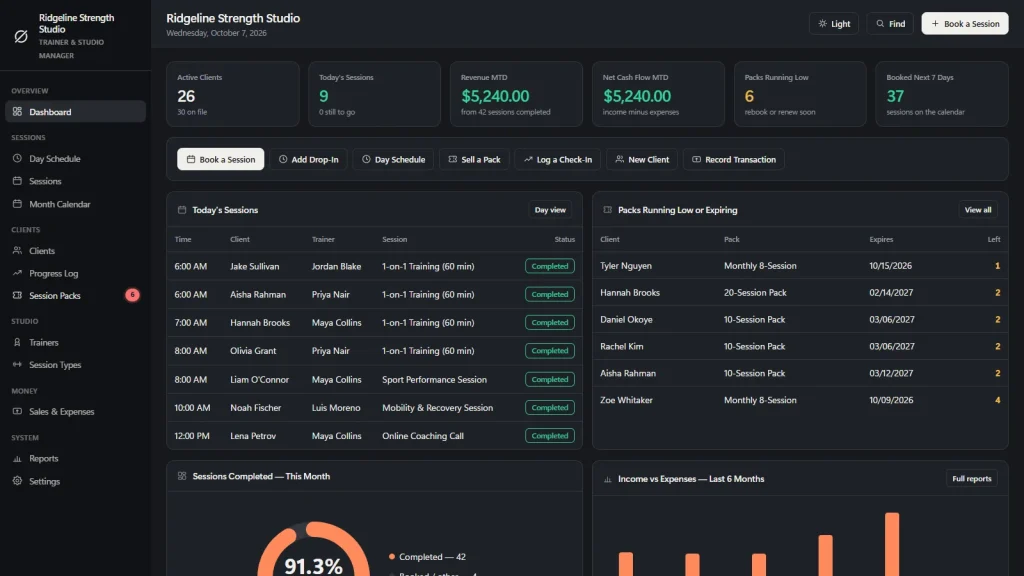
You get a dashboard, a day schedule, a month calendar, sessions, clients, a progress log, session packs, trainers and session types.
Sales and expenses, reports and settings are included. Every list prints and exports to CSV, and a JSON backup saves the whole studio in one file.
Session packs that count themselves
Open a booking, choose the client, and the form offers that client’s active packs: “10-Session Pack, 6 of 10 left”. Pick one and the session comes off the pack when it is completed.
Selling a pack records the income once, on the day it was paid, so sessions taken from it never count as income twice. Packs with two sessions left, or expiring within 14 days, show on the dashboard and as a badge in the menu.
A client profile on one screen
Sessions completed, pack sessions left, the next booked session, the weight change since the first check-in and a trend line of body weight, with their packs and latest check-ins below. Print it as a clean one-page progress report.
A day schedule per trainer
One column per trainer, one day at a time. Click an empty slot to book it. Open times are worked out from your studio hours and the trainer’s other sessions, and a double-booked trainer or time slot is flagged before you save.
Check out in one click
Complete a session and the pack balance drops by itself, or the payment is recorded at the rate. The tip is its own line. Sessions run through Booked, Confirmed, Checked In, Completed, No-Show and Cancelled.
Reports that show the real month
Income, expenses, net cash flow, completion and no-show rate, share of sessions on packs, average session value, performance by trainer and your busiest days, for any date range.
Pack liability, in one number
Reports shows how many sessions you still owe across all active packs and what those prepaid sessions are worth. Money you have been paid but have not yet earned by training is easy to forget. Here it is a number.
Online personal training software, and its limits
Coaching calls fit. A client app does not.
If you coach some clients online, the online personal training software you choose should tell you plainly what it covers. Here is what this one does and does not do.
What it covers
Online coaching is a session type with its own length and rate. Book it, check it out and put it on a pack like any other session, and track the same client’s weight and measurements in the progress log.
What it does not do
No client app or portal, no online booking page, no video calls, no workout or program builder and no photo library. It sends no texts or emails, so you send your own reminders.
Works on your computer
This personal training computer software is one file on your own machine. It runs offline in Chrome, Edge, Firefox or Safari, on Windows, Mac or iPad, with nothing to install and no account.
One person at a time
There is no cloud sync and there are no logins. One computer holds the data, and a backup file moves it to another. It is a single-operator tool by design.
How a client runs through it
From first pack to renewal in four steps.
Add the client
Name, contact, main goal, trainer, current program, and any injuries and limitations, so it is in front of you at every session.
Sell a pack
Record a 5, 10 or 20-session pack with what was paid and its expiry date. The income is booked once.
Book and check out
Book each session against the pack, then check it out. The balance drops, and a check-in logs weight and measurements.
Renew or re-engage
Packs running low appear for a renewal conversation, and clients gone quiet appear on the re-engage list.
Why trainers switch
You are not really choosing between two personal training software packages.
Most personal training software is rented by the month, and your client records live on somebody else’s server. A spreadsheet is cheap, but it has no pack balances, no schedule and no progress charts behind it.
This personal trainer software is a file you own, with the pack balance and the progress log built in.
| OwnDesk Trainer | Subscription personal training software | Paper & spreadsheets | |
|---|---|---|---|
| Price | Original price was: $149.00.$49.00Current price is: $49.00. once | Monthly fee, for as long as you use it | Free, but it costs your evenings |
| Session packs with a live balance | Built in, counts itself | Usually | A column you update by hand |
| Client progress log and trend line | Included, printable | Varies | A separate sheet |
| Clients to re-engage | On your dashboard | Varies | A reminder in your head |
| Works offline | Yes | Often needs a connection | Yes |
| Your records if you stop paying | Still yours | Access ends | Still yours |
| Client app, online booking, card payments, reminders | Not included | Often included | No |
| Several people at once | Not included — one computer at a time | Usually included | Only through a cloud drive |
The subscription column is a general description of software sold by the month, not a claim about any single company — features and pricing differ, so check each site.
OwnDesk Trainer is single-computer software: it does not sync between devices, send messages, take bookings online or process card payments. It organizes your records and is not medical, nutrition or injury-rehabilitation advice.
From payment to your first session
Three steps, about two minutes.
Pay with card
Checkout runs on Stripe. Your card details never touch this site.
Download and open
The link appears the moment payment clears. Double-click the file — it opens in your browser, no install, no internet needed after that.
Look around, then start fresh
It opens with a sample fitness studio already loaded. Remove the sample data from Settings, then add your own session types, trainers and clients.
If OwnDesk Trainer isn't right for how you run your training business, email me and you get a refund — no questions. If something's confusing, you're writing to the person who built it, not a queue.
Custom build
Need it to work exactly the way your studio does?
I can adapt OwnDesk Trainer to the way your studio works: your own fields, your client records, your reports, or two OwnDesk products combined into one. It’s still a one-time payment, it still runs offline, and it’s yours. I built the software, and I build your version myself.
- Your own assessment form, with the tests and measurements you run at intake
- Small group sessions, with a shared pack and per-head pay for trainers
- A rent or revenue split report for independent trainers in your gym
Custom builds start at $490, paid in two halves: 50% to start, 50% after you’ve tested it.
Tell me about your businessQuestions
Before you buy.
What is personal trainer software?
Is this personal training software for an independent trainer or a small studio?
How do the session packs work?
Can it track client progress such as weight, body fat and measurements?
Is it a personal trainer software app I can install on my phone?
Is it personal training computer software that works offline?
Is it online personal training software for trainers who coach remotely?
Is it personal training software for online training with programs and workouts?
Is this online personal trainer software with online payments?
What is the best personal training software?
Can several trainers use it at the same time?
Is there a subscription, and where is my clients’ data stored?
Can you customize it for my personal training business?
Sell a session pack in it before you decide.
The live demo has real screens and a sample fitness studio loaded — no sign-up beyond your name and email, no credit card. If it fits, buying takes about a minute.
14-day money-back guarantee · instant download · one-time payment